


Dynamics Business Central (NAV)
Public Group
Active 9 hours ago
Experts:




November’s Tips & Tricks
-
November’s Tips & Tricks
Posted by Holly Kutil on November 1, 2017 at 9:07 am-

 What happened to Zoom?
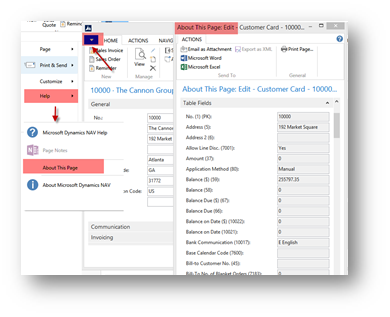
In the newer version i.e. in RTC to achieve the same results we use About this Page function which will allow us to view all the fields, filters and source expressions of a record. It can be accessed from the page as shown in the fig: 3
Help –> About this Page
The shortcut key for About this Page function is (Ctrl + Alt+ F1)
When you are on the document page to view the fields of a subpage you don’t have the option to use Help –> About this page, so to view all the fields of a subpage record you need to select the line and use the shortcut (Ctrl + Alt + F1).

Tweaking the Send To menu
What’s that, you say? None of the stock Send to options offer the ability to shuffle your files to the locations you commonly use? Force the issue!
First, create shortcuts to the folder locations you’re like to add to the Send To menu y right clicking them, then selecting Send to > Desktop (create shortcut). Once that’s done, open Windows Explorer, then type shell:sendto in the location bar at the top, followed by Enter. You’ll be brought to the location that holds your Send To options; just drag and drop in the shortcuts to the folders you want to add to the tool.
Quick launch a new instance of a program
Those taskbar icons can also be used to quickly launch a second (or third, or fourth, or…) instance of a program-a fresh browser window alongside an already populated one, for instance, or another Windows Explorer window.
Doing so is easy: just hold down the Shift button, then open the program as you normally would, either via a left click of the mouse or the quick-launch keyboard trick. Boom! A new, clean version of the software appears alongside the one you already have open.
Erase the past
 When you’re shuffling files around willy-nilly, you’re bound to accidentally drop one in the wrong folder-or almost more irritating, errantly make copies of a slew of files rather than simply dragging them to a new location. Arrrrrrg.
Rather than trying to track that missing file down or manually delete the legion of copies, whip out the universal Get Out of Jail Free card that, somewhat surprisingly, also works within Windows proper: CTRL + Z. The keyboard shortcut undoes your last action, restoring order when chaos suddenly appears. (CTRL + C and CTRL + V for copying and pasting, respectively, also work properly within Windows.
——————————
Holly Kutil ~ NAVUG All-Star
American Ring/Business Intelligence Dir.
Solon, OH 44139
**Great Lakes Chapter**
?? Women In Dynamics ??
—————————— -
Zoom:
On some (Dell) computers, Ctrl+Alt+F1 will open ?the Intel HD Graphics Control Panel, so if that happens to you, use Ctri+Windows Key+Alt+F1, instead.
Windows Key =

——————————
Lewis Rosenberg
IT Manager
Mars Fishcare
Chalfont PANAVUG Board of Advisors, Programming
NAVUG Programming Committee
NAVUG Membership Committee
——————————
——————————————- -
I use this functionality 25 times a day and find it extremely helpful. Sending the data to Excel is nice as well especially if you want to compare 2 records side by side or search for a value.
What drives me crazy about this screen in that you cannot page down or page up! The only keyboard shortcut that seems to work is you can hold down tab to go down field by field (shift tab to go up). But this is way too slow. So I am forced to use the scroll bar.
Does anyone know of a way to quickly page down in this screen?
Another quick tip is that if you want to select the data of a field on a Card page, simply click on the caption of the field and it will highlight the data for that field. Small tip but nice for copying the value of a single field. Obviously you cannot do this on a List page as that will sort the column instead.
——————————
Jason Wilder
Senior Application Developer
Stonewall Kitchen
York ME
——————————
——————————————- -

Maarten Gerritsen
MemberNovember 3, 2017 at 3:29 AM
I still miss some ‘features’ of the old zoom functionality in the Classic (Ctrl+F8).
There we could copy the content with 2 shortcuts to the clipboard and paste it Excel: Ctrl+A and Ctrl+C, open Excel and Ctrl+V.
A fast way to ‘save’ the content of record, ideal when testing.
Microsoft, if possible make these keyboard shortcut again for the new client(s).——————————
Maarten Gerritsen
Analyst-Programmer
Magium
Wageningen
NL
——————————
——————————————-
Holly Kutil replied 8 years, 4 months ago 1 Member · 0 Replies -
-
0 Replies
Sorry, there were no replies found.
The discussion ‘November’s Tips & Tricks’ is closed to new replies.
