


Dynamics Business Central (NAV)
Public Group
Active 6 days ago
Experts:




Notes on G/L Entry
-
Notes on G/L Entry
Posted by Jason Wilder on October 10, 2018 at 9:14 am-
This is a must do mod for you accountants out there. Not joking, this is a super good add to NAV.
Most of you are probably familiar with the Notes factbox present on many pages (often you need to show the factbox). I was pleasantly surprised to see that Notes existed on both the General Journal and General Ledger Entry Pages. Then I was unpleasantly surprised when I realized they do not work. General Journal lets you add Notes to a line but when you post the Journal the Note does not get carried to the G/L Entry. Even worse the Note remains attached to the General Journal Line when you enter a new line (it never gets deleted). My next hope was to at least be able to enter Notes directly against a G/L Entry but that doesn’t work either because the General Ledger Entry Page (Page 20) has the Editable property = No which means Notes can only be viewed but not edited. That’s it for bad news, the rest is all really good. I have confirmed this is the behavior in NAV 2016 and NAV 2018.
A few quick mods will make this all work.
To make the General Journal Notes move to the G/L Entry Notes you need to create a subscription event and add 2 lines of code as seen here:

Next if you want to be able to add Notes directly to a G/L Entry there are some properties you need to change on Page 20:
- Editable = Yes
- InsertAllowed = No
- DeleteAllowed = No
- Set the Editable property of each field to No (no picture for this)
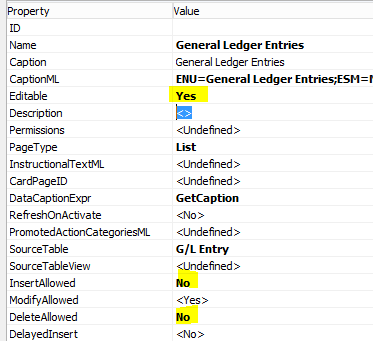
The real trick on this one is to have AllowModify = Yes (but make the field controls not editable) which makes the factbox allow a user to “Click here to create a new note”. These mods take a total of 10 to 15 minutes but to me are well worth the effort. I could envision this on any other Journal/Ledger Entry combo as well such as Item Journal/Item Ledger Entry (Customer Ledger and Vendor Ledger work since the pages are already editable so you can modify a few of the fields such as Due Date).
Microsoft if you see this I would totally consider adding this to base (barely any effort as seen above). Another solution might be to change the behavior of Notes to allow you to add a Note even when a Page is not Editable. This would allow the second mod mentioned above to go away and allow this to work on every Ledger Entry page plus a few others (such as page 5076 Interaction Log Entries).
——————————
Jason Wilder
Senior Application Developer
Stonewall Kitchen
York ME
—————————— -
Just want to add 2 things:
1) By doing the changes listed above this will make Links work in the same manner as well.
2) Currently the second mod above (Add a Note or Link directly while on a G/L Entry) is not doable in AL as Page Extension objects do not provide access to the Editable, InsertAllowed or DeleteAllowed properties.——————————
Jason Wilder
Senior Application Developer
Stonewall Kitchen
York ME
——————————
——————————————- -

Ramin Marghi
MemberOctober 15, 2018 at 2:02 PM
Hi Jason,As an accountant I can appreciate the general theory behind this, however as a consultant I strongly advise against any specific related records on the G/L Entry records themselves (where the Primary Key is “Entry No.”). I’ve actually talked a few people off this ledge in the past.
Instead, my general recommendation is if you absolutely must have related records (be it a file link/attachment — which we’ve done a few times, note, etc.) then do it on the G/L Register and not the G/L Entry. This ensures that you’re actually associating the note/document with the entire transaction itself and not just a single G/L Entry record. A good example is if you’re doing post-audit adjustments and want to associate the PDF scan of the auditors’ comments with the transaction — you may have hundreds of lines in there for adjustments that really refer to one source document, so the entire G/L Register is a good spot to associate the note/document with.
Just my two cents.
——————————
Ramin Marghi , CPA, CGA
CPA, CGA | ERP Consultant
Catapult
VANCOUVER BC
——————————
——————————————-
Jason Wilder replied 8 years ago 1 Member · 0 Replies -
-
0 Replies
Sorry, there were no replies found.
The discussion ‘Notes on G/L Entry’ is closed to new replies.
