


Dynamics Business Central (NAV)
Public Group
Active 5 days ago
Experts:




NAV RM Active Segments and Saved Criteria
-
NAV RM Active Segments and Saved Criteria
Posted by Jason Wilder on June 29, 2018 at 7:27 am-
We are a few weeks away from going live with NAV Relationship Management moving from an older version of Dynamics CRM. Things are going very well so far and we are liking what we are seeing, very much. I have a question in the area of Segments.
Segments are just a list of contacts. There is a nice report that helps populate the contacts and then you can start removing people from this list to get the exact contacts that you are looking for. What is amazing is that all the filters that you apply to the segment are recorded and called Filter Criteria. You can then go in and save this filter so you can use it over and over on other segments. This is a unique function that I have not seen anywhere else in NAV, ever.
So as amazing as this tool is takes some time to think through how you want to set your filters. Once a filter is saved you can view it but you cannot edit it as seen here in this example:
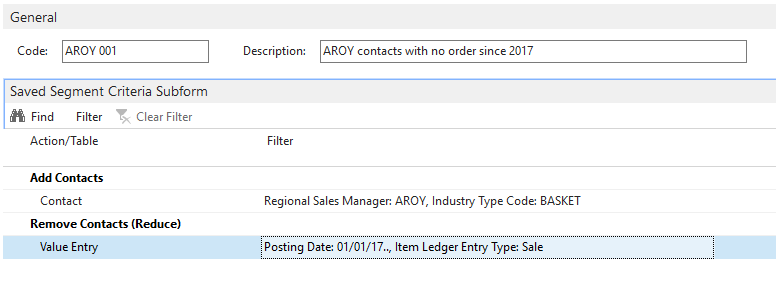
We really want to be able to change the Posting Date or change the Industry Type Code (in example above) but to do this we would need to create another segment and do it all over again. The actual value that you see on the page (Posting Date: 01/01/17.., Item Ledger Entry Type: Sale) is stored in a different format, something like this: VERSION(1) SORTING(Field41,Field5,Field2,Field3,Field105,Field5818,Field47,Field4) WHERE(Field3=1(2017-01-01..),Field4=1(1)). So it isn’t straight forward to just expose this and let people edit. So before I go forward with designing something to make this editable in a usable way has anyone done this or am I missing a way to already do this?——————————
Jason Wilder
Senior Application Developer
Stonewall Kitchen
York ME
—————————— -

Dianne Butterworth
MemberAugust 20, 2018 at 12:10 PM
?Hi Jason,I’d be very interested in the answer to this if you ever find a solution!
Dianne
——————————
Dianne Butterworth
Business System Manager
The King’s Fund
London
United Kingdom
——————————
——————————————- -
I came up with a partial fix for this. Basically if the criteria is there for a table you can add, change and delete filters. You cannot do 2 things:
- remove all filters (which would delete the line)
- add a new table with filters.
Those 2 things are possible to program but I did not spend the time to make them happen as they would require a bit of testing.
If you have a developer license or maybe just page designer (add a couple of lines of code to page 5144 that call a function that would exist in a new codeunit) I could help you with the changes as they are super easy.
If your wanting to just add a filter or change a posting date filter this works pretty slick.
——————————
Jason Wilder
Senior Application Developer
Stonewall Kitchen
York ME
——————————
——————————————-
Jason Wilder replied 8 years, 3 months ago 1 Member · 0 Replies -
-
0 Replies
Sorry, there were no replies found.
The discussion ‘NAV RM Active Segments and Saved Criteria’ is closed to new replies.
