


Dynamics Business Central (NAV)
Public Group
Active a day ago
Experts:




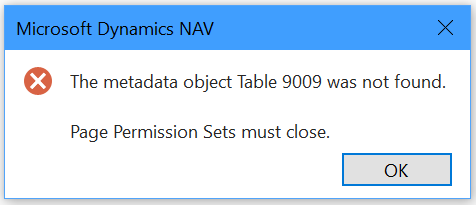
Metadata Object Error Opening Permission Sets
-
Metadata Object Error Opening Permission Sets
Posted by Lewis Rosenberg on January 13, 2020 at 2:26 pm-
I’m looking for help with the following error. It occurs in #NAV2013R2 when trying to look at the Permission Sets list (Page 9802).
I do not get an error opening the page from the Development Environment. The error only occurs in the RTC.I have super user access and table 9009 is not listed in the Development Environment.
The error also occurs in our test system (same server, different database). This issue began suddenly last week.I set up a test user as a Super User and gave that account the same PROFILE ID and I did not encounter the error on the test account.
?
——————————
Lewis Rosenberg
IT Manager
Mars Fishcare
Chalfont PA
————————————————————————
BCUG/NAVUG All-Star
BCUG/NAVUG Board of Advisors, Chairperson
BCUG/NAVUG Programming CommitteeTwitter: @RosenbergL
LinkedIn: https://www.linkedin.com/in/rosenbergl
————————————————————————NAVUG/D365BC-User Group Focus
May 18-19, 2019
Denver, Colorado
—————————— -
Try recompiling your objects in the development environment. I am not sure what causes it, but I used to get it in my NAV2013 environment. Recompiling the object list helped at times.
~Meenakshi
——————————
Meenakshi Singh
Senior Manager, Business Applications
Home Market Foods, Inc.
NAVUG Programming Committee
——————————
——————————————- -
Thanks for the suggestion Meenakshi. That was my first thought and I went looking for, but did not find any objects that required recompiling. Before recompiling all objects, I wanted to see what my partner could figure out. After reaching out to Microsoft a couple of times, the issue was with the C:Users<UserName>AppDataRoamingMicrosoftMicrosoft Dynamics NAVPersonalizationStore.xml file. After deleting the file and letting NAV recreate it, all is fine.
I have NAV2013R2, NAV2018, BC-13, and BC-14 installed on my laptop and it appears that they all share the PersonalizationStore.xml file, so that may have led to the problem. I am now wondering if it is possible to have different versions of this file for different installed versions of NAV/BC.
——————————
Lewis Rosenberg
IT Manager
Mars Fishcare
Chalfont PA
————————————————————————
BCUG/NAVUG All-Star
BCUG/NAVUG Board of Advisors, Chairperson
BCUG/NAVUG Programming CommitteeTwitter: @RosenbergL
LinkedIn: https://www.linkedin.com/in/rosenbergl
————————————————————————NAVUG/D365BC-User Group Focus
May 18-19, 2019
Denver, Colorado
——————————
——————————————- -
Hi Lewis,
Good to hear that you were able to figure it out. I can see the multiple version and personalization file causing this error.
I haven’t installed multiple instances of NAV on my laptop in a while but maybe someone from a partner side can confirm your theory and see if multiple instances can be maintained for personalization XML file for each version.
~Meenakshi
——————————
Meenakshi Singh
Senior Manager, Business Applications
Home Market Foods, Inc.
NAVUG Programming Committee
——————————
——————————————- -
I have multiple version of NAV/BC client installed on my desktop and notebook. I used to have multiple copies of NAV on my notebook.Sent from my T-Mobile 4G LTE DevicePlease excuse the brevity of the response and any mistakes. Thanks.
——Original Message——
Hi Lewis,
Good to hear that you were able to figure it out. I can see the multiple version and personalization file causing this error.
I haven’t installed multiple instances of NAV on my laptop in a while but maybe someone from a partner side can confirm your theory and see if multiple instances can be maintained for personalization XML file for each version.
~Meenakshi
——————————
Meenakshi Singh
Senior Manager, Business Applications
Home Market Foods, Inc.
NAVUG Programming Committee
——————————
Lewis Rosenberg replied 6 years, 9 months ago 1 Member · 0 Replies -
-
0 Replies

Sorry, there were no replies found.
The discussion ‘Metadata Object Error Opening Permission Sets’ is closed to new replies.
