


Dynamics Business Central (NAV)
Public Group
Active a week ago
Experts:




Lanham EDI 855 TD5 Mapping
-
Lanham EDI 855 TD5 Mapping
Posted by Lewis Rosenberg on November 26, 2020 at 12:11 pm-
Hello,
Is anyone using Lanham EDI mapping the EDI855 TD5 segment? How are you mapping the TD5-03 (Shipping Agent SCAC) and TD5-05 (Shipping Agent Name)? Mapping from the Shipping Agent table is now working, so I am now just pulling the Shipping Agent name from the Sales Header for both.
——————————
Lewis Rosenberg
IT Manager
Mars Fishcare
Chalfont PA
http://www.apifishcare.com
————————————————————————
D365UG-BC/NAVUG All-Star
D365UG-BC/NAVUG Board of Advisors, Chairperson Emeritus
D365UG-BC/NAVUG Programming CommitteeTwitter: @RosenbergL
LinkedIn: https://www.linkedin.com/in/rosenbergl
————————————————————————
—————————— -
Hi Lewis,
Assuming this is a required segment, is your Trade Partner expecting the SCAC code as you define it in your system or as the shipping code they sent in the 850 order file? If they are expecting your carrier SCAC then you should map from the Navision >> Shipping Agent >> SCAC_Code field and ensure your carrier has a SCAC code on the shipping agent card. Mapping to the Navision >> Shipping Agent >> Name field for the TD5-05 will work just fine as well.
If the Trade Partner is sending you a shipping agent code in the 850 file (typically in the TD5-01 element) and they are expecting that value back in the TD5-03, you can enable “Reverse Cross Reference” on the element line and enter in the General Cross Reference No. “1” (or “29” if you are not using E-Ship). On the Trade Partner General Cross Reference table, ensure there is a cross reference of the same type set up (see attached screenshots).
I hope this helps!
Margaret Mextorf——————————
Margaret Mextorf
EDI Support Specialist
Lanham Associates/Lanham Services
——————————
——————————————- -
Thanks Margaret,
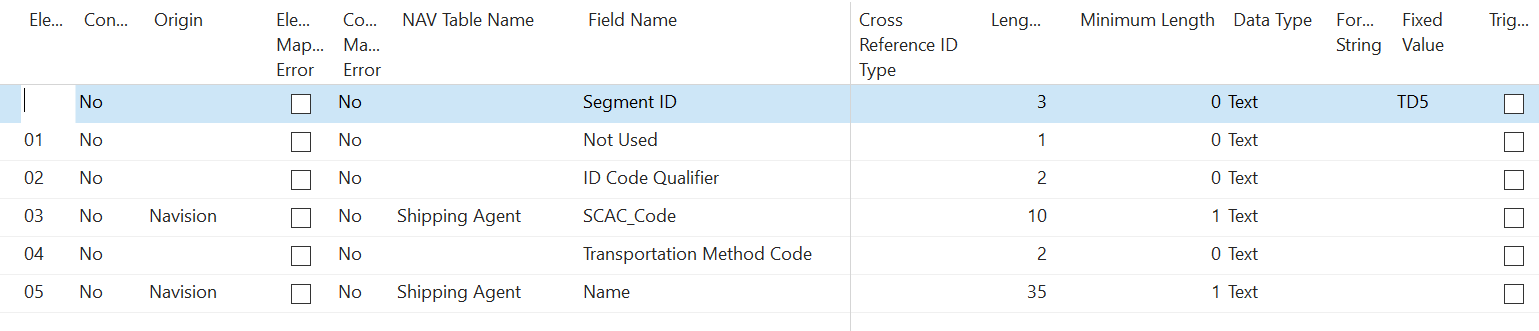
Maybe I have to do more testing, but your first scenario did not work when I tested last week:
VERSION INFO:
Microsoft Dynamics 365 Business Central—————————5203615Version (US Business Central 14.10)(E-Ship 3.17 (SE0.61.01 (SE0.61.01)))——————————
Lewis Rosenberg
IT Manager
Mars Fishcare
Chalfont PA
http://www.apifishcare.com
————————————————————————
D365UG-BC/NAVUG All-Star
D365UG-BC/NAVUG Board of Advisors, Chairperson Emeritus
D365UG-BC/NAVUG Programming CommitteeTwitter: @RosenbergL
LinkedIn: https://www.linkedin.com/in/rosenbergl
————————————————————————
——————————
——————————————- -
Hi Lewis,
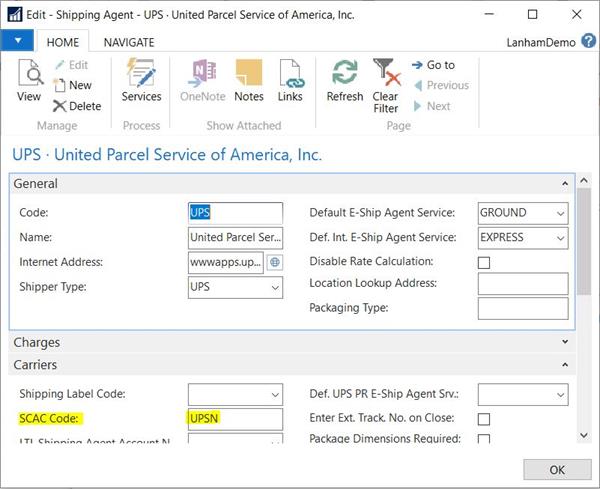
On the Shipping Agent card for the carrier listed on the Sales Order – do you have a value in the SCAC Code field? When you go to send the PO Acknowledgement, the element remains blank?
——————————
Margaret Mextorf
EDI Support Specialist
Lanham Associates/Lanham Services
——————————
——————————————- -
Yes and yes.
——————————
Lewis Rosenberg
IT Manager
Mars Fishcare
Chalfont PA
http://www.apifishcare.com
————————————————————————
D365UG-BC/NAVUG All-Star
D365UG-BC/NAVUG Board of Advisors, Chairperson Emeritus
D365UG-BC/NAVUG Programming CommitteeTwitter: @RosenbergL
LinkedIn: https://www.linkedin.com/in/rosenbergl
————————————————————————
——————————
——————————————- -
I just tested this again.
The customer is not sending a TD5. We do have a Shipping Agent assigned to the customer and the Shipping Agent Card has the NAME and SCAC populated.
The sales order does have the Shipping Agent populated.
The TD5-03 and TD5-05 to the “Navision” “Shipping Agent” table fields for “SCAC Code” and “Name”, but on the outbound 855, the fields are empty.
——————————
Lewis Rosenberg
IT Manager
Mars Fishcare
Chalfont PA
http://www.apifishcare.com
————————————————————————
D365UG-BC/NAVUG All-Star
D365UG-BC/NAVUG Board of Advisors, Chairperson Emeritus
D365UG-BC/NAVUG Programming CommitteeTwitter: @RosenbergL
LinkedIn: https://www.linkedin.com/in/rosenbergl
————————————————————————
——————————
——————————————-
Lewis Rosenberg replied 5 years, 10 months ago 1 Member · 0 Replies -
-
0 Replies

Sorry, there were no replies found.
The discussion ‘Lanham EDI 855 TD5 Mapping’ is closed to new replies.
