


Dynamics Business Central (NAV)
Public Group
Active 6 days ago
Experts:




Lanham E-Mail – No E-Mail Receivers
-
Lanham E-Mail – No E-Mail Receivers
Posted by Lewis Rosenberg on June 17, 2019 at 7:58 pm-
Hello,
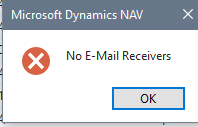
For anyone running Lanham’s e-Mail functionality, our Customer Service Team is trying to send e-Mail Sales Order Confirmations and frequently get the error message, “No E-Mail Receivers.” Everything looks to be set up correctly and I cannot duplicate the issue our test system.
The customers have e-mail addresses populated on the Customer Card (Communication Tab) and in the E-Mail List Entries for the Customer (table 14000908/Page 4000908), so we are not adding anything extra for the sales order.
Can anyone explain under what conditions we might expect this error?
Thanks.——————————
Lewis Rosenberg
IT Manager
Mars Fishcare
Chalfont PA
————————————————————————
BCUG/NAVUG All-Star
BCUG/NAVUG Board of Advisors, Chairperson
BCUG/NAVUG Programming CommitteeTwitter: @RosenbergL
LinkedIn: https://www.linkedin.com/in/rosenbergl
————————————————————————NAVUG/BCUG Summit (navugsummit.com)
Orlando, FL – October 15-18, 2019
—————————— -

ReBecca Wadsworth
MemberJune 18, 2019 at 4:04 PM
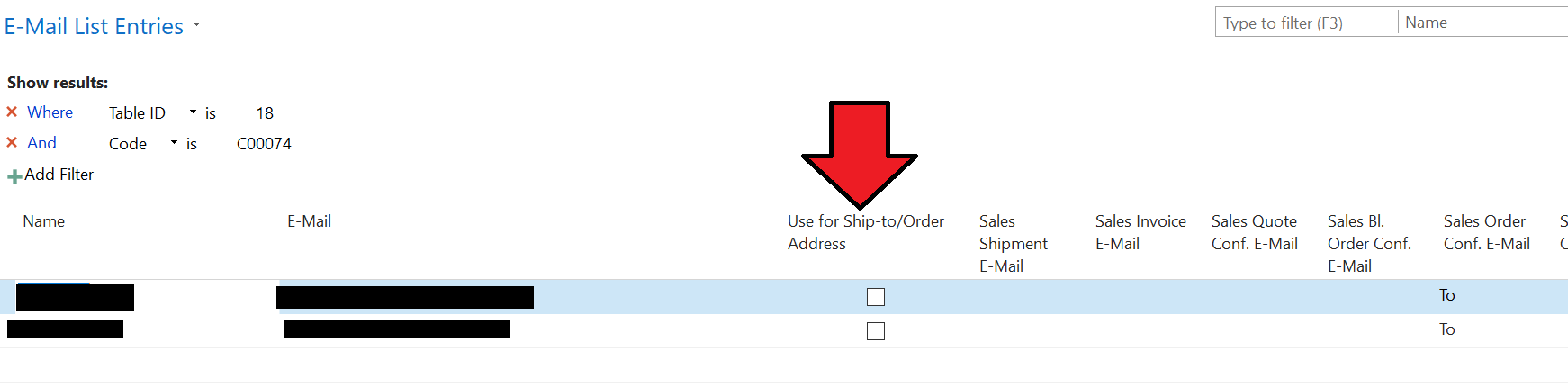
Hey Lewis –Do they specifically have recipients set up on the Customer for Sales Order confirmations? They need to make sure they have at least one designated as “To”, also (as opposed to just CC or BCC). Also, if they have Ship-to Addresses associated with the Customer, they need to make sure they have “Use for Ship-to/Order Address” set on the E-Mail List for each line.
Let us know if this helps!
Thanks
ReBecca
——————————
ReBecca Wadsworth
Lanham Associates/Lanham Services
Norcross GA
——————————
——————————————- -
There was a TO set up…I’ll check the SHIP-TO’s.
I also have a hunch that the order was created BEFORE adding email addresses to the Customer.Thanks for the response!?
——————————
Lewis Rosenberg
IT Manager
Mars Fishcare
Chalfont PA
————————————————————————
BCUG/NAVUG All-Star
BCUG/NAVUG Board of Advisors, Chairperson
BCUG/NAVUG Programming CommitteeTwitter: @RosenbergL
LinkedIn: https://www.linkedin.com/in/rosenbergl
————————————————————————NAVUG/BCUG Summit (navugsummit.com)
Orlando, FL – October 15-18, 2019
——————————
——————————————- -
Further testing seems to indicate that the issue was that there were no email addresses set up for the Customer Ship-To, however, the “Use E-Mail Rule for Ship To Addr” is not checked on the eShip tab of the customer card. Are there any other settings to turn this functionality off so that the customer card email addresses are always used?
——————————
Lewis Rosenberg
IT Manager
Mars Fishcare
Chalfont PA
————————————————————————
BCUG/NAVUG All-Star
BCUG/NAVUG Board of Advisors, Chairperson
BCUG/NAVUG Programming CommitteeTwitter: @RosenbergL
LinkedIn: https://www.linkedin.com/in/rosenbergl
————————————————————————NAVUG/BCUG Summit (navugsummit.com)
Orlando, FL – October 15-18, 2019
——————————
——————————————- -
ReBecca Wadsworth
MemberJune 19, 2019 at 10:24 AM
Hey Lewis –You will need to look at the Booleans on the *E-Mail List* for the Customer, this should accomplish what you are looking for.
——————————
ReBecca Wadsworth
Lanham Associates/Lanham Services
Norcross GA
——————————
——————————————- -
Got it! Thanks!
——————————
Lewis Rosenberg
IT Manager
Mars Fishcare
Chalfont PA
————————————————————————
BCUG/NAVUG All-Star
BCUG/NAVUG Board of Advisors, Chairperson
BCUG/NAVUG Programming CommitteeTwitter: @RosenbergL
LinkedIn: https://www.linkedin.com/in/rosenbergl
————————————————————————NAVUG/BCUG Summit (navugsummit.com)
Orlando, FL – October 15-18, 2019
——————————
——————————————-
Lewis Rosenberg replied 7 years, 4 months ago 1 Member · 0 Replies -
-
0 Replies
Sorry, there were no replies found.
The discussion ‘Lanham E-Mail – No E-Mail Receivers’ is closed to new replies.
