


Dynamics Business Central (NAV)
Public Group
Active 22 hours ago
Experts:




Jet Report – can we show per column each sales comment line
-
Jet Report – can we show per column each sales comment line
Posted by DSC Communities on January 4, 2017 at 5:24 pm-

Berlinda Yap
MemberJanuary 4, 2017 at 5:24 PM
We have a credit memo report that was created with Jet Report – it will show all the line items of each credit memo – posted and open.
We would like to add the sales comment line to this report – as some credit memo has more than one line of comment – when we add this to the existing report – it will show each line of the sales comment at the same time, it will duplicate the sales line item.
Our sales comment is done on the Sales Header (the Pencil Icon).
Is there a way to show the sales comment line without having the line item duplicated if the sales comment has more than one line ?
Is it possible to show each comment line per column on the existing Jet Report – meaning that it will have all the credit memo information per row but the sales comment line will be per column.
——————————
Berlinda Yap
IS Service Manager
Foremost Groups, Inc.
East Hanover NJ
—————————— -
Ian Ray
MemberJanuary 4, 2017 at 5:38 PM
Yes. If you use the “NL” function, the first parameter is the “what” to bring in.
A positive number brings in the nth result for the filter. Thus, you would use “1” for the first result, “2” for the second result, etc.
——————————
Ian Ray
Cypress Grove
Arcata CA
————————————————————————- -
Eduardo Diaz
MemberJanuary 4, 2017 at 5:40 PM
Hi Berlinda,
I think if you take the Comment Line No., you should be able to group your orders in JetReports. See the below screen for details. Depending on how many comment lines you have, you might want to show only the last 3 lines or the last 3 dates.
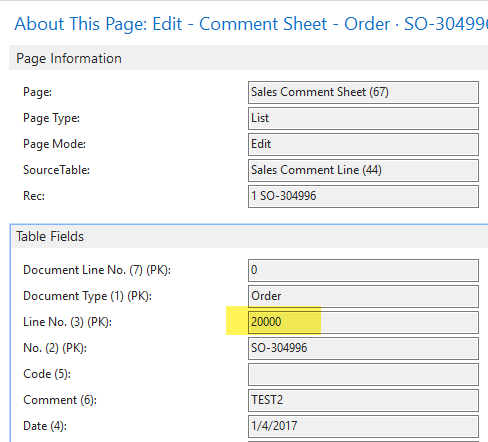
Hi Berlinda,
——————————
Eduardo Diaz
IT Director
Minequip Corp.
Miami FL
————————————————————————- -
Berl Childers
MemberJanuary 5, 2017 at 8:46 AM
Hi Berlinda, it is hard to know without seeing your report but one suggestion I would offer is to modify your report so that it groups by the sales header and add the comment lines to that section of the report. Using the Rows NL function where Rows=2 or 3, depending on if you have subtotals, and then another Rows NL function within the above group. This will give you a line for each order header with the comment and then the order lines under that. If you are not familiar with grouping with Jet Professional, Jet offers some good user videos you can review (here).
——————————
Berl Childers
Senior Consultant
Business Management International
New York NY
————————————————————————- -
Ramin Marghi
MemberJanuary 6, 2017 at 1:08 PM
Hi Berlinda,
While I agree that doing row comments is infinitely better than columns, what you’re looking to do is definitely do-able.
Please see the attached Jet Report for reference — this will show the first 30 comments per line (you can absolutely expand this go even further by expanding the concatenate in column G:
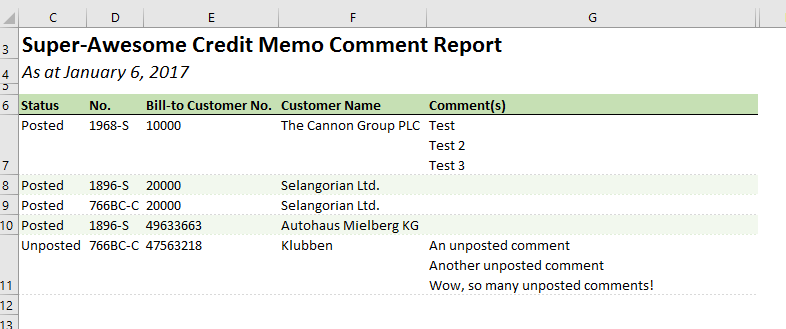
Basically what I did was create columns for the Sales Line Comments and then include a concatenate function, recursive for the first 30 offsets from reference cell “G#”, adding in CHAR(10) in between. Feel free to dissect the formula and throw it into your report.
OR if you want each comment in one cell across columns, just change the “Hide” function to “Fit” in H1 and just get rid of column G (not recommended, since it may become a very wide report which won’t be print-friendly, if that’s your end medium):

Note that there are no report options for this sample report — it will run for the first 100 lines it finds in posted and unposted, just as a proof of concept.
Enjoy!
——————————
Ramin Marghi , CPA, CGA
NAV Finance Consultant
Catapult
VANCOUVER BC
————————————————————————-
DSC Communities replied 9 years, 5 months ago 1 Member · 0 Replies -
-
0 Replies
Sorry, there were no replies found.
The discussion ‘Jet Report – can we show per column each sales comment line’ is closed to new replies.
