

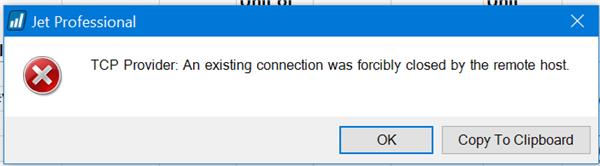
Jet Professional Error: TCP Provider: An existing connection was forcible closed by the remote host

  • Jet Professional Error: TCP Provider: An existing connection was forcible closed by the remote host

    Posted by Lewis Rosenberg on July 22, 2020 at 2:27 pm
    • Lewis Rosenberg

      Member

      July 22, 2020 at 2:27 PM

      Has anyone ever seen this error before when running a Jet Professional report with a direct connection to a NAV database?

      I am almost certain it is an issue with SQL permissions since we just moved NAV to a new SQL server during an upgrade and I am not getting the error, but the users that I support are getting it.

      ——————————
      Lewis Rosenberg
      IT Manager
      Mars Fishcare
      Chalfont PA
      http://www.apifishcare.com
      ————————————————————————
      BCUG/NAVUG All-Star
      BCUG/NAVUG Board of Advisors, Chairperson
      BCUG/NAVUG Programming Committee

      Twitter: @RosenbergL
      LinkedIn: https://www.linkedin.com/in/rosenbergl
      ————————————————————————

      NAVUG/D365BC-Community Summit: https://na.usergroupsummit.com/home
      October 6-9, 2020
      Nashville, TN & Online
      ——————————

    • Lewis Rosenberg

      Member

      July 24, 2020 at 5:20 PM

      After some troubleshooting, this issue has not yet been resolved, BUT I am almost certain that it has something to do with the laptop/workstation running Jet Reports.

      On laptop #1, I do not get the error.
      On laptop #2, my test user gets the error.

      On laptop #1, my test user does NOT get the error
      On laptop #2, I DO get the error.

      The error occurs when running or refreshing any Jet Report.
      ????

      ——————————
      Lewis Rosenberg
      IT Manager
      Mars Fishcare
      Chalfont PA
      http://www.apifishcare.com
      ————————————————————————
      BCUG/NAVUG All-Star
      BCUG/NAVUG Board of Advisors, Chairperson
      BCUG/NAVUG Programming Committee

      Twitter: @RosenbergL
      LinkedIn: https://www.linkedin.com/in/rosenbergl
      ————————————————————————

      NAVUG/D365BC-Community Summit: https://na.usergroupsummit.com/home
      October 6-9, 2020
      Nashville, TN
      ——————————
      ——————————————-

    • Lewis Rosenberg

      Member

      July 28, 2020 at 8:55 PM

      With the support of InsightSoftware (Jet Global), we resolved this error by doing the following from any computer experiencing the error:

      (1) Uninstalling Jet Reports
      (2) Installing the latest release of Jet Reports:Ā Ā https://insightsoftware.com/downloads/Ā click: Download Jet Reports
      (3) InstallingĀ the SQL Server 2012 Native Client QFE driver:Ā Ā https://www.microsoft.com/en-us/download/details.aspx?id=50402

      ——————————
      Lewis Rosenberg
      IT Manager
      Mars Fishcare
      Chalfont PA
      http://www.apifishcare.com
      ————————————————————————
      BCUG/NAVUG All-Star
      BCUG/NAVUG Board of Advisors, Chairperson
      BCUG/NAVUG Programming Committee

      Twitter: @RosenbergL
      LinkedIn: https://www.linkedin.com/in/rosenbergl
      ————————————————————————

      NAVUG/D365BC-Community Summit: https://na.usergroupsummit.com/home
      October 6-9, 2020
      Nashville, TN
      ——————————
      ——————————————-

    Lewis Rosenberg replied 6 years, 2 months ago 1 Member · 0 Replies
  • 0 Replies

Sorry, there were no replies found.

The discussion ‘Jet Professional Error: TCP Provider: An existing connection was forcible closed by the remote host’ is closed to new replies.

Start of Discussion
0 of 0 replies June 2018
Now

Welcome to our new site!

Here you will find a wealth of information created for peopleĀ  that are on a mission to redefine business models with cloud techinologies, AI, automation, low code / no code applications, data, security & more to compete in the Acceleration Economy!



