Jet Express – Combining Non Contigous COA accounts in a single line

  • Jet Express – Combining Non Contigous COA accounts in a single line
    Posted by Michael-Carr on February 15, 2018 at 4:49 pm
    • Michael Carr

      Member

      February 15, 2018 at 4:49 PM

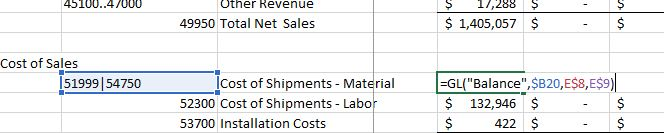
      My understanding and training has been to combine two non-contiguous accounts you list them togrther in a cell separated by pipes and Jet will combine the totals.

      So my formulas look like this with B20 the accounts, E8 and E9 date parameters


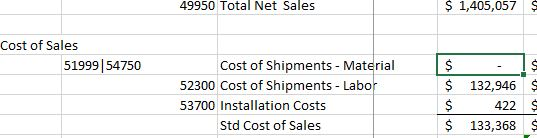
      Yet when executed it returns nothing


      Auto calculation is on , when I use 51999 or 54750 by itself it works. IĀ  am new at this —– what am I missing?

      Thanks.

      ——————————
      Michael Carr
      VP , Finance
      Philadelphia Scientific LLC
      Montgomeryville PA
      ——————————

    • Ian Ray

      Member

      February 15, 2018 at 7:13 PM

      That’s absolutely how it works.

      Have you tried Jet ribbon – Refresh?

      The only ways I am able to get the same result you have is by

      • Using accounts with balances that add up to 0
      • Using accounts with individual balances of 0
      • Using accounts that don’t exist
      • Some combination of the above

      If refreshing doesn’t work, I would suggest trying a new workbook to see if you get the same result.

      ——————————
      Ian Ray
      Cypress Grove
      Arcata CA
      ——————————
      ——————————————-

    • John Hawkins

      Member

      February 16, 2018 at 8:44 AM

      You may also want to check out this article from Jet on the GL function, but as Ian said your formula is setup correctly. The only thing that I know of off-hand that could cause your formula to return a $0 value is if the accounts you are referencing are totaling accounts. If a totaling account is referenced by itself then the value will be displayed, as it is for your Total Net Sales account – 49950; however, if a totaling account is included with other non-totaling accounts in the reference then the totaling account values are ignored in the calculation of the formula’s total. I hope that helps and doesn’t muddy the waters!Ā 

      https://jetsupport.jetreports.com/hc/en-us/articles/115002085707-Jet-Express-GL-Function-for-NAV?mobile_site=true

      ——————————
      John Hawkins
      Accounting Systems Manager
      Wilks Brothers
      Cisco TX
      ——————————
      ——————————————-

    • Michael Carr

      Member

      February 16, 2018 at 9:21 AM

      Ian and John,

      Thanks for your response.

      The formula wasĀ  indeed trying to total two totals. Which seemed perfectly logical so when it didn’t work it shorted out the logical circuit board in my brain. After adding the actual ranges in place of the totals the formula works.

      “when you have eliminated all the logical answers, all that remains is the illogical”

      ——————————
      Michael Carr
      VP , Finance
      Philadelphia Scientific LLC
      Montgomeryville PA
      ——————————
      ——————————————-

    Michael-Carr replied 8 years, 6 months ago 1 Member · 0 Replies
  • 0 Replies

Sorry, there were no replies found.

The discussion ‘Jet Express – Combining Non Contigous COA accounts in a single line’ is closed to new replies.

Start of Discussion
0 of 0 replies June 2018
Now

Welcome to our new site!

Here you will find a wealth of information created for peopleĀ  that are on a mission to redefine business models with cloud techinologies, AI, automation, low code / no code applications, data, security & more to compete in the Acceleration Economy!