


Dynamics Business Central (NAV)
Public Group
Active 18 hours ago
Experts:




Inventory by Lot Bin
-
Inventory by Lot Bin
Posted by sjackson@manzanaproductsco.com on January 3, 2019 at 10:42 pm-
I am trying to understand connection between Warehouse Entry and Item Ledger Entries. I need Lot, Item, Expiration Date, and Quantity data. ILE seems to be keeper of data but how do I connect ILE to bins?
——————————
Simon Jackson
Information Systems Manager
Manzana Products
Sebastopol CA
—————————— -
?Have you tried looking at the Warehouse Entries? Bins/Lots are housed there and you might be able to tie using a Doc/Source No.
——————————
Jessie Sanger-Picard
NAV Level II Support Lead
Forum Energy Technologies
Houston TX
——————————
——————————————- -
Hello Simon,?
Think of the Item Ledger Entry table as the fiinancial data source or inventory summary table. You can find all of the information you listed there (item, lot, expiration date, quantity). The Warehouse Entries tracks inventory transactions by bin.
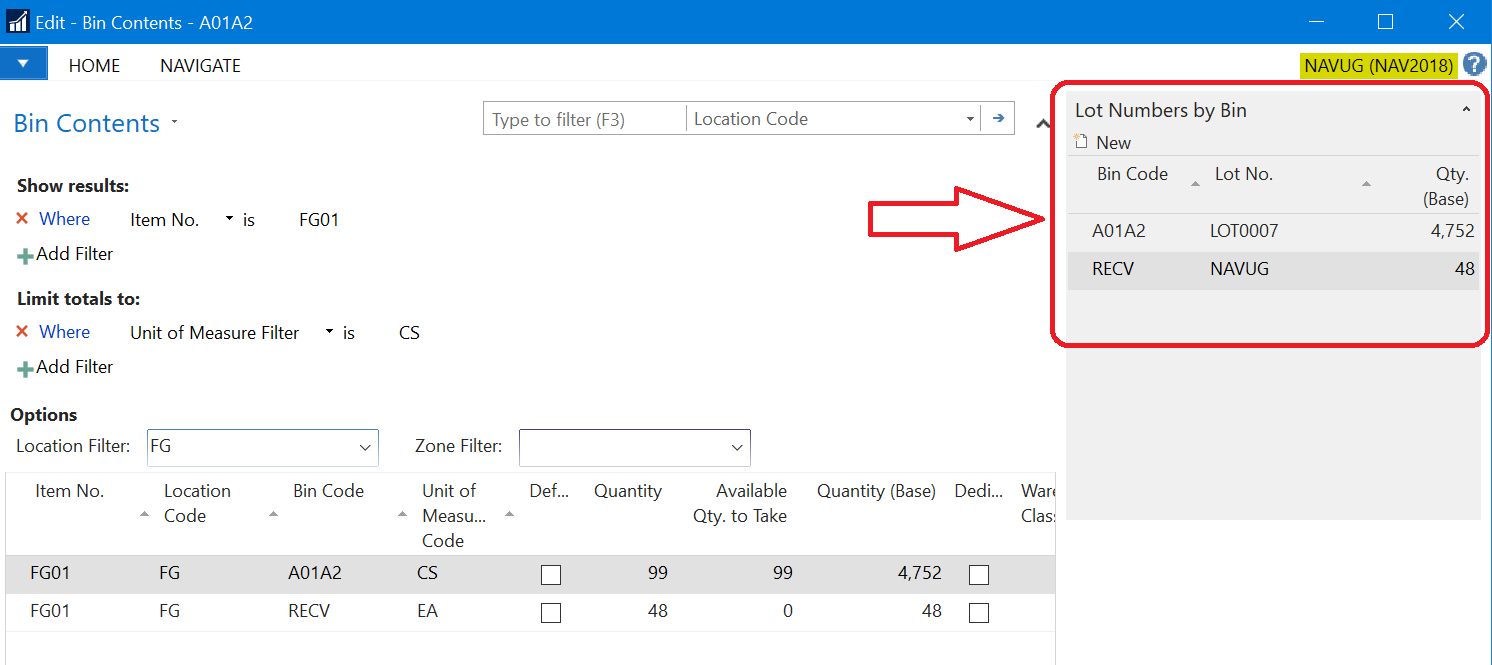
There is a Lot Numbers by Bin factbox that you can display on Bin Contents (Departments > Warehouse > Planning & Execution: TASKS – Bin Contents) that will show what lot can be found in what bin.
——————————
Lewis Rosenberg
IT Manager
Mars Fishcare
Chalfont PA
———————————————–
BCUG/NAVUG All-Star
BCUG/NAVUG Board of Advisors, Chairperson
BCUG/NAVUG Programming CommitteeTwitter: @RosenbergL
LinkedIn: https://www.linkedin.com/in/rosenbergl/
——————————
——————————————- -
Hi Simon,
If your Lot’s are recorded in the Warehouse Entries, then you should be able to get everything you need from Warehouse Entry. See if “Lot Warehouse Tracking” is checked on the Item Tracking Code Card. If so, then the Lot information should be in the Warehouse Entry Records.
If you are trying to get the information you are looking for from within NAV then you can just go to the “Bin Contents” Page and set your filters. Bin Contents are simply summing Warehouse Entries for the filters you set. To Set a Filter for a specific Lot Number, you will need to use the “Limit Totals” Filter Option.
If you are trying to do this outside of NAV (like a SQL Query). You will do the same kind of thing on the Warehouse Entry Sum the Quantity grouped by Item, Lot and Bin.
If the Lot is not tracked in the Warehouse Entry there isn’t a real great “connection” of these two tables. There is a table called “Whse. Item Entry Relation”, but it doesn’t necessarily tie specific ILE’s to Warehouse Entry records. I think you might be able to use this to make your connection, but it would not be a simple JOIN.
——————————
Joe Draeger
Ortho Molecular Products, Inc
Woodstock IL
——————————
——————————————-
sjackson@manzanaproductsco.com replied 7 years, 9 months ago 1 Member · 0 Replies -
-
0 Replies

Sorry, there were no replies found.
The discussion ‘Inventory by Lot Bin’ is closed to new replies.
