


Dynamics Business Central (NAV)
Public Group
Active 5 days ago
Experts:




Getting Customer Balances and Aging quickly
-
Getting Customer Balances and Aging quickly
Posted by Jason Wilder on November 12, 2018 at 11:36 am-
We have over 1 million customers in our system so when running the AR aging report, it takes quite a while. I have been aware that there is a quicker way to get similar information through a saved view and decided to teach our Finance department about this. The only downside is that the Balance in the Page is as of “right now”, not “back in time”. While putting a slide together to explain this I had a thought on how to run the aging back in time on any date and of course have it tie to the g/l. Here’s how to do all of this (this all applies to the Vendor/AP side as well):
Customer Balance as of right now
- Search for Customers to pull up page 22 Customer List
- Save as View and call it “Customers With a Balance”
- Make sure No., Name and Balance ($) are showing plus whatever else you want.
- Set a filter of Balance ($) <> 0
- Save View
- Hit Ctrl E to send to Excel and compare total with your Receivables G/L Account (it should match)
Customer Balance back in time
- A quick mod needs to be done to Page 22 Customer List. Simply add the field called “Net Change (LCY)” to the Page.
- Search for Customers to pull up Page 22 Customer List
- Save as View and call it “Customers With a Balance – Back In Time”
- Make sure No., Name and Net Change ($) are showing plus whatever else you want.
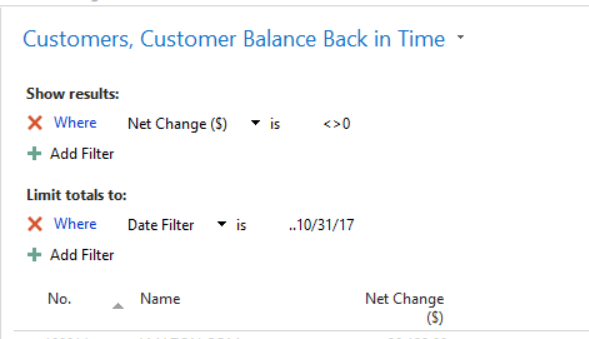
- Set a filter of Net Change ($) <> 0
- Make sure Limit totals to: is showing and add a filter with your ending date being the “Back In time” date. Here is a screenshot to see balances as of 10/31/17:
- Save View
- Hit Ctrl E to send to Excel and compare total with your Receivables G/L Account as of 10/31/17 and it will match!
AR Aging Detail as of right now
- Search for Customer Ledger Entries (Page 25)
- Save as View and call it “Customer Open Entries
- Make sure Customer No., Description, Document Date, Posting Date, Due Date Document Type, Document No., External Document No., Original Amount and Remaining Balance ($) are showing plus whatever else you want.
- Set a filter of Remaining Amt. ($) <> 0
- Save View
- Hit Ctrl E to send to Excel and compare total with your Receivables G/L Account (it should match)
- Add 4 columns with the following formulas to get 0 to 30, 31 to 60, 61 to 90, 90+ Columns ((Replace M with your Posting Date, Document Date or Due Date Column and L with your Remaining Amt.($) column)
- 0 to 30 Days =IF(TODAY()-$M2<=30,$L2,0)
- 31 to 60 Days =IF(AND(TODAY()-$M2>=31,TODAY()-$M2<=60),$L2,0)
- 61 to 90 Days =IF(AND(TODAY()-$M2>=61,TODAY()-$M2<=90),$L2,0)
- 90 + Days =IF(TODAY()-$M2>91,$L2,0)
That should do it, you now have something in Excel with the amount aged for you. You can easily tweak the formulas as needed but generally they should be good to go.
AR Aging Detail Back In Time
Same as above but use the “Limit totals to:” to set a Date Filter (such as ..10/31/17)
Just a warning that this view (and when sending to Excel) may take a minute or 2 to run. We have many millions of Customer Leger Entries and this runs in under a minute for us.——————————
Jason Wilder
Senior Application Developer
Stonewall Kitchen
York ME
—————————— -
I would recommend using SSRS Reporting using a pass through set of parameters to pre-filter if you definitely have millions of customers, else I’d recommend creating a Power BI database to replicate data such as you have recommended.
When I have been in the Dynamics GP community I have leveraged MVP’s like Victoria Yudin who has maintained for years SQL scripts for many functional areas such as aging like you are after. I have used Victoria’s examples to help me write my NAV SQL scripts as well. I just substitute the tables and columns for the right NAV mappings. The following two links are here Receivables Aging Detail and Summary.
- Current Receivables Aging Detail Shows one row per unpaid transaction with hard-coded aging buckets aged by due date.
- Current Receivables Aging Summary Shows one row per customer with a balance with hard-coded aging buckets aged by due date.
I think you can still do a as of aging to get what you are after.
——————————
Ronald McVicar, IT Software Mgr
NSP (Quality Meats)
nspproteins.com
——————————
——————————————-
Jason Wilder replied 7 years, 11 months ago 1 Member · 0 Replies -
-
0 Replies

Sorry, there were no replies found.
The discussion ‘Getting Customer Balances and Aging quickly’ is closed to new replies.
