


Dynamics Business Central (NAV)
Public Group
Active a day ago
Experts:




Fixed Assets
-
Fixed Assets
Posted by Roland-Schenk on January 29, 2018 at 8:46 am-
I did a GL Entry to Building Improvements but now need to get it on my Fixed Asset card so my GL will equal my FA Book Value 1 Report. I tried the FA Journal but it won’t let me post because it doesn’t like me choosing Acquisition Cost as a Fixed Asset Type. Any help is appreciated.
——————————
Roland Schenk
DELCATH SYSTEMS
Queensbury NY
—————————— -

Cynthia Priebe
MemberJanuary 29, 2018 at 10:08 AM
When you indicate that it won’t let you post, are you getting an error? If so, the error would be helpful. However, I am going to take a guess at what may be happening.If you are getting an error and it includes …”cost must be posted in the general journal…”, this is because for the Depreciation Book you have assigned to the asset you have checked Acquisition Cost in Depreciation Book G/L Integration.
I teach to use the FA G/L Journal rather than the GL Journal if you have the Depreciation Book G/L Integration set True for Acquisition Cost. Using this journal adds the appropriate validation rules on posting and creates the FA Ledger and GL Ledger Entries on posting.
If all the above is true you might do one of the following:
- Reverse the GL Entry and post again using
the the FA GL Journal. - Make certain no one else is posting anything related to Fixed Assets while you do the following: Uncheck Acquisition Cost on the Integration
Fasttab of the Depreciation Book assigned to the Asset, post your FA Journal Entry, recheck Acquisition Cost in G/L Integration.
Let me know if this is helpful!
——————————
Cynthia Priebe, MCTS, DCP
Senior Business Analyst and Project Manager
Liberty Grove Software
——————————
——————————————- - Reverse the GL Entry and post again using
-
Here is my error
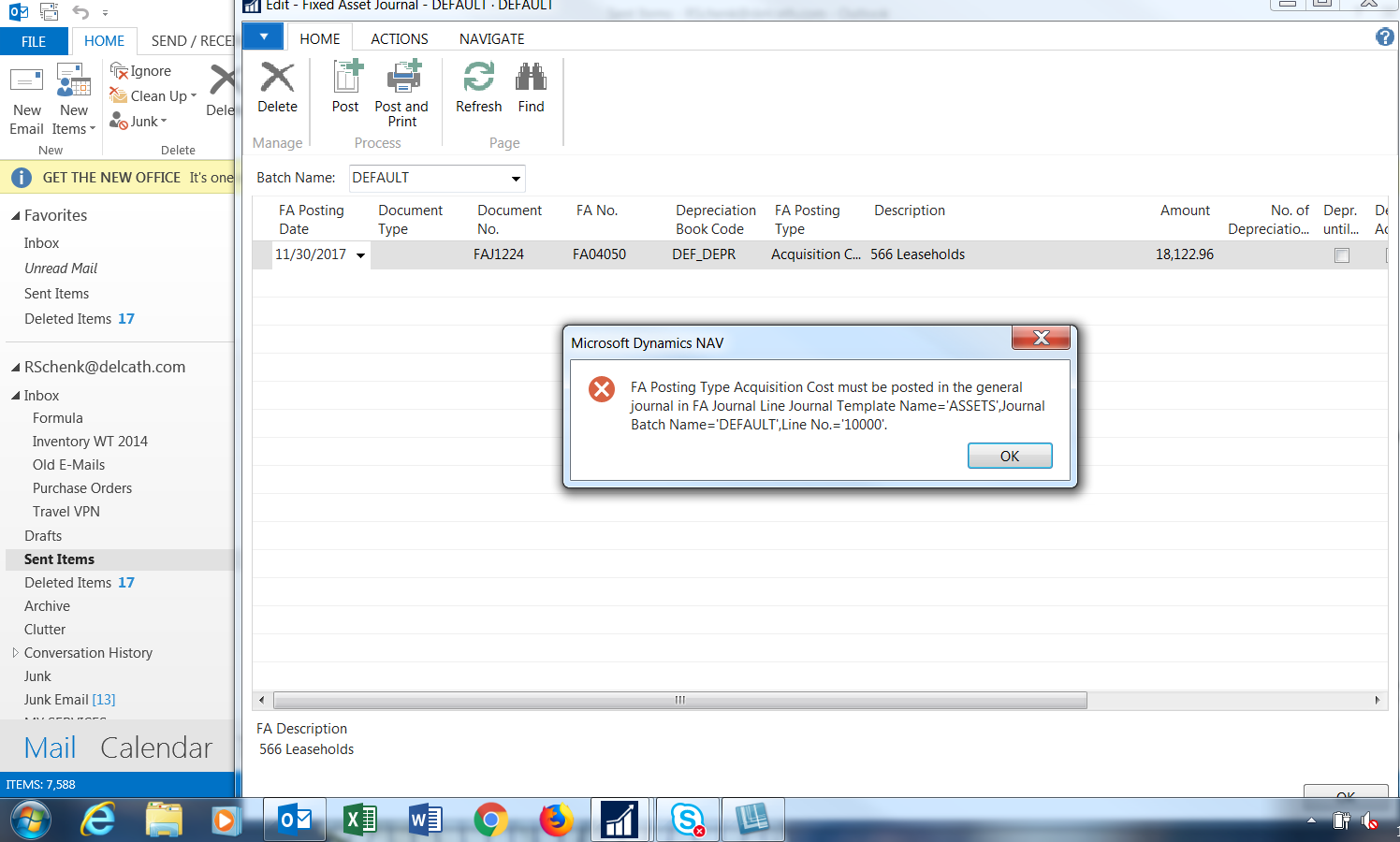 Where do I go for the integration fasttab?
——————————
Roland Schenk
DELCATH SYSTEMS
Queensbury NY
——————————
——————————————- -
Cynthia Priebe
MemberJanuary 29, 2018 at 12:24 PM
Go to the Fixed Asset Card and determine what Depreciation Book has been assignedon the Fixed Asset Card Lines Fast Tab.Go to that Depreciation Book
Card, and the IntegrationFasttab .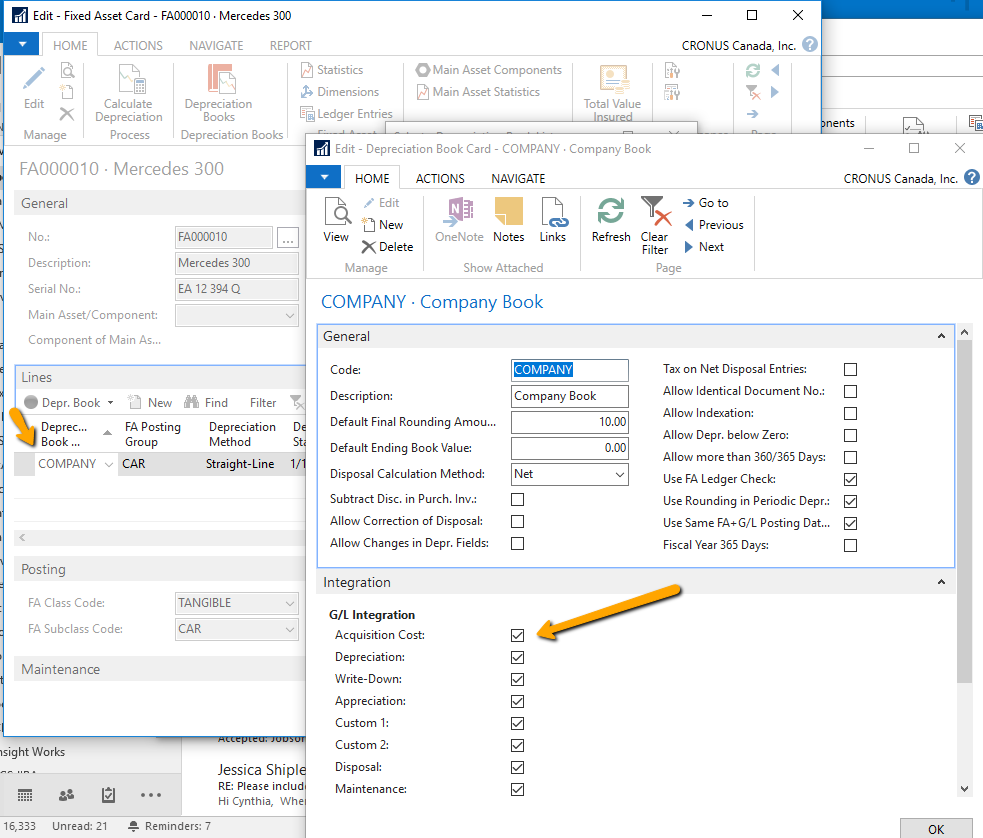
——————————
Cynthia Priebe, MCTS, DCP
Senior Business Analyst and Project Manager
Liberty Grove Software
——————————
——————————————- -
Cynthia Priebe
MemberJanuary 29, 2018 at 12:26 PM
And don’t forget to use the FA G/L Journal the next time you need to post an entry like this.——————————
Cynthia Priebe, MCTS, DCP
Senior Business Analyst and Project Manager
Liberty Grove Software
——————————
——————————————- -
Will do! Thanks for the help it worked. Now one more question. This asset should have been depreciating since April 1st. How can I catch up on the depreciation in 2018.
——————————
Roland Schenk
DELCATH SYSTEMS
Queensbury NY
——————————
——————————————- -
Cynthia Priebe
MemberJanuary 29, 2018 at 1:49 PM
If you set up the Asset lines with the Depreciation information correctly, Calculate Depreciation should create the correct entry, even if “catch-up” is needed.
——————————
Cynthia Priebe, MCTS, DCP
Senior Business Analyst and Project Manager
Liberty Grove Software
——————————
——————————————- -
Naveen Jain
MemberJanuary 30, 2018 at 1:21 PM
HI Roland,You can depreciate the asset any time even after years, but the question is when do you want to start hitting the depreciation to G/L. If you have already Posted/adjusted the G/L for the Depreciation till December 2017, then
– You must first turn off the G/L Integration and post the depreciation. When you run the “Calculate Depreciation” report after turning off integration, it will create depreciation entries in the “FA Journal”. Posting this journal will post the depreciation to the book but it will NOT hit the G/L.
– When you Turn ON the integration, it will generate the Depreciation entries in the “FA G/L Journal”. Posting this will hit the depreciation as well as G/L.Hope this make sense.
Naveen Jain
——————————
Naveen Jain
Director of IT
Symbex Companies
Santa Fe Springs CA
——————————
——————————————-
Roland-Schenk replied 8 years, 9 months ago 1 Member · 0 Replies -
-
0 Replies
Sorry, there were no replies found.
The discussion ‘Fixed Assets’ is closed to new replies.
