


Dynamics Business Central (NAV)
Public Group
Active an hour ago
Experts:




Entering and Paying a vendor invoice with one journal
-
Entering and Paying a vendor invoice with one journal
Posted by Elizabeth McQuiston on July 30, 2019 at 3:43 pm-
I feel like I’m missing something – hopefully this is an easy answer.
When we make tax payments (estimates, extensions, etc.) I would like to do a journal entry to record the expense against the state vendor and record the payment at the same time (amount is paid via ACH on the state site).
We used to enter these as invoices and paid with a check, but now that most states want payments made via their websites I want a better process. I know I can do a payment journal directly to the expense and bank account – but then I can’t see the activity in the vendor ledger.
Ideas? Looking for the least steps possible.
——————————
Liz McQuiston
Corporate Controller
Superior Walls of America
New Holland PA
Running NAV 2016, currently upgrading to BC on Prem
******************************
BCUG/NAVUG Board of Advisors
Delaware Valley Chapter Leader
—————————— -

Patti Parrish
MemberJuly 31, 2019 at 7:51 AM
One option would be to use a general journal to enter both the invoice and the payment, one journal line for invoice and one for payment. You’ll have to apply them after they are posted. So it’s a 2 step process but fairly quick.——————————
Patti Parrish
Finance Project Manager
EthosEnergy Power Plant Services
Alpharetta, Ga
——————————
——————————————- -
Samuel Champoux
MemberJuly 31, 2019 at 8:15 AM
?If you use a Payment Method and enter a Balancing account into it, it will automatically post the payment when you post the purchase invoice.——————————
Samuel Champoux
IT Director
Drummondville QC Canada
——————————
——————————————- -
Patti Parrish
MemberJuly 31, 2019 at 8:29 AM
Thanks for pointing that out. I have never used that functionality before and it works great!——————————
Patti Parrish
Finance Project Manager
EthosEnergy Power Plant Services
Alpharetta, Ga
——————————
——————————————- -
and thanks for your responses, still not working. I have entered the invoice against the vendor and that works as expected, but I can’t enter the payment as we have out Accounts payable account set to not allow direct posting. If this wasn’t the case I would add a second journal line…
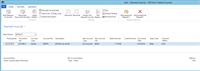
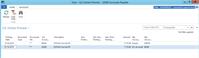
??
——————————
Liz McQuiston
Corporate Controller
Superior Walls of America
New Holland PA
Running NAV 2016, currently upgrading to BC on Prem
******************************
BCUG/NAVUG Board of Advisors
Delaware Valley Chapter Leader
——————————
——————————————- -
Patti Parrish
MemberJuly 31, 2019 at 9:21 AM
My AP account is also no direct posting and it works. The only difference I see is I put VENDOR first in the journal and used vendor in both entries.
——————————
Patti Parrish
Finance Project Manager
EthosEnergy Power Plant Services
Alpharetta, Ga
——————————
——————————————- -
Patti Parrish
MemberJuly 31, 2019 at 9:41 AM
Here’s how you set up payment method to offset a bank account.The balancing account no. could also be a GL account if you aren’t using banks.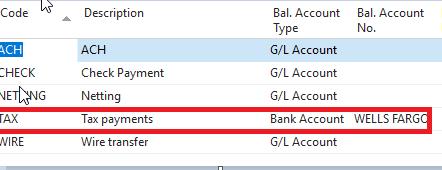
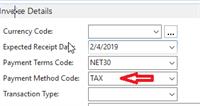
Then when you enter the purchase invoice you add payment method to the entry and it automatically posts the offsetting entry set up in payment methods.
——————————
Patti Parrish
Finance Project Manager
EthosEnergy Power Plant Services
Alpharetta, Ga
——————————
——————————————- -
Samuel Champoux
MemberJuly 31, 2019 at 9:22 AM
?Liz, the balancing account must be setup in the Payment Method, not entered directly on the journal line.
In this case you would want to create a new Payment Method so that not all your ACH post automatically.——————————
Samuel Champoux
IT Director
Drummondville QC Canada
——————————
——————————————- -
and again thank you for your help. I did create a new payment method, I then added that payment method to the vendor card for the state. I tried entering it as a single line payment journal it does not automatically post the payment, Samuel does this only work when entering it as a purchase invoice? The two line journal works now that I put vendor in both lines.
——————————
Liz McQuiston
Corporate Controller
Superior Walls of America
New Holland PA
Running NAV 2016, currently upgrading to BC on Prem
******************************
BCUG/NAVUG Board of Advisors
Delaware Valley Chapter Leader
——————————
——————————————- -
Samuel Champoux
MemberJuly 31, 2019 at 3:04 PM
?Did you enter a Balancing account on the Payment Method?
You could try a purchase invoice to test if the setup if right.
Maybe it doesn’t work with journals, but that would be surprising as the posting of the vendor ledger entry is what I thought was triggering the payment…——————————
Samuel Champoux
IT Director
Drummondville QC Canada
——————————
——————————————-
Elizabeth McQuiston replied 7 years, 2 months ago 1 Member · 0 Replies -
-
0 Replies
Sorry, there were no replies found.
The discussion ‘Entering and Paying a vendor invoice with one journal’ is closed to new replies.
