Email Accounts Setup in Dynamics BC

  • Carlos Garcia

    Member
    January 15, 2026 at 10:35 pm
    Up
    0
    Down
    ::

    Enmanuella

    I found this article and may help you.

    Set up email in Business Central – Business Central | Microsoft Learn

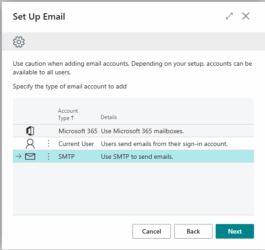
    Use SMTP

    If you want to use SMTP protocol to send emails from Business Central, you can use the SMTP Connector extension. When you set up an account that uses SMTP, the Sender Type field is important. If you choose Specific User, emails are sent using the name and other information from the account you’re setting up. However, if you choose Current User, emails are sent from the email account specified for each user’s account. Current User is similar to the Send As feature

  • Jamie Constantine

    Member
    January 20, 2026 at 2:05 pm
    Up
    0
    Down
    ::

    What is the error when you send?

  • Vishal Pandey

    Member
    January 30, 2026 at 1:01 am
    Up
    1
    Down
    ::

    This is what I’d recommend

    This is honestly the easiest and most reliable method. It uses modern authentication, so you don’t have to worry about storing passwords or dealing with MFA issues.

    Here’s how to set it up:

    • Go into Business Central and search for “Set Up Email”
    • Pick the Microsoft 365 option
    • Hit Next
    • Sign in with your Microsoft 365 email (you might need admin consent if it asks)
    • Allow the permissions it requests

    Why this is better: It uses OAuth, doesn’t store your password anywhere, works fine with multi-factor authentication, and it’s what Microsoft actually supports. Honestly, use this one if you can.

Log in to reply.

Welcome to our new site!

Here you will find a wealth of information created for peopleĀ  that are on a mission to redefine business models with cloud techinologies, AI, automation, low code / no code applications, data, security & more to compete in the Acceleration Economy!