


Dynamics Business Central (NAV)
Public Group
Active 5 hours ago
Experts:




Debugging Base BC Objects
-
Debugging Base BC Objects
Posted by DSC Communities on April 15, 2020 at 5:48 pm-

Christopher Boyle
MemberApril 15, 2020 at 5:48 PM
Hello again,Has anyone discovered a way to step into Base BC Objects with VSC/AL for BC-15. Even if my extension calls a function in a Base BC Code Unit, while debugging the extension, the debugger doesn’t step into any Base BC logic. I’m trying to debug a data issue.
Thanks,
Chris
——————————
Christopher Boyle
iCepts Technology Group, Inc.
Middletown PA
—————————— -
So a few things that work sometimes is go to your symbols folder (.alpackages) and right click on your Microsoft_Base Application.app file. Then click “Open in AL Object Browser”. Then you can filter on the search portion up top or search through the tree view:
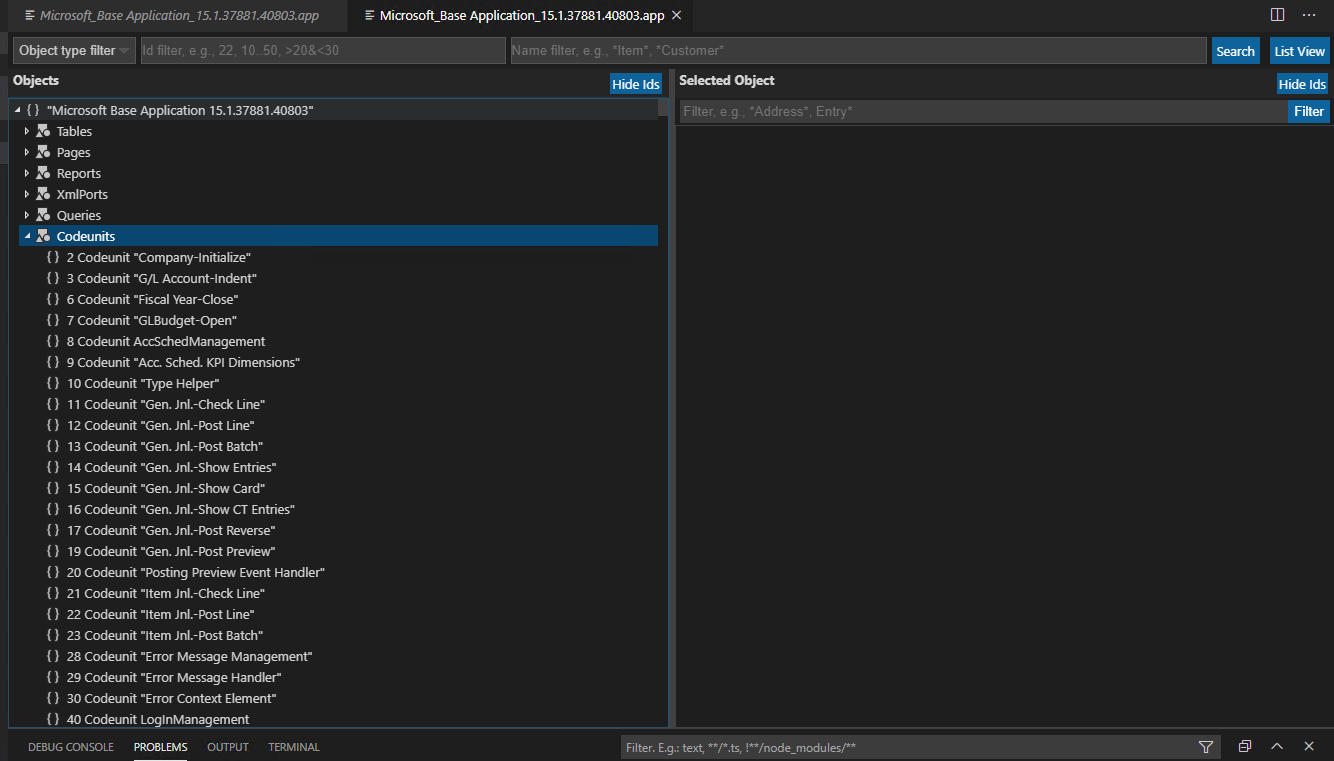
Once you find the one that you need to get into, then right click on that resource and click “Go To Definition”. Then up in the VSC search bar you should get a dropdown that will say “Please select Launch configuration” and the dropdown will have “Launch”. Click “Launch” and that should get you into the resource which will allow you to place a breakpoint.
——————————
Gary Nilsen
Stoneridge Software
Fargo ND
——————————
——————————————- -
Christopher Boyle
MemberApril 16, 2020 at 12:19 PM
Hi Gary,Thanks for your response. I found that I had to download an extension out there called, “AZ AL Dev Tools/AL Code Outline” in order to right click on the .app file and see the “Open In Object Browser”. Then I right-clicked on the object I was interested in, and right-clicked and clicked “Go to definition”. But, then I had trouble with this part of your instruction: “Then up in the VSC search bar you should get a dropdown that will say “Please select Launch configuration” and the dropdown will have “Launch”.”
I couldn’t find any dropdown that said “Please select Launch configuration”. Would you please send me a screen shot of where you see this dropdown?
Thanks in advance,
——————————
Christopher Boyle
iCepts Technology Group, Inc.
Middletown PA
——————————
——————————————- -
So this is what I get after I click on “Go To Definition”
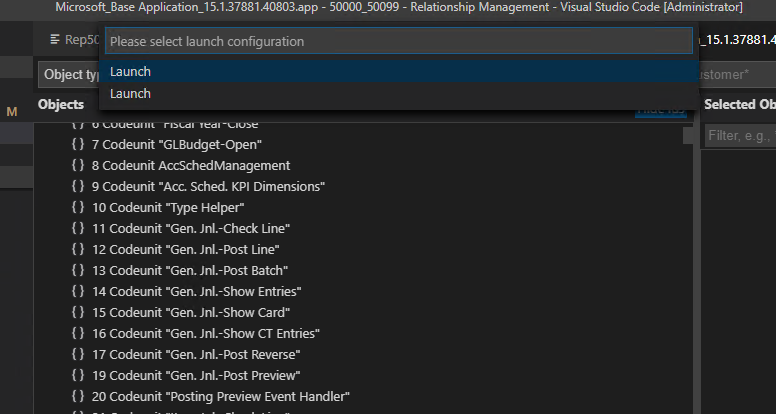
I have found that debugging sometimes works and sometimes it doesn’t. It has been frustrating for me as I don’t know why it works sometimes and others it doesn’t.
I hope this helps.
——————————
Gary Nilsen
Stoneridge Software
Fargo ND
——————————
——————————————-
DSC Communities replied 5 years, 11 months ago 1 Member · 0 Replies -
-
0 Replies
Sorry, there were no replies found.
The discussion ‘Debugging Base BC Objects’ is closed to new replies.
