Customize Navigation Pane

  • Customize Navigation Pane

    Posted by Roland-Schenk on April 19, 2017 at 9:26 am
    • Roland Schenk

      Member

      April 19, 2017 at 9:26 AM

      How to I set one up and then add function to them in Nav 2017.

      ——————————
      Roland Schenk
      DELCATH SYSTEMS
      Queensbury NY
      ——————————

    • Suresh Kulla

      Member

      April 19, 2017 at 9:53 AM

      Roland,

      To customize the navigation pane, you can right-click on the Navigation page and go to Customize Navigation Pane, this will allow you to arrange the items between the departments.

      If the Item you want to add is not available then you need to make sure you to add that first to the Menusuite by using Company/Partner Menusuite and then compile all the menu suites.

      Please check the below blog for more information

      Customize the Navigation Pane in NAV 2013 and Beyond

      ——————————
      Thanks
      Suresh Kulla
      NAV Technical Architect
      ArcherPoint Inc.
      Atlanta GA
      ——————————
      ——————————————-

    • Ramin Marghi

      Member

      April 19, 2017 at 11:33 AM

      Hi Roland,

      Just want to add that the navigation pane itself really only supports ListĀ  pages to be displayed in the main “body” window. I’ve (reluctantly) put Card pages on there before, but it’s really not pretty and doesn’t function very well. I know for some Classic client users, moving to RTC posed a bit of a challenge because they didn’t have a “shortcuts” tab, so I wrote a quick blurb about the navigation pane/ribbon model in a post here: Customize the Navigation Pane in NAV 2013 and Beyond.

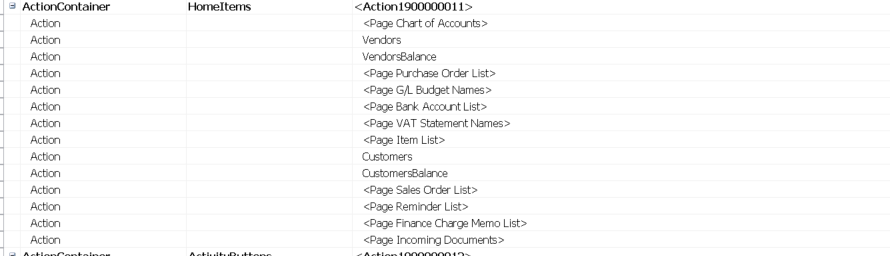
      Just a bonus tidbit: What shows up there by default is dictated by what Profile that the user is on — or more specifically, what Role Center pages they’ve been assigned. There’s a whole section called “HomeItems” in that page’s design that contains all the navigation pane items:

      Let us know if you have any issues getting this working for you.

      ——————————
      Ramin Marghi , CPA, CGA
      NAV Finance Consultant
      Catapult
      VANCOUVER BC
      ——————————
      ——————————————-

    Roland-Schenk replied 9 years, 4 months ago 1 Member · 0 Replies
  • 0 Replies

Sorry, there were no replies found.

The discussion ‘Customize Navigation Pane’ is closed to new replies.

Start of Discussion
0 of 0 replies June 2018
Now

Welcome to our new site!

Here you will find a wealth of information created for peopleĀ  that are on a mission to redefine business models with cloud techinologies, AI, automation, low code / no code applications, data, security & more to compete in the Acceleration Economy!