


Dynamics Business Central (NAV)
Public Group
Active 6 hours ago
Experts:




Customer Purchase Frequency
-
Customer Purchase Frequency
Posted by Unknown Member on January 6, 2017 at 6:23 pm-
We would like to know our customers purchasing frequency. If we know it we can watch their purchasing/order pattern and if it changes (drops off) we then could take corrective action. Curious if anyone out there is reporting on this and if so how and what tools are you using.
For example if customer purchased in January, then in May, again in August and lastly in December the average would be 3.7 months. We would then compare this to their last order date to see if it is longer and flag customer as a possible marketing promo. As I stated…this is just an example. I’m not 100% if this would be a true indicator of frequency or not?
We are trying to use core NAV relationship management features so doing this, if it is even possible to do, with a vertical add on CRM package is something we want to avoid. I do have SQL reporting writing skill set in house and a partner but I’m curious if someone has created this data and if so how?
Any insight is appreciated.
Thanks
——————————
Bill Blomker
IT Director
Crest Healthcare Supply
Dassel, Minnesota
—————————— -

Peter Lomman
MemberJanuary 9, 2017 at 3:25 AM
GDay Bill
We have been using NAV2009, and now NAV2015 for a while now, and have been using some of the standard NAV Marketing functions to determine and report this kind of information about customers buying frequency.
Have a look at Marketing > Profiles > Questionnaire Setup.
NAV keeps a count of the number of Invoices per year, along with Sales Revenue and Profit in the Customer table.
The Profile Questionnaire allows you to setup your own profile questions, that will need manual responses, but also allows ‘Auto Contact Classification’ which are system calculated profiles based some standard customer data. Sales Frequency just happens to be one of them!! Yay… In the Profile Question Details, under the Classification tab you can setup a selected data source, and start and end date formulas for the current or previous year, month or week. (whatever period makes sense for your business)
In the Answer details, setup some ranges that help determine what frequency of purchase you deem as good.
For example; 0 to 1 per year (very low), 2 to 12 per year, 13 to 24 per year, 25 to 49 per year, 50 or more per year (very high). Dont worry about these ranges too much until you run the results, as you may then want to change them and refine them based on the actual customer purchase frequencies.
When you get past the setup, run the Update Classification, which will calculate the number of customer contacts in each category. From the Profile Question Setup detail list, clicking on the number of contacts in a category will display the customers in the range of frequency. If you need to adjust the ranges, just change the from and to values, then rerun the Update Classification.
Your system may already have some of these basic Profile Questions already setup..
So once you know how often your customers buy from you, you will be asking, what value do they buy, and how much profit do we get from each customer… this starts to get really interesting when you can correllate this kind of information.
I think this is a hidden gem in NAV, and goes a long way towards CRM without buying an additional CRM application.. Enjoy!!
——————————
Peter Lomman
NAV Project manager
Lienert Australia Pty Ltd
Roseworthy
————————————————————————- -
Iaroslav Pankovskyi
MemberJanuary 9, 2017 at 1:04 PM
Hi Peter,
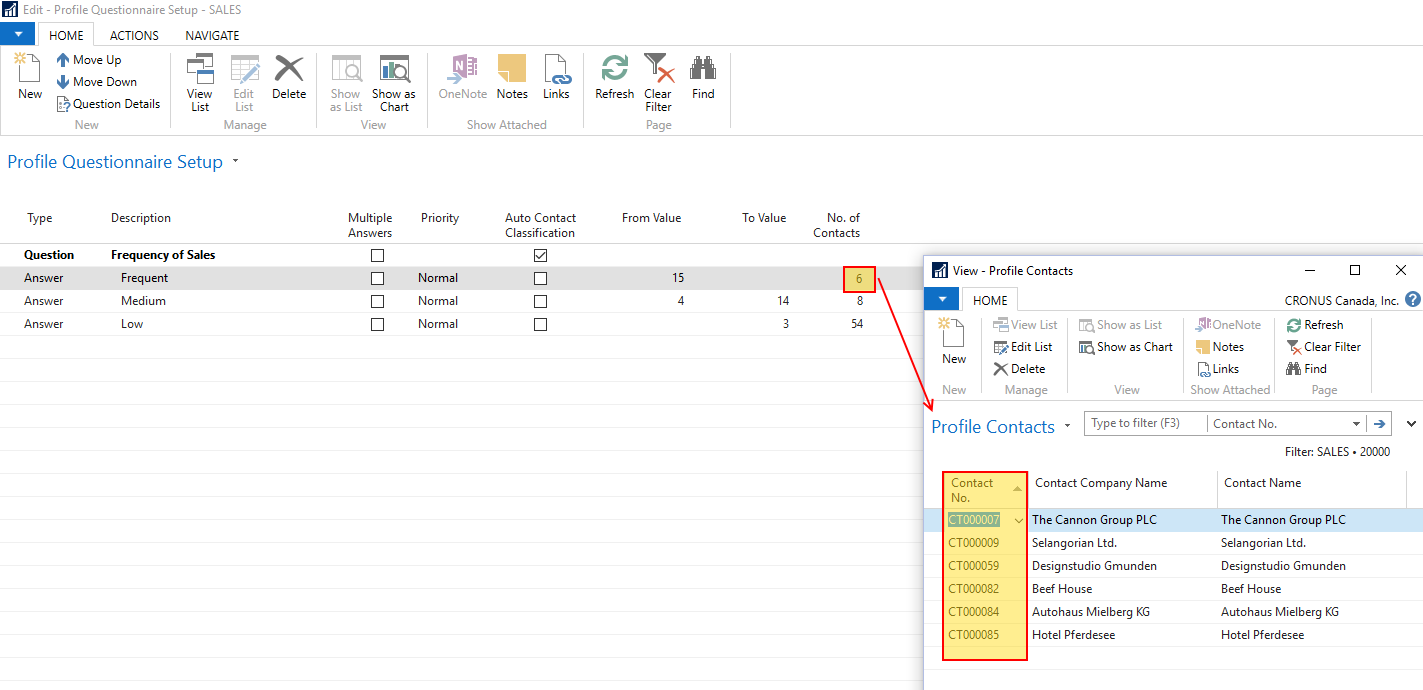
I tried this and it is an interesting solution. Let me clarify if I did it right – I set up a new Profile Questionnaire to classify customers into three groups based on how frequently they purchase from my company:
1) Frequent
2) Medium
3) Low (frequency of purchase)
I ran the “Update Contact Classification” function which updated the groups on my Profile Questionnaire Setup page – now I can see what Contact belongs to what group. In this connection I have the following two questions:
a) Can I see Customers instead of contacts in my groups without a modification (I do see the customer name in the “Description” field, but perhaps it would be more helpful to see the “Customer No.” instead of the “Contact No.”) – see the attached image?
b) Is breaking into set groups as far as NAV can go – is it possible to run a report based on these groups?
Thanks!
——————————
Iaroslav
————————————————————————- -
Peter Lomman
MemberJanuary 10, 2017 at 3:36 AM
GDay Laroslav
If you are using standard NAV, then I think each new customer or vendor automatically gets a ‘company’ contact record created for it. The Marketing functions are focused on these ‘company’ contact records, although any contact record can have a profile based on a series of questionnaires, but the automatic classification detail only works for ‘company’ type contact records.
These company contact records are linked to the customer, but I think a modification is required to display it. I think this is because Contact records can exist without being linked to a customer or vendor, as they may initially be prospective customers.
I have not explored the Marketing reports to see if this data can be reported.
Profiles can be made up of a number of different questionnaire answers.
——————————
Peter Lomman
NAV Project manager
Lienert Australia Pty Ltd
Roseworthy
————————————————————————- -
Ian Ray
MemberJanuary 9, 2017 at 2:50 PM
If it helps, this is the SQL view I have for number of orders in previous year:
SELECT [Sell-to Customer No_],
[Sell-to Customer Name],
COUNT([Sell-to Customer No_]) AS Ordercount
FROM [**Your Database**].[dbo].[**Your Company Name**$Sales Invoice Header] WHERE [Order Date] >= CONVERT(date,(DATEADD(year,-1,getdate())))
GROUP BY [Sell-to Customer No_],
[Sell-to Customer Name]
ORDER BY [Sell-to Customer Name] ASCThis is semi-accurate as it just counts the number of orders. I include the Sell-to Customer Name as there are some customers with multiple names for the same customer number (e.g. Donation – John Q. Smith). The only accuracy issues I have encountered are from credit memos, but I haven’t devised a good system to tell if a credit memo was intended for a sales invoice that had something wrong with the data in NAV or if a credit memo is was intended for a sales invoice that needed correction to the actual sale. If anyone else can tell me what I should be doing for that, I would appreciate it. If you aren’t constantly crediting orders, this query should be close enough.
Edit: also, it may be possible to slip this same data in as a FlowField for customers, but I haven’t tried that.
——————————
Ian Ray
Cypress Grove
Arcata CA
————————————————————————-
Unknown Member replied 9 years, 2 months ago 1 Member · 0 Replies -
-
0 Replies
Sorry, there were no replies found.
The discussion ‘Customer Purchase Frequency’ is closed to new replies.
