


Dynamics Business Central (NAV)
Public Group
Active 6 hours ago
Experts:




Credit Card A/P
-
Credit Card A/P
Posted by DSC Communities on January 4, 2017 at 5:53 pm-

Kelly Roselyne
MemberJanuary 4, 2017 at 5:53 PM
Hi, I am wondering if anyone knows a better way to process this.. We have a corporate credit card that we use to pay some bills. Currently, every time we pay a bill using a credit card, we make a manual journal entry.
Example:
We pay FedEx using AMEX. When we get an invoice from FedEx, we would create a purchase invoice as normal and post it. Once we pay the invoice, we make a journal entry as follow:
First Entry
Doc. type: Payment
Vendor: FedEx (debit amount)
Bal. account: A/P
Second Entry
Doc. type: Invoice
Vendor: AMEX (credit amount)
Bal. account: A/P
Is there a simpler way to do this in NAV that’s somewhat automated? We are using NAV 2013 version. If someone has a similar situation and has a better way to process this, please share with me!
Thanks!
Kelly
——————————
Kelly Roselyne
Terrybear Urns & Memorials
St. Paul MN
—————————— -
Peter Makki
MemberJanuary 5, 2017 at 2:37 AM
Hi Kelly
We do AMC-Banking / the NAV “bank data conversion service”. This solution is a part of standard NAV from 2015.
Normal process is to pay bills as wire transfers. (In US it is ACH or FedWire. Checks can be handled as well)
The process is that you search out your vendor invoices and make a payment file which is send to the bank. Either by your web bank or by STP (straight threw processing).
The solution is also able to post the transfers by the incoming bank statement and lockbox files.
When paying with a credit card I asume you do not have the invoice posted in NAV already?
Never the less we would be interested of extend our service with a more smooth way to handle credit card payments.
Maybe we could show by a online demo how to use the AMC-Banking and you could inform us what could be made more “smooth” with the credit card process.
Please contact me if you are interested.
Best regards
Peter Makki
By the way, you can take a look at http://www.amcbanking.com
——————————
Peter Makki
CEO
AMC Banking
Frederiksberg
————————————————————————- -
Kristen Wiggins
MemberJanuary 5, 2017 at 7:52 AM
We are more and more bills with credit cards, and although I do not think our process is perfect it seems to work.
We create a purchase invoices for the credit card charge (your example FedEx) but under the invoicing tab we change the pay to vendor to the credit card that is set up as a vendor. When the bill comes at the end of the month, AP does a suggest vendor payment just for the credit card and creates a manual payment to pay all the bills at once. I believe this would eliminate your need to make a journal entry.
——————————
Kristen Wiggins
Staff Accounting/Data Analyst
DOW Electronics
Tampa FL
————————————————————————- -
Crystal Tollison
MemberJanuary 5, 2017 at 8:24 AM
Kelly,
You can use the Payment Method Code to automatically close the invoice when you post it. In the Payment Method Code table, enter the account you want to apply it to in the ‘Bal. Account No.’ field. When you post the invoice it will close and post an entry to this account.
For credit card payments, I like to setup a Bank Account card to use and close the invoices using it. Then when the Credit card invoice is paid you can post against this same account. Any balance in that account is what is currently owed to the credit card company. You can even use the Bank Reconciliation function when your credit card invoice comes in to make sure you have all of your credit card entries posted in the system.
Hope this helps!
——————————
Crystal Tollison
Consultant
ArcherPoint Inc.
Lawrenceville GA
————————————————————————- -
Georges Leduc
MemberJanuary 5, 2017 at 8:50 AM
Hello Kelly,
One thing you could try is to create a bank account named AMEX and apply your FedEx payment against this bank account. If you are paying multiple invoices at the same time, you do it the same way as you would make a regular payment but instead of using a regular bank account, you use the Amex bank account.
If you are paying your Fedex invoice on receipt of the invoice, you could attach this Amex bank account to a Payment method and link it to your FedEx vendor so every time you would enter an invoice, it would be directly paid against the Amex bank account.
As for G/L distribution, create a Bank Posting Group for the Amex bank account and link it to a G/L named Amex Payable. So when you enter the invoice the G/L entry will be
Transport Dt
Amex Payable Ct
This will generate negative Bank Ledger entries in the Amex bank account and this is what you want since this is in fact a payable account.
When it will be time to pay Amex, on the Payment Journal instead of using your Amex vendor, you will use the Amex bank account and balance the payment with your regular Bank account. It will create a positive Bank Ledger Entry in the Amex bank account in order to offset that Bank account.
The other advantage with this bank account is that you could reconcile your Amex statement with the bank account as you do with all the other bank account except that this bank account would show negative values.
I hope this is clear enough for you, if you have any question do not hesitate to contact me.
——————————
Georges Leduc
Georges Leduc ERP Consultant, S.A.
L’Ile Perrot QC
————————————————————————- -
Clive Parker
MemberJanuary 5, 2017 at 9:12 AM
In 2009 we have a similar situation. E.G. on the FedEx card mark AMEX as the pay to vendor. No journal entries are necessary. The ledger entries now appear on AMEX rather than FedEx but are filterable by the buy from vendor
——————————
Clive Parker
President, CFO
Macho Products, Inc.
Sebastian FL
————————————————————————- -
CV Sudarshan
MemberJanuary 6, 2017 at 6:40 AM
Kelly –
We have a Credit Card / P-card reconciliation solution that automates the process you describe below. The way it works is – the statement from AMEX is either automatically imported into Gorilla Expense on a daily basis -OR- if you want to control the statement import process, you can manually import using Excel. Once the statement is imported, all the coding (incl. dimensions) can be completed for the different line items in our application. After that, we provide an automated integration of the data into NAV (into either the Purchase invoice or Purchase Journal or General Journal pages).
You can read more here: P-Card Reconciliation. If you would like to see a live demo, feel free to give me a shout.
CV
.
——————————
CV Sudarshan
Gorilla Expense
Duluth GA
————————————————————————- -
Julie Sebo
MemberJanuary 6, 2017 at 3:45 PM
I’m not sure if this will help, but we had our VAR add a payment type of credit card. We then suggest payments on a credit card payment journal and run the AP Credit Card account as a bank account. It makes reconciling to the statement very easy and I always know what my outstanding balance is on that credit card account. This does require that we post a deposit to that bank account when we pay the statement so this shows up as a deposit on that credit card bank account.
For our T& E cards we run those purchases under the employees name and post a zero invoice – expense line gets offset by the credit card GL account. When the statement comes in for the T&E cards we post it as an invoice using the same GL as the expenses were offset to.
We use two separate GL’s one for the AP Credit Card account and one for the T&E accounts and have them billed separately by our credit card provider.
Julie
——————————
Julie Sebo
Accounts Payable Manager
Hal Leonard Corporation
Winona MN
————————————————————————- -
Ramin Marghi
MemberJanuary 9, 2017 at 11:36 AM
Hi Kelly,
I agree with both Crystal and Georges. Although there’s no “right answer” when it comes to this, using the following methodology, you get, in my estimation, the most effective method of managing a credit card without customizations:
1. Set up a bank account per Credit Card (e.g. “AMEX-JD”, “AMEX-MK” for John Doe and Mary Kate’s AMEX cards, respectively);
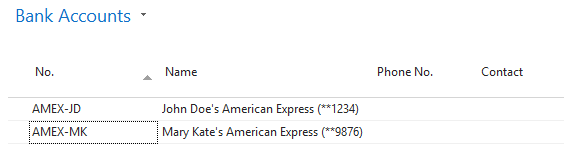
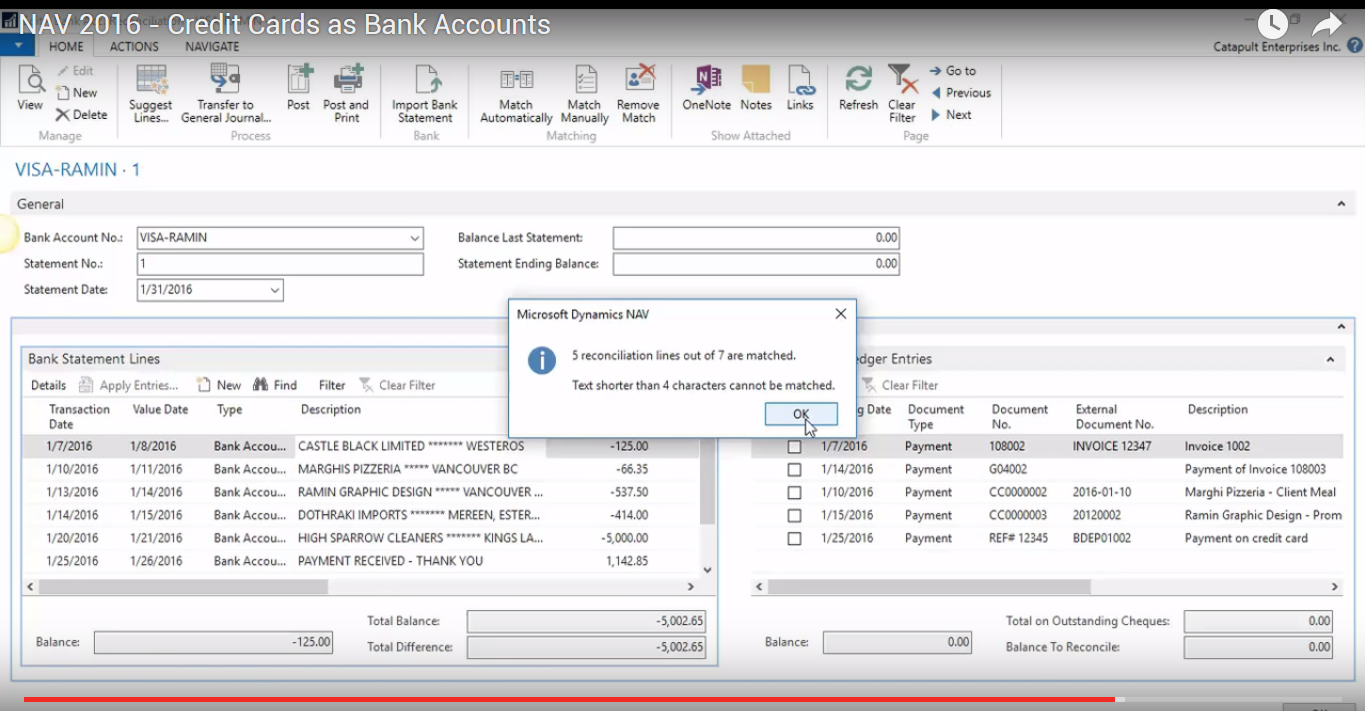
Advantages: Setting them up as Bank Accounts means that you can take full advantage of the reconciliation functionality within NAV. If down the road you upgrade to 2015 or later, for North America this implies you can use the “Bank Rec. with Automatch” feature where you can import your credit card statement into NAV and auto-match features (see example below, with credit card statement lines on the left and credit card ledger entries on the right):
2. Create three payment method codes called “CC”, “AMEX-JD”, and “AMEX-MK”, balancing the named ones to their respective “bank accounts”;
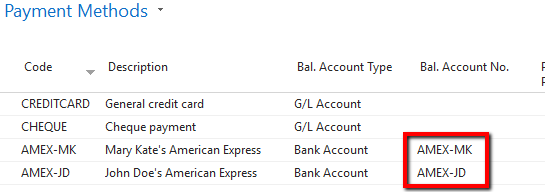
Advantages: When you do this, whenever something is “paid” with the self-balancing Bal. Account Payment Methods, it will automatically pay and close the Purchase Invoice –> this is huge in time-saving if in real life, you’ve already paid the Purchase Invoice off with the credit card in question! To demonstrate, after I post this Purchase Invoice with that Payment Method:
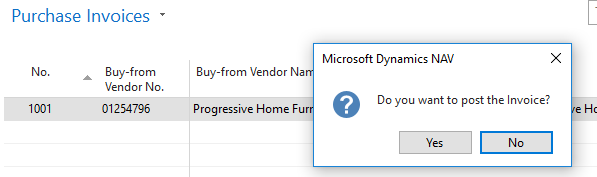
These are the resulting Vendor Ledger Entries:

As you can see, it “auto-paid” that invoice.3. For any pre-authorized / recurring credit card vendors, set them up with the default Payment Method Codes above. For example, if your utilities bill is set to automatically come out of AMEX-MK, then you simply set that on the Vendor-level (see below):
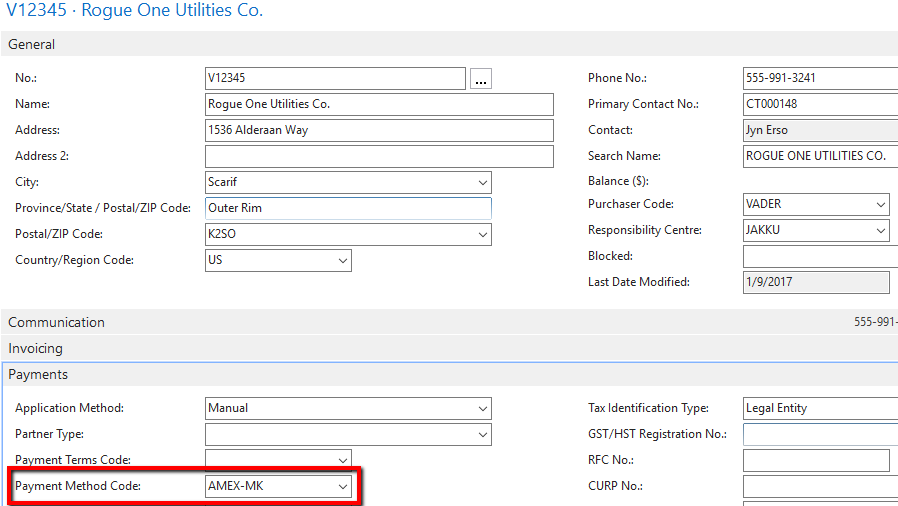
Advantages: This just ensures that A/P doesn’t have to remember to do this on every PI and it is auto-paid;
5. Whenever you make payments on the credit card, simply perform a “Deposit” to the credit card from the bank you’re paying from (e.g. if you pay off AMEX-JD with the Citibank chequing, it’d look like the below):
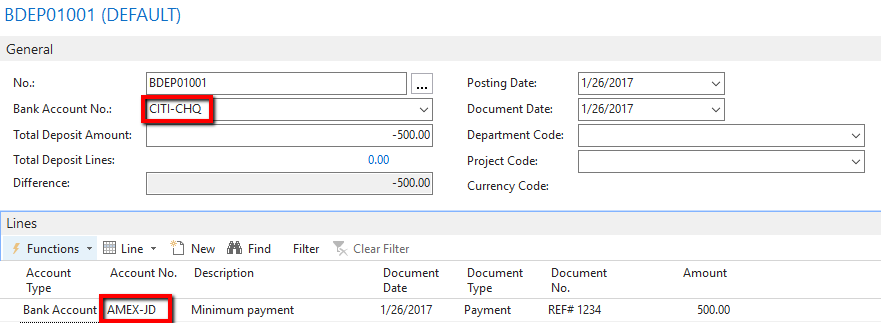
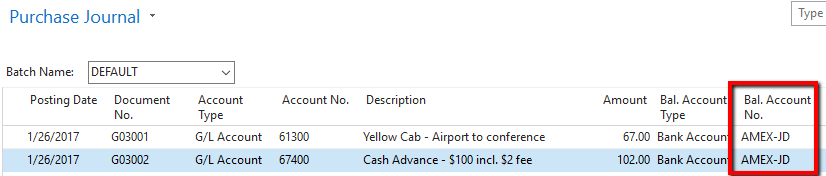
6. For transaction you don’t really care to use a Vendor for (e.g. taxis, incidentals, etc.) use the Purchasing Journal to enter one-off purchases, balancing to the respective credit cards:
7. For any regular PI that you, after the fact, decide to pay with the credit card, just pay it with the credit card in the Payment Journal:

That’s, in a nutshell, what the process would look like. I do have this one video you can watch going over the process:
Apologies, this is very poorly-recorded — it was an “internal” video I sent to a few colleagues earlier last year to discuss how the process would look for CCs and banks with the auto-match functionality and it’s not very polished, but it gets the message across.
Hope that helps!
——————————
Ramin Marghi , CPA, CGA
NAV Finance Consultant
Catapult
VANCOUVER BC
————————————————————————- -
Kelly Roselyne
MemberJanuary 11, 2017 at 11:27 AM
Thank you so much all for your feedback & comments!!
I will certainly try couple of the suggestions and let you know if it works out!
Really appreciate your help.
Regards,
Kelly
——————————
Kelly Roselyne
Terrybear Urns & Memorials
St. Paul MN
————————————————————————-
DSC Communities replied 9 years, 2 months ago 1 Member · 0 Replies -
-
0 Replies
Sorry, there were no replies found.
The discussion ‘Credit Card A/P’ is closed to new replies.
