


Dynamics Business Central (NAV)
Public Group
Active 5 days ago
Experts:




Converting data from NAV2009 to NAV2017
-
Converting data from NAV2009 to NAV2017
Posted by kstrandberg@bernatellos.com on January 12, 2018 at 10:16 am-
We are currently in the process of upgrading our data from NAV2009 to NAV2017. The size of our database is 150 gig. The available RAM on the server when running the process conversion was about 200 gig. We have 6 virtual processors in a HyperV environment.
The data conversion on the dimension table step in the process is taking about 25 hours. We have operations 6 days a week and at the down time during the conversion is concerning. Our VAR is exploring options to reduce the conversion. I’m wondering if others have had similar experiences and how they reduced the conversion times.
——————————
Kari Strandberg
Bernatello’s Pizza, Inc
Maple Lake MN
—————————— -
Is reimplementation an option? Since your database size is so big, it will certainly take longer to convert.
Meenakshi
——————————
Meenakshi Singh
Manager of Business Applications
Home Market Foods, Inc.
Norwood MA
——————————
——————————————- -

Gino Pack
MemberJanuary 15, 2018 at 8:46 AM
We recently did an upgrade from NAV2009 to NAV2016 and our database size is ~250GB when our partner ran the upgrade it did take about ~36 hours from the time we turned our frozen database over to them, and them returning the upgraded objects and database and data back to us.There will unfortunately be down time when upgrading a database that large. To lessen the impact of down time we turned over our custom objects to our partner a week prior to the upgrade so they can upgrade the objects. Then during “go live” weekend we shut down early on a Friday, and we had the upgraded database back by Saturday evening.
——————————
Gino Pack
Director of Information Systems
Modern Optical International
ROSELLE IL
——————————
——————————————- -
Kevin Ball
MemberJanuary 15, 2018 at 8:58 AM
We also upgraded our NAV 2009 to NAV 2016 in the beginning of 2017. Our database is about 500 gig in size, so it was much larger than yours.
So our concern was the runtime as well (altough we had one weekend of downtime).Our NAV partner suggested buying a “Gaming-PC” just for converting the database.
The specs of this “Gaming-PC” were:1x Intel Core i7-6700K
2x Samsung 950 PRO 256 GB
2x Samsung 950 PRO 512 GB
1x Crucial 64GB Kit DDR4-2133
1x Seagate Desktop HDD 1 TBWith this machine it was possible to convert the database within one night (we started at 06.00pm on Friday and the conversion was finished at about 08.00am on Saturday).
Still doesn’t solve your issue with the running operations on six days a week, but it might help you with a solution.
——————————
Kevin Ball
Rajapack GmbH
Ettlingen
——————————
——————————————- -
Val Gameiro
MemberJanuary 15, 2018 at 10:12 AM
?You can always throw more processors and faster disks at the process, but you can also decide you don’t need all the detail from your ledgers.You can date compress the larger ledgers, like the G/L and leave the old system around for detailed reports.
You can look at your tables and see which ledgers are the largest, and date compress those. If you date compress by month, you can still run monthly and yearly reports, but you won’t have weekly or daily.
That will cut down the size of your database/conversion.
Definitely something to check with your head of Accounting, and remind them that the old system can still be on hand for all the detail (just make the database read-only).
——————————
Val Gameiro
Senior NAV Analyst
BPL Plasma Inc.
Austin, Texas
NAVUG Austin Chapter Leader
——————————
——————————————- -
There where 3 processes that take a while when upgrading from NAV 2009 R2 to NAV 2016 (for us):
1) Converting to unicode (NAV 2013) (4 hours)
2) Converting to new dimension structure (2 hours)
3) Renaming user id’s (7 hours with mods to make this faster)All this very much matters on your data. For example if you do not use lots of dimensions or do not have a lot of G/L or Item Ledger entries then those times can be greatly reduced. Our database was in the 350 gb range when we did this and we had an extremely fast server. It took us 30 hours total.
By far the longest part for us was the renaming of the user id (from name to domain/name). This would have taken days for us to do this, so I ended up not renaming the user id in certain large tables (G/L, Item Ledger etc…) The process of changing dimensions and renaming the user id is in the same step so maybe it is the name updating that is taking a long time not the dimension piece. If I remember correctly the dimension upgrade uses straight sql (from NAV) while the name renaming does not. This is why the dimension piece doesn’t actually take too long. Someone should be able to add a line or two of code (simple message statement which will show up in the windows event log) in the upgrade toolkit so you can see where one step finished and the other begins so you can see which process is taking the most time. I am suggesting this since i have a sneaking suspicion it might be your user rename piece that is taking a while not the dimension piece. If it turns out it is the user rename then respond to this and I have suggestions on how to reduce that time.
——————————
Jason Wilder
Senior Application Developer
Stonewall Kitchen
York ME
——————————
——————————————- -
Per your request here is what I did to make the name rename doable in a reasonable time. Run Page or Form 7702 (Fields) and set the following filters to see what tables are related to the User table field #2 User Name. This will list all of the tables that will be impacted by renaming the User Name:
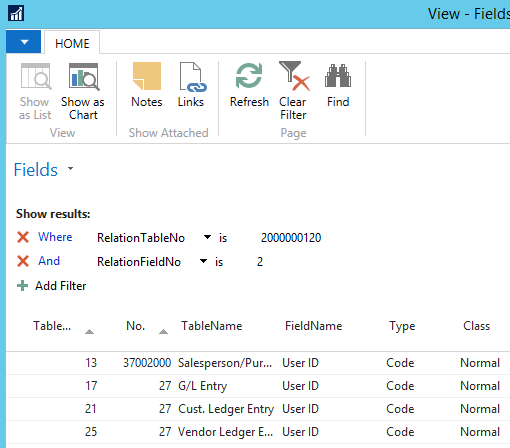 ?We had 148 tables many of which we didn’t use.
So the next step is to see how many records exist in each table. I grabbed the record count from the Database Information Form in classic client but you could grab directly from sql or write some code to get it for you.Then you have to decide which tables you want to update. For example our G/L had 100 million records (not exaggerating) so there is just no way we could update this table in a reasonable time frame. These are the tables I skipped:
TableNo TableName 17 G/L Entry 21 Cust. Ledger Entry 25 Vendor Ledger Entry 45 G/L Register 46 Item Register 96 G/L Budget Entry 254 VAT Entry 339 Item Application Entry 339 Item Application Entry 379 Detailed Cust. Ledg. Entry 380 Detailed Vendor Ledg. Entry 405 Change Log Entry 5802 Value Entry Then the final piece is to alter the upgrade toolkit to skip the rename process based on the tables you chose to skip. I don’t remember the exact function where I did this but if someone had a database with the upgrade toolkit installed I could find it pretty easily. The code I added was straight forward and something like this:
IF NOT (Tableno IN [17,21,25,45,46,96,254,339,339,379,380,405,5802]) THEN BEGINSo the solution is to basically skip the rename in some of the tables. You can certainly go back at a later point and do this step when you have more time. Plus you could do it with commits every 100 records or so, so it shouldn’t lock your users. I have not gone back to do this and probably never will as I haven’t seen any negative impacts of not doing this. Don’t forget that the this process is per company so you might be able to rename for all tables in one company but maybe not another based on the number of records in each table.
——————————
Jason Wilder
Senior Application Developer
Stonewall Kitchen
York ME
——————————
——————————————- -
Thank you to everyone that replied with suggestions. Our conversion team has discussed each one of them. We will be investigating a few of them more in-depth in our test environment.
Thank you NAVUG!
——————————
Kari Strandberg
Bernatello’s Pizza, Inc
Maple Lake MN
——————————
——————————————- -
Mathew Ealy
MemberJanuary 17, 2018 at 8:06 AM
I have just finished an upgrade from 09 to 16, our database was roughly 250 gb from end to end, all users out of the system till all users back in the system took roughly 96 hours, with another 2 months of data clean up as we found data errors. The upgrade path is not one I would ever recommend. Depending how far a long you are I would stop and look at a re-implementation, it has less down time and allows you to correct any modifications you had implemented you no longer like/want/need. From my own personal experience going through this it cost about double with no see-able upside over the re-implementation route.——————————
Mathew Ealy
Nav Support Specialist
Rentokil N. America
Reading PA
——————————
——————————————- -
Pamela Kolochuk
MemberJanuary 18, 2018 at 9:03 AM
We have the 2002 version of NAV that was eventually updated to 2009, however it does not have all of the 2009 features. We are moving to NAV 2017 and our consultant that we are working with is pushing us to convert all of our data and load to the 2017 version. I am very hesitant to do this as we are carrying all of our baggage forward into a new version that is so different and so much easier to use. I really would just love to decide on a cut off date and transfer balances for the last 2 years and all open items to NAV 2017 instead of all data from 2002 forward. We could leave the current version of NAV we have on the server and provide access to people if they need to run history on anything. Are there any negative implications from doing this? I think it would be a lot easier than trying to convert 15+ years of data that we don’t need. Any advice would be great!——————————
Pamela Kolochuk
Chief Financial Officer
Peak of the Market
Winnipeg MB
——————————
——————————————- -
I would suggest the re-implementation. Allow access to the old history as you need in the old database to selected users. Make all the users have READ ONLY access to that database and start fresh with the new database. Also, this will be the best time to review any dimensions/Setup changes that you want to reconsider & change.
I don’t see a downside other than users (especially finance) users might have to use both databases for a while. I had done that with my company when we re-implemented NAV 2013 and everyone was skeptical about it but guess what they are all happy about it. They were in that old database, maybe once a month to review details on orders/postings but that faded away within 6 months.
Good luck with the reimplementation!
Meenakshi——————————
Meenakshi Singh
Manager of Business Applications
Home Market Foods, Inc.
Norwood MA
——————————
——————————————- -
Cynthia Priebe
MemberJanuary 18, 2018 at 9:41 AM
Without all the details on your current implementation, your instincts to “start over” could be good.Not only will you have the opportunity to leave behind bad data, but also “bad” customizations or customizations that are no longer needed as new NAV functionality has replaced what was done. In addition, you can investigate adding independent software solutions, or decide to bring forward your mods refactoring them to use the current standards and design patterns for best practice.
I have been involved in several recent projects where upgrade, re-implementation and/or hybrid approach have been presented as options. You may want to ask for this so you can contrast and compare not only the end result functionality but project plans and cost. You may find bringing forward data may ultimately be the costliest option with the highest risk.
Hopefully this is helpful!
——————————
Cynthia Priebe, MCTS, DCP
Senior Business Analyst and Project Manager
Liberty Grove Software
——————————
——————————————- -
Concur with re-implementation based on what you have told us. It kind of depends on the number of mods and what the mods are though.
——————————
Jason Wilder
Senior Application Developer
Stonewall Kitchen
York ME
——————————
——————————————- -
Re-implementation will be difficult for us. We have external systems that share information back and forth with NAV so our data in NAV needs to come forward (sales orders, transfer orders, inventory balances, etc.). We are going to test Jason’s suggestion to skip the User Name rename of the upgrade toolkit on the large files. We are also going to see what options we have to increase RAM on the server during the conversion.
Thank you to everyone for all the input!
——————————
Kari Strandberg
Bernatello’s Pizza, Inc
Maple Lake MN
——————————
——————————————- -
Melissa Reichenbacher
MemberJanuary 24, 2018 at 11:31 AM
Hi Jason,
I am working on this for Kari. ?It appears that this change needs to be made to codeunit 418. Does this make sense?
Thanks!——————————
Melissa Reichenbacher
Business Automation Specialists of MN, Inc.
Minneapolis MN
——————————
——————————————- -
Melissa that does make sense but do you have the codeunit that calls codeuit 418 in the upgrade toolkit? I think the place you want to limit to certain tables is in the calling codeunit. You can email me and we could set up a quick GoTo to find the correct spot if you want.
——————————
Jason Wilder
Senior Application Developer
Stonewall Kitchen
York ME
——————————
——————————————-
kstrandberg@bernatellos.com replied 8 years, 8 months ago 1 Member · 0 Replies -
-
0 Replies
Sorry, there were no replies found.
The discussion ‘Converting data from NAV2009 to NAV2017’ is closed to new replies.
