


Dynamics Business Central (NAV)
Public Group
Active 17 hours ago
Experts:




Configuring Zetadocs on a new company in your NAV environment?
-
Configuring Zetadocs on a new company in your NAV environment?
Posted by Holly Kutil on March 22, 2017 at 8:51 am-
So I built a new company in our NAV Test environment and we use Zetadocs, it is telling me to configure the zetadocs in the new company, has anyone done this? Was it easy?
——————————
Holly Kutil
American Ring/NAV Admin
Solon, OH 44139
**Great Lakes Chapter**
?? Women In Dynamics ??
—————————— -

Eduardo Diaz
MemberMarch 22, 2017 at 1:47 PM
Holly,
I usually go to table 9041211 (Zetadocs Company Ids) and add the new company name. We are using SharePoint. This will add all attachments to the same SharePoint site. If you are planning on having a lot of records, you might want to create a separate SharePoint library.
Cheers——————————
Eduardo Diaz
IT Director
Minequip Corp.
Miami FL
——————————
——————————————- -
I have often wondered WHY Equisys has not made this simpler. It’s been an issue for as long as I’ve been using Zetadocs. I’m surprised that they have no routine to automatically update their Company Ids table when a new company is created, nor do they have a page for this Company Ids table (unless they’ve recently added it).
For clients of ours who frequently add new companies, I used to just create a custom page for that table, and then update the MenuSuite to map this page to a department. This way, they would be able to navigate to or search for this page, and quickly add the new company to the Company Ids table.
——————————
AJ Ansari
NAV Product Manager
InterDyn BMI
Houston TX
——————————
——————————————- -
Paul Crawley
MemberMarch 24, 2017 at 1:30 PM
Hi AJ
Thanks for the feedback. We chose not to make the Zetadocs Company Ids table generally available outside the NAV Development Environment. The Zetadocs Company Id is a critical element of the URL Zetadocs uses to retrieve documents from the Electronic Archive. Getting the Id settings wrong would result in missing documents or worse still show another NAV companies documents. If not picked up immediately, it would lead to documents for one company ending up in the wrong company, and make clean-up when discovered complicated.
We’ve taken the feedback on-board and will look at the best way to solve this issue in the software. In the interim please be cautious when editing the Zetadocs Company Ids table directly.
——————————
Paul Crawley
Equisys
——————————
——————————————- -
I agree with Eduardo on manually changing/adding the company name.
One other related note…We use file servers to store Zetadocs files. You should have 1 file server per NAV database regardless of number of companies. This is setup in the Zetadocs General Settings table (9041209).——————————
Greg Enns
ERP Coordinator
Technical Prospects
Kaukauna WI
——————————
——————————————- -
Ramin Marghi
MemberMarch 23, 2017 at 10:56 AM
Hi Holly,The general process of the initial configuration of Zetadocs using the UI is to:
- Go to the Zetadocs General Settings page (search for it or go to Application Setup > Zetadocs Setup > General);
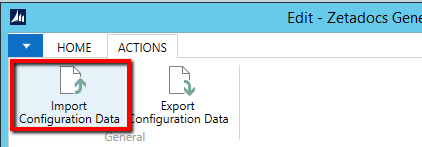
- Go to Actions > Import Configuration Data:
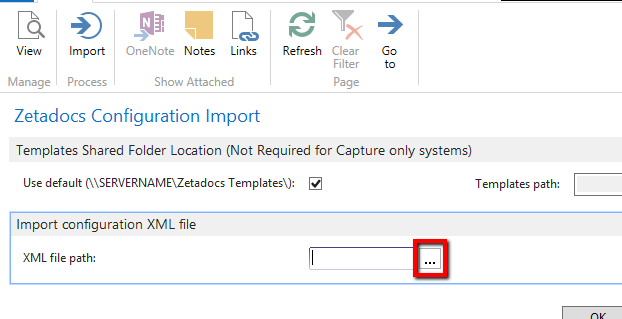
- Click the Browse AssistEdit in the XML file path field:
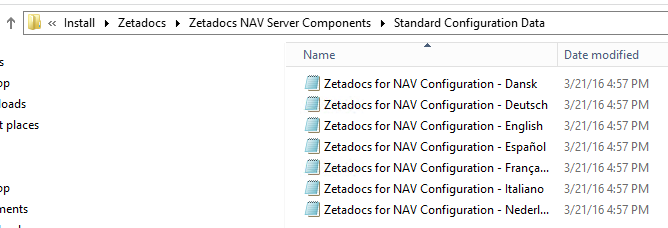
- Select the Standard Configuration XML file that comes with the Zetadocs install:
That’s the general process. But basically you can also export the standard configuration file from your LIVE company by (in the Zetadocs General Settings), clicking Export Configuration Data:
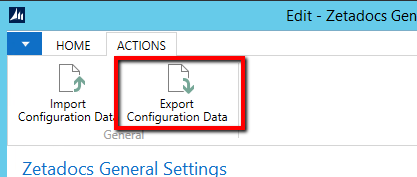
Saving that XML file somewhere, and then importing it into your TEST company.——————————
Ramin Marghi , CPA, CGA
NAV Finance Consultant
Catapult
VANCOUVER BC
——————————
——————————————-
Holly Kutil replied 9 years ago 1 Member · 0 Replies -
-
0 Replies
Sorry, there were no replies found.
The discussion ‘Configuring Zetadocs on a new company in your NAV environment?’ is closed to new replies.
