


Dynamics Business Central (NAV)
Public Group
Active an hour ago
Experts:




Closing an unfulfilled Purchase Order
-
Closing an unfulfilled Purchase Order
Posted by DSC Communities on November 22, 2019 at 1:55 pm-

Brian St Clair
MemberNovember 22, 2019 at 1:55 PM
We are new to NAV. We are using NAV 2017.
How do we close out a Purchase Order when we are done with it, even though the Purchase Order still has quantities unreceived?
For example, the PO was written for 1000 units if an item, we have received 750 units, but we have received all the units we will be getting?Thank You,
——————————
Brian St Clair
Controller
Columbia Pulp I, LLC
Dayton, Wa
—————————— -
You can manually delete any completed purchase orders. There is also a Delete Invoiced Purchase Orders function in the IT Administration area of NAV that can be used to delete purchase orders that have been invoiced. (You may need to first delete any items from the orders that will not be received if you want to run this function – or – you can change the order qty to zero).
——————————
Lewis Rosenberg
IT Manager
Mars Fishcare
Chalfont PA
————————————————————————
BCUG/NAVUG All-Star
BCUG/NAVUG Board of Advisors, Chairperson
BCUG/NAVUG Programming CommitteeTwitter: @RosenbergL
LinkedIn: https://www.linkedin.com/in/rosenbergl
————————————————————————NAVUG/D365BC-User Group Focus
May 18-19, 2019
Denver, Colorado
——————————
——————————————- -
Ken Elliott
MemberNovember 25, 2019 at 6:51 AM
Brian,It sounds like you need to cancel everything that has not been received. To do that, open the purchase order page, change the posting date to be within the current open period, and click Cancel Document on the ribbon.
If you do this before the final invoice is posted, you don’t need to do anything else. If the final invoice has already been posted, you’ll need to run the Delete Invoiced Purchase Orders function, which you can find using the search box.
Blessings,
Ken Elliott
Billy Graham Evangelistic Association
Director, Financial Operations & Process Improvement——Original Message——
We are new to NAV. We are using NAV 2017.
How do we close out a Purchase Order when we are done with it, even though the Purchase Order still has quantities unreceived?
For example, the PO was written for 1000 units if an item, we have received 750 units, but we have received all the units we will be getting?Thank You,
——————————
Brian St Clair
Controller
Columbia Pulp I, LLC
Dayton, Wa
—————————— -
Hi Brian,
Before performing either of the methods and ?? suggest, you may also want to create a Purchase Order Archive to save a snapshot of the PO, before modification or deletion, for future reference. Click Archive Document on the Actions tab as show below.
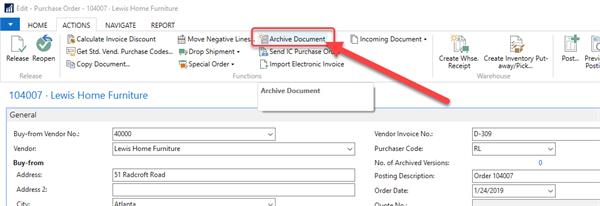 Purchase Order Archives has proved very helpful in understanding the history of our Purchase Orders.
——————————
Brian Bates
Chair, NAVUG Southern California Chapter
IT and Finance Project Manager, Power Plus!
ANAHEIM CA
——————————
——————————————- -
Yusuf Newland
MemberNovember 26, 2019 at 7:27 AM
Hi BrianJust my thoughts
From the perspective of audit trail and future reference it may not be a best practice to delete a purchase order just because you are done with it
The purchase order once approved is not open any more. The status would have been releasedIt is also good to be able to come back to the PO and see what was the original Qty and what was received for what ever reason
Another approach is to archive before deleting
But ask yourself if you really need to delete it. is it standing on the way of doing other things
Just my thoughts
Thanks
——————————
Yusuf Newland
MGAC
Washintgon DC
——————————
——————————————-
DSC Communities replied 6 years, 4 months ago 1 Member · 0 Replies -
-
0 Replies
Sorry, there were no replies found.
The discussion ‘Closing an unfulfilled Purchase Order’ is closed to new replies.
