


Dynamics Business Central (NAV)
Public Group
Active 2 days ago
Experts:




Change contact name on Vendor company contact card
-
Change contact name on Vendor company contact card
Posted by Devora on June 7, 2018 at 10:27 am-
NAV 2016- Will someone please advise how to edit a vendor card for a vendor where there is a contact name, but it is greyed out? This is field 8 in the table.
I can create a new person contact and can link it to the vendor, but I still cannot change that field on the vendor card. Still greyed out. I do not wish to create a new vendor card just to change a contact name.
Is there no way to change this field?? Been to various MS forums, checked many links, and still not finding the answer. Thanks!
——————————
D.Locke
Phoenix AZ
—————————— -
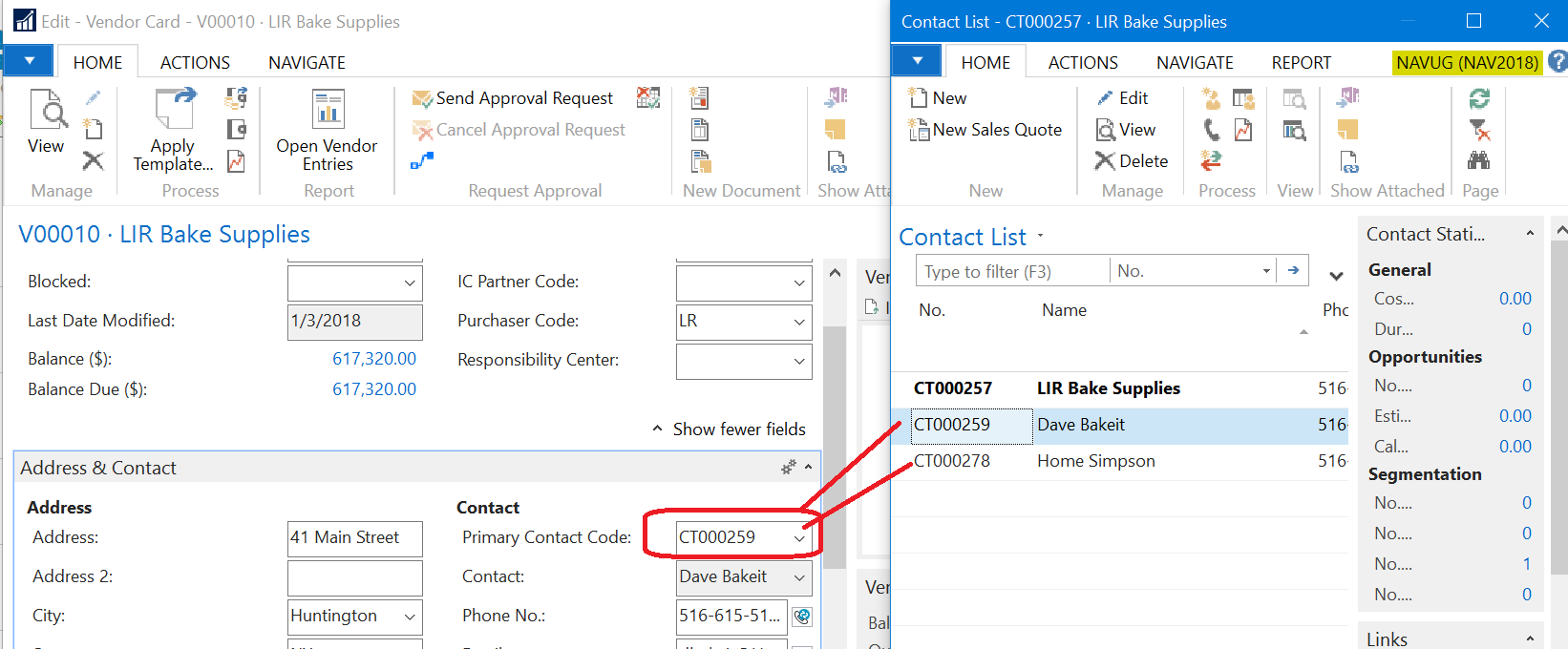
?Use the drop-down from the Primary Contact code field and select the contact.
——————————
Lewis Rosenberg
IT Manager
Mars Fishcare
Chalfont PANAVUG Board of Advisors, Programming
NAVUG Programming Committee
NAVUG Membership Committee
——————————
——————————————- -
Thanks, Lewis.
Sadly we do not have that section, for a vendor company contact. Using a screenshot for new, but also not there for edit.
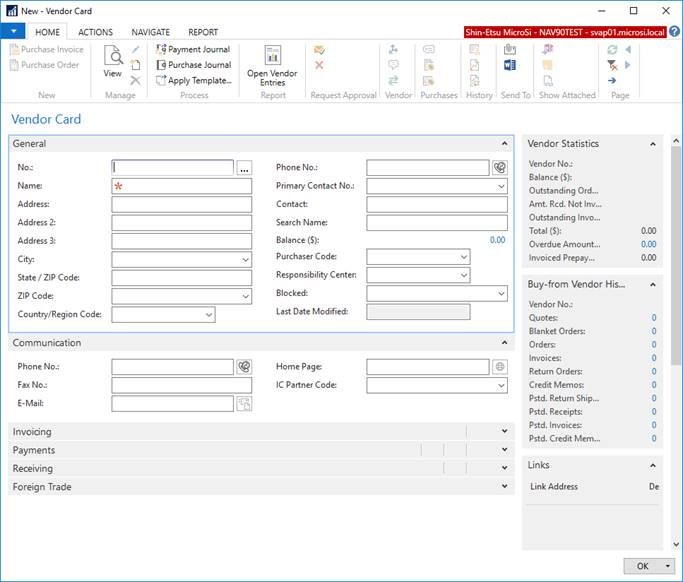
Many Thanks!
Best Regards,
Devora Locke
IT Helpdesk Analyst
Shin-Etsu MicroSi
623-463-4658 Direct
480-893-8898 ext 1070 Office
845-399-4604 Mobile/Google
Updated Hours- 6:00 am-1:30 pm Mon-Fri
——Original Message——
?Use the drop-down from the Primary Contact code field and select the contact.
——————————
Lewis Rosenberg
IT Manager
Mars Fishcare
Chalfont PANAVUG Board of Advisors, Programming
NAVUG Programming Committee
NAVUG Membership Committee
—————————— -
?I see the “Primary Contact No.” on your image on the General tab, right column, below the phone number.
——————————
Lewis Rosenberg
IT Manager
Mars Fishcare
Chalfont PANAVUG Board of Advisors, Programming
NAVUG Programming Committee
NAVUG Membership Committee
——————————
——————————————- -

Franz Kalchmair
MemberJune 8, 2018 at 11:42 AM
you have field “primary contact no.” on tab “general”.——————————
Franz Kalchmair
Microsoft MVP
Senior Consultant
Austria, Europe
——————————
——————————————- -
?Update- I did find the field Lewis was talking about even though we do not have that section on the page (not the same layout, but thanks!). Still cannot edit because when I try to edit the contact card (Primary Contact No.), again there is no field for a name?, as pointed out by another. So its in another table,… Sounds very Dynamics-like,.. But which? <g>
——————————
Devora Locke
Shin-Etsu MicroSi, Inc
Phoenix AZ
——————————
——————————————- -
?Devora,
If you click the down-arrow on the “Primary Contact Code”, it will open the Contact List page.

Now if you click the “New” button in the ribbon, you can create a new contact.
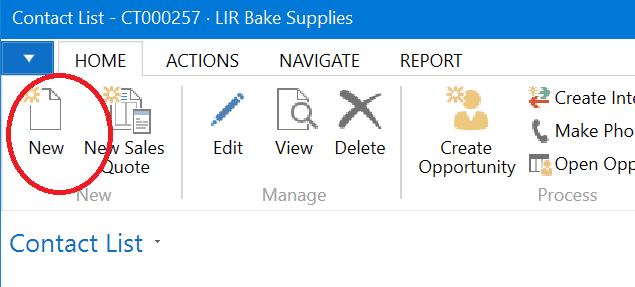
Make sure you select “Person” as the Comtact Type and also make sure you select the correct Company.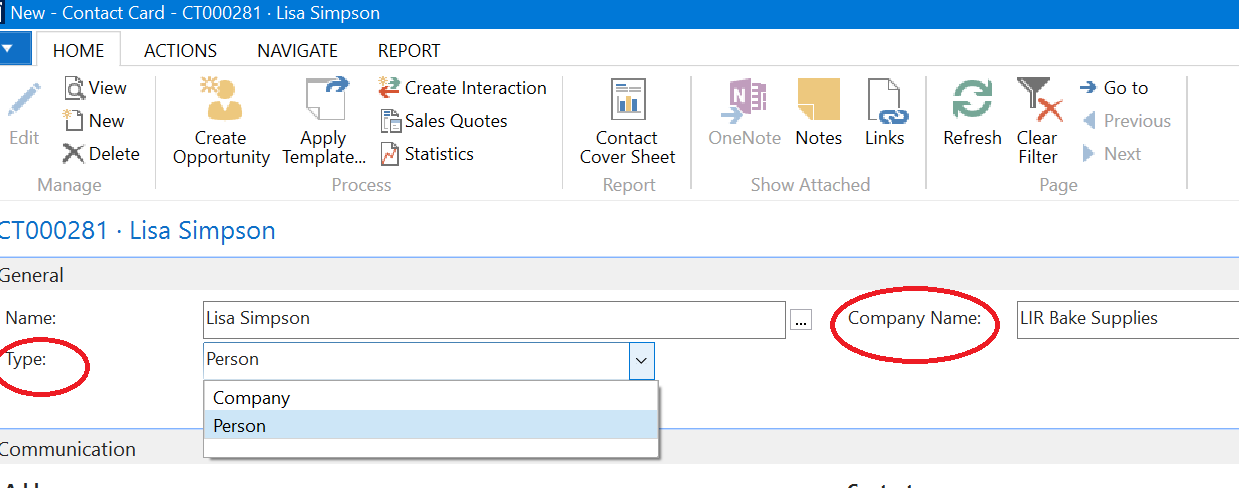
Click OK to close the Contact Card page and you will be brought back to the Contact List Page. Select your new contact (highlight the correct row) and click OK.
——————————
Lewis Rosenberg
IT Manager
Mars Fishcare
Chalfont PANAVUG Board of Advisors, Programming
NAVUG Programming Committee
NAVUG Membership Committee
——————————
——————————————- -
Joel Baines
MemberJune 8, 2018 at 7:03 AM
DevoraIt is greyed out because the value is driven from another table. It is part of the contact management system (CMS). Whether you go directly to the CMS, and find that contact or use the drop down as above, you are editing in another table…which is displayed here.
——————————
Joel Baines [Designation]
Navision Business Analyst
Mississauga ON
——————————
——————————————- -
?I cannot even find contact management system (CMS). We don’t use CRM, if that matters.
——————————
Devora Locke
Shin-Etsu MicroSi, Inc
Phoenix AZ
——————————
——————————————- -
Cynthia Priebe
MemberJune 11, 2018 at 10:18 AM
Devora,I am not certain what is being referenced as “CMS”. This may be a customization or recaptioned standard functionality for this user. What I think is being referred to is Relationship Management in NAV. However, the lists, reports etc. can be found under the Sales & Marketing Department Menu.
To define the Name on the Contact Card, click on the ellipsis button next to the Name field, it opens a new page for Name Details. You should be able to enter everything you need here.
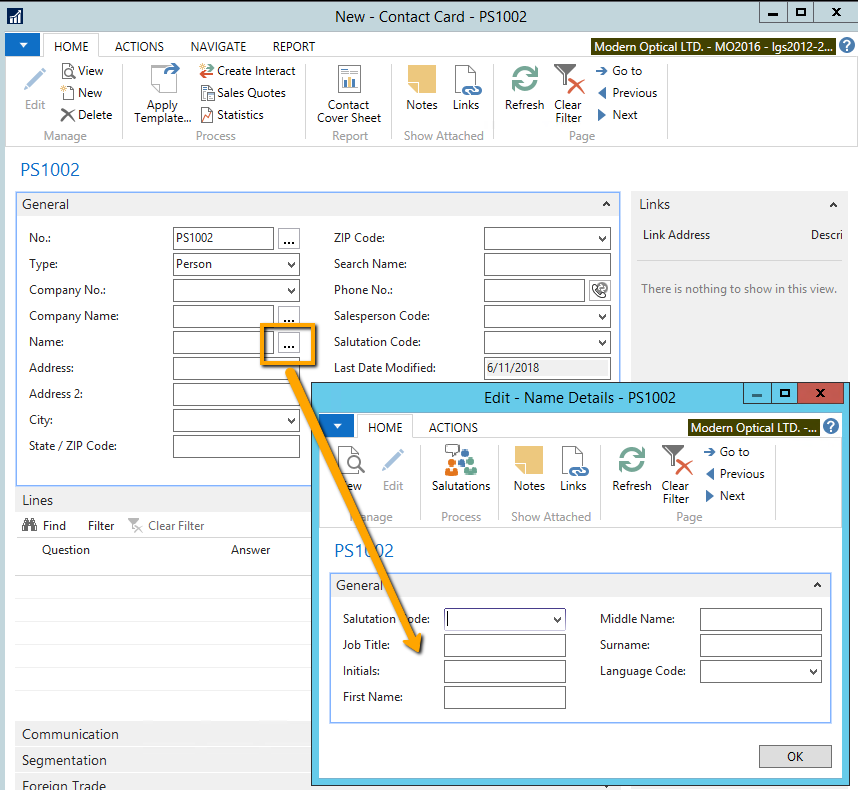
Hope you find this helpful.——————————
Cynthia Priebe, MCTS, DCP
Senior Business Analyst and Project Manager
Liberty Grove Software
——————————
——————————————-
Devora replied 8 years, 4 months ago 1 Member · 0 Replies -
-
0 Replies
Sorry, there were no replies found.
The discussion ‘Change contact name on Vendor company contact card’ is closed to new replies.
