

Approval Workflows for General Journals

  • Approval Workflows for General Journals
    Posted by DSC Communities on September 24, 2019 at 12:26 pm
    • Elize Erasmus

      Member

      September 24, 2019 at 12:26 PM

      ?Hi all,

      We’d like to set up some approval workflows for posting of General Journals in NAV, and I was hoping that some of you might have run into a similar scenario before and would have some advise. šŸ™‚

      This is what we want to happen:

      Journals with a value from $0 to $50k go to Peter for approval.
      Journals with a value ofĀ more than $50kĀ go to Paul for approval.
      BUT
      Regardless of value, if Peter creates a journal, it goes to Paul for approval (Peter can’t approve his own journals).
      If Paul creates a journal with a value from $0 to $50k, it goes to Peter for approval (Paul can’t approve his own journals).
      If Paul creates a journal with a value of more than $50k, it goes to Pierre for approval (Paul can’t approve his own journals).

      My questions:
      1. In the generic “General Journal Batch Approval Workflow”, I haven’t been able to find a way to set up workflows based on journal values.Ā  A journal value will always be zero, so I assume one would have to set up the restriction based on either the total debits or credits.Ā  Any idea how to do this?

      2. I also haven’t seen approval being set up based on a User ID.Ā  Any idea if this can be done by a super-user (i.e. without development)?

      Thanks in advance!

      ——————————
      Elize Erasmus
      Business Process Analyst
      Lifting Solutions Inc.
      Edmonton AB
      ——————————
      ?

    • Jason Nicolaou

      Member

      September 25, 2019 at 7:29 AM

      Hi Elize.Ā  What version are you on?Ā  I took a look in BC and Credit Amount and Debit Amount are options under On Condition.Ā  You will have to create multiple lines to trigger the approval workflow based on the amount.

      As far as approving for each other look into building your response based on the Approver Limit Type.Ā  Maybe Peter and Paul are at the same level, or you set up rules for a specific approver per rule.Ā 

      Finally, the approval user setup will give you the ability to assign Paul as Peter’s approver and vice versa.Ā 

      This isn’t the final answer, but I hope it gets you closer to the goal.Ā  The OOB approval process requires multiple lines and multiple tests to achieve what you are after.

      ——————————
      Jason Nicolaou
      Engagement Manager
      Sikich, LLP
      ——————————
      ——————————————-

    • Elize Erasmus

      Member

      September 25, 2019 at 10:37 AM

      ?Hi Jason,

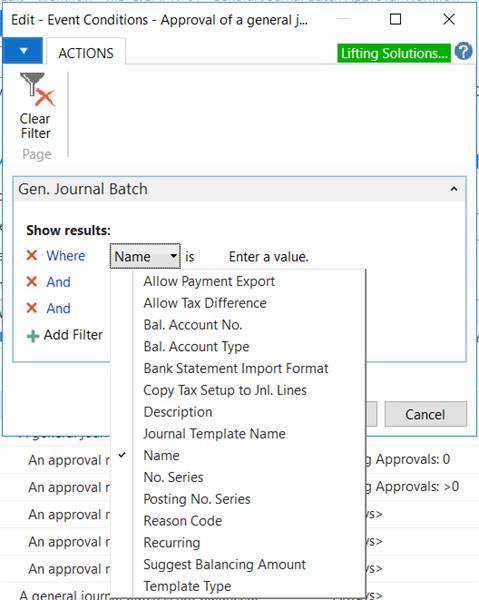
      We are on Dynamics NAV 2017. Our options under On Condition are quite limited, and I don’t see any way to increase those options.Ā  Looks like this might not be an option for me…

      Options under On Condition in GL journal workflow

      #workflows;Ā #GLJournalApprovals;
      ???

      ——————————
      Elize Erasmus
      Business Process Analyst
      Lifting Solutions Inc.
      Edmonton AB
      ——————————
      ——————————————-

    DSC Communities replied 6 years, 11 months ago 1 Member · 0 Replies
  • 0 Replies

Sorry, there were no replies found.

The discussion ‘Approval Workflows for General Journals’ is closed to new replies.

Start of Discussion
0 of 0 replies June 2018
Now

Welcome to our new site!

Here you will find a wealth of information created for peopleĀ  that are on a mission to redefine business models with cloud techinologies, AI, automation, low code / no code applications, data, security & more to compete in the Acceleration Economy!



