


Dynamics Business Central (NAV)
Public Group
Active a day ago
Experts:




Approval Notifications
-
Approval Notifications
Posted by Elizabeth McQuiston on September 21, 2020 at 8:59 am-
Has anyone figured out a way to get an e-mail notification that an approval request has been approved? We can get the original “requires your approval” and “approval has been rejected” but can’t get one for “request has been approved”. We are on BC 13 on Prem. We are looking for a solution that does not involve a customization either in the base system or using Flow.
——————————
Liz McQuiston
Corporate Controller
Superior Walls of America
New Holland PA
Running BC on Prem
******************************
BCUG/NAVUG Board of Advisors
Delaware Valley Chapter Leader
—————————— -
Base NAV2013R2 unfortunately does not send email notifications after an approval. I haven’t seen or heard whether that has changed in later versions of NAV and BC.
——————————
Lewis Rosenberg
IT Manager
Mars Fishcare
Chalfont PA
http://www.apifishcare.com
————————————————————————
BCUG/NAVUG All-Star
BCUG/NAVUG Board of Advisors, Chairperson
BCUG/NAVUG Programming CommitteeTwitter: @RosenbergL
LinkedIn: https://www.linkedin.com/in/rosenbergl
————————————————————————NAVUG/D365BC-Community Summit:
https://www.dynamiccommunities.com/events/community-summit-north-america/
October 7-9, 2020
——————————
——————————————- -
Sorry Liz, but the only way were able to get approval E-mails to work was a customization.
——————————
Gregory Alford
Director of Technical Resources
Tri Star Metals LLC
Aurora IL
——————————
——————————————- -
I think we need to submit this as an upgrade request to Microsoft. Its something we have often wanted as well. -d.
——————————————-
-
If you want the “Approved” notification to be sent to the person who requested the approval, then you need a developer to create an extension. This is not a modification of base app–just extending it using events that Microsoft created for exactly this sort of purpose. Check out this link for how to make it work. We did this in NAV2016 and are now using it in BC14 with zero changes/issues.
If you want your “Approved” notifications to go back to one user, then you need only specify in the workflow that you want to send a notification to a specific recipient and then you specify the userID of that recipient.——————————
Greg Enns
ERP Coordinator
Technical Prospects
Appleton WI
——————————
——————————————- -

Mary Carrero
MemberSeptember 23, 2020 at 8:56 AM
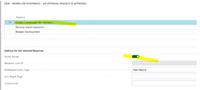
This can be accomplished using the notify sender button on the workflow response. I had a Microsoft rep show this to me.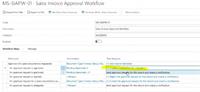
——————————
Mary Carrero
Velosio
apopka NJ
——————————
——————————————- -
Sydney Stroyer
MemberSeptember 23, 2020 at 11:22 AM
LIz, If you are in BC have you considered using Flows to handle your workflows and notifications? We are in BC16 but I believe Flows started with the first version of BC. Flows is extremely easy to connect to and use.——————————
Sydney Stroyer
JMH Companies
New Orleans
——————————
——————————————-
Elizabeth McQuiston replied 6 years, 1 month ago 1 Member · 0 Replies -
-
0 Replies
Sorry, there were no replies found.
The discussion ‘Approval Notifications’ is closed to new replies.
