


Dynamics Business Central (NAV)
Public Group
Active 14 hours ago
Experts:




Any suggestions on how to cater for product aliases
-
Any suggestions on how to cater for product aliases
Posted by DSC Communities on July 10, 2022 at 5:38 am-

Graeme Gallagher
MemberJuly 10, 2022 at 5:38 AM
Hi everyone,We have products that are known under different names and brands depending on the markets they are competing in. This means they are manufactured and stocked as one code but could be ordered as a number of different ones. In our previous system we defined the manufactured and stocked item and set up aliases for it – that way if we sold product A, B or C (the aliases), stock would be depleted for product D.
BC doesn’t seem to have a similar function – we have tinkered with variants and alternatives but they don’t seem to enact that automatic stock relationship. If any of you can think of some way to achieve the same thing, that would be awesome.
Thanks
Graeme——————————
Graeme Gallagher
New Zealand Panels Group
Auckland
—————————— -
In BC, you have item cross references, or item reference as it is called now that allows you to stock the item as the main item no, but you can sell it under different references on a sales order. This functionally is useful for customers that but the product with their own sku no, but you could potentially use it as references as well.
Thanks,
Devraj——————————————-
-
Consider a make to order assembly order to accomplish this.Sent from my Verizon, Samsung Galaxy smartphone
——————————————-
-
Spencer Coulter
MemberJuly 11, 2022 at 7:41 AM
Agreeing with Devraj here, take a look at the item cross reference functionality in the system. You can then use your other identifiers even though it is a single item in BC. I’m guessing you also want to print reports using the varying ID so you would need a slight tweak to the reports to pull from the item reference field to your sales documents instead of the standard No. field.——————————
Spencer Coulter
Director, Business ApplicationsRSM US LLP
D: 515.281.9248 F: 515.471.5261
E: Spencer.Coulter@rsmus.com
——————————
——————————————- -
Robb Delprado
MemberJuly 11, 2022 at 11:04 AM
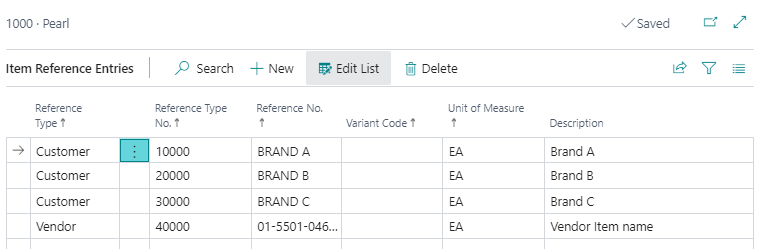
Hello Graeme,Have you looked at the Item References? There is a cross-reference for Customers and the Description you enter in the table is the Description that prints on the customer-facing documents.
You may have to activate the “Use Item References” option on the Inventory Setup page.
——————————
Robb Delprado
Senior Trainer and Consultant
New View Strategies
robb@newviewstrategies.com
860.558.8032
Houston, TX
——————————
——————————————- -
Graeme Gallagher
MemberJuly 12, 2022 at 5:56 AM
Thanks for the suggestions everyone… you are awesome!
The item references took a bit of figuring out (thanks Google and Youtube) but being able to set the reference against a blank customer means that entering the alias into the item reference fills the item number field and does all of the stock shenanigans that I need it to. Bonus is that I am using Azure Datalake for my DW and reporting mostly so no tweaking is needed to any standard reports.
Ron, I gave the assembly orders a go as well and, whilst it isn’t where we’ll end up for the alias products, it did get me thinking along a that track for a completely different challenge we’re facing. So bonus, another ticket off the backlog!
Thanks so much everyone, virtual drinks are on me 🙂
Graeme
PS. If you ever make it down our way, I’d be happy to make that a real drink.
——————————
Graeme Gallagher
New Zealand Panels Group
Auckland
——————————
——————————————-
DSC Communities replied 3 years, 8 months ago 1 Member · 0 Replies -
-
0 Replies
Sorry, there were no replies found.
The discussion ‘Any suggestions on how to cater for product aliases’ is closed to new replies.
