


David Laster
Forum Replies Created
-
 ::
::Hi Laura:
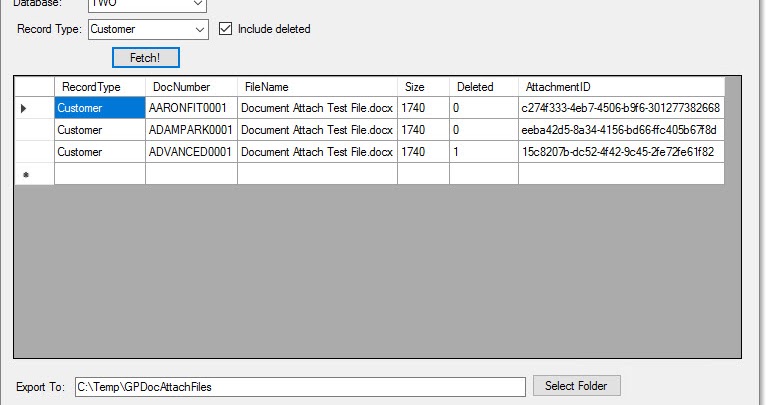
I would not recommend the migration approach for GP, or using the migration tool to get to BC. It works OK to push some GP data to the cloud, but in reality you should create a new BC company from scratch and load the master records from the BC templates using the BC-way. You can import attachments afterward. Steve Endow has a great free tool / utility available that you can download and use against your GP company database to download your attachments to a folder. Map these to your new master records and load to BC. You’ll probably find that you don’t need all the vendors or their attachments, saving precious cloud storage space as well.
-
::
Hi Brian:
Check out Integrity Data for a solution that does this:
https://www.integrity-data.com/software/comprehensive-leave-management-software/
Regards,

integrity-data.com
Comprehensive Leave Management Software | Integrity Data
Create and manage unlimited types of leave with varying rules in Comprehensive Leave Manager for Dynamics GP Payroll, software by Integrity Data. Learn more.
-
::
Tiffany:
My favorite answer to this is Steve Endow’s free and easy to use utility! It is a .NET program that connects to your GP company, then lets you choose which record type to download files from (Customers, Vendors, SOP, POP, etc.). You choose where to direct the downloads locally and then wait for it to complete.https://blog.steveendow.com/2018/12/bulk-export-dynamics-gp-document.html
Regards,
David
P.S. Thanks again Steve for giving this cool tool to the #GPUG Community!
blog.steveendow.com
Bulk Export Dynamics GP Document Attachments using .NET
Steve Endow is a Microsoft MVP who shares information about Microsoft Dynamics 365 Business Central, Azure, .NET, SQL Server, and Power Platform
