


Power Platform
Public Group
Active 17 hours ago
Power Platform
Organizer:
- JOSE Organized by
-
-

Power BI Self Service with PBI Data Sets
-
Power BI Self Service with PBI Data Sets
Posted by DSC Communities on December 18, 2022 at 2:21 pm-

Tim Stutzman
MemberDecember 18, 2022 at 2:21 PM
Hello,We are trying to implement a self-service model in Power BI so our IT department is not inundated with Power BI report modification and creation requests. We also believe it would be good for the users to learn Power BI themselves and be able to manage their reports without relying so much on IT. I have a few clarifying questions.
For our Power BI reports, our IT department currently pull data from our SQL server and transform it using Power Query. I was testing creating Power BI data sets for a self service model so the users don’t have to query the SQL server (which might be too difficult for them) and then creating a report in Power BI desktop.
While testing, here are some observations that I made.
- You can’t use Power Query to transform the data anymore. I think this makes sense because the Power BI data set is supposed to be transformed and ready to go.
- Doesn’t look like you can create measures or columns (maybe I am doing something wrong).
- There is no table view so you can see the data in a table (option between the report and model on the left hand side of PBI desktop
Are these assumptions correct? I was hoping the user could at least create measure and columns. In this model, the user still would have to contact the developer every time they needed a new calculated field added to the data set instead of them doing it themselves. I was hoping to teach the non-IT users to use DAX so they could create their own measures and be more self service.
If my assumptions are correct, is there another type of self service model that would allow the users to be able to create measures and columns and view data in the table view? Maybe create views in SQL server and the non-IT users are trained to select from a SQL views for the data they want to build a Power BI report? Any other suggestions would be greatly appreciated.
Thanks,
Tim——————————
Tim Stutzman
Information Technology Manager
Eugene
—————————— -
Miguel Viera
MemberDecember 22, 2022 at 10:43 AM
Tim,I think there is a way to do what you are looking to accomplish. Happy to review and discuss over a Zoom call when your schedule permits.
-Miguel Viera
Independent Consultant
King, NC
miguelrviera@gmail.com——————————
Miguel Viera
Consultant
King NC
——————————
——————————————- -
Tim Stutzman
MemberDecember 22, 2022 at 1:01 PM
Hi Miguel,Thanks for the reply. I was actually able to figure out how to make my use case work with the help of PBI User Group user sending me a direct message and pointing me in the right direction.
The key thing I was missing is that a measure table needs to be created for the non-technical person can create measures. Once I did that and tested, I confirmed the self service model we are trying to create will work for the end users.
Thanks,
Tim——————————
Tim Stutzman
Information Technology Manager
Eugene
——————————
——————————————- -
Miguel Viera
MemberDecember 23, 2022 at 10:24 AM
Tim,Happy to hear you were able to figure it out and now have a self-service model that will work for your end users. Thank you for the note about the measure table that needed to be created. Happy Power BI building and Merry Christmas!
-Miguel
——————————
Miguel Viera
Consultant
King NC
——————————
——————————————- -
Adam Artur Boltryk
MemberJanuary 6, 2023 at 12:17 PM
Hi Tim,No Table view = can’t modified tables (add columns etc) also can’t investigate.
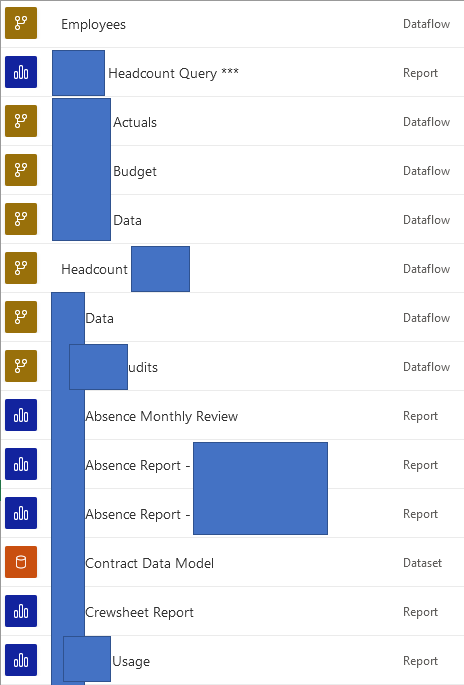
But you are still able to create measures. specific and used only in this one report.In model we build in our team we have always few/dozens Dataflows -> ONE Dataset (DataModel) -> dozens reports
Regards
——————————
Adam Artur Boltryk
Business Analyst
——————————
——————————————-
DSC Communities replied 3 years, 4 months ago 1 Member · 0 Replies -
-
0 Replies
Sorry, there were no replies found.
The discussion ‘Power BI Self Service with PBI Data Sets’ is closed to new replies.
