


Power Platform
Public Group
Active a day ago
Power Platform
Organizer:
- JOSE Organized by
-
-

NOAA Weather Data for a single station
-
NOAA Weather Data for a single station
Posted by DSC Communities on April 3, 2020 at 11:29 am-

Josiah Bussing
MemberApril 3, 2020 at 11:29 AM
Hello,I am trying to use the API service on the ncdc.noaa.gov website to automatically pull data into PowerBI.
I am trying to use a specific station ID (Station ID: GHCND:USW00003017), which is Denver international Airport. I want to pull the daily weather summary for as long as I can (at least 23 years).
Can someone help me figure out the API that will allow me to pull this back? I have tried Googling this, but wasn’t able to find anything that worked to pull this data back.
——————————
Josiah
—————————— -
Joseph Lipker
MemberApril 6, 2020 at 8:01 AM
?Based upon their documentation the below pulls back data.
https://www.ncei.noaa.gov/support/access-data-service-api-user-documentation——————————
Joseph Lipker——————————
——————————————- -
The NOAA API gives you a number of options, providing parameters for not only the station and date range, but also the columns to return and the format of the data itself.
I’ve put together an M query that let’s you easily specify the date range, station, columns to return, and data format. It also should refresh in the Power BI service without error.
To use the M query:
- Launch the Power Query Editor
- Click on New Source > Blank Query
- Click the Advanced Editor button
- In the Advanced Editor, delete any M code and paste the following:
let
    responseType = "csv", // "json" or "csv"
    station = "USW00003017", // station ID
    currentDate = Date.From(DateTime.LocalNow()), // your local time according to your computer's clock
    numYears = 23, // the number of years to return data for
    previousDate = Date.AddYears(currentDate, -numYears), // start date of the date range
    startDate = Date.ToText(previousDate, "yyyy-MM-dd"), // text formatted version of the start date
    endDate = Date.ToText(currentDate, "yyyy-MM-dd"), // text formatted version of the end date
    request =
        Web.Contents(
            "https://www.ncei.noaa.gov",
            [
                RelativePath = "/access/services/data/v1",
                Query = [
                    dataset = "daily-summaries",
                    // dataTypes = "DP01,DP05,DP10,DSND,DSNW,DT00,DT32,DX32,DX70,DX90,SNOW,PRCP",
                    stations = station,
                    startDate = startDate,
                    endDate = endDate,
                    // includeAttributes = "true",
                    format = responseType
                ]
            ]
        ),
    responseTable = if responseType <> "json" then
            let
                response = Csv.Document(request),
                PromotedHeaders =  Table.PromoteHeaders(response)
            in
                PromotedHeaders
        else
            let
                response = Json.Document(request),
                ConvertedToTable = Table.FromList(response, Splitter.SplitByNothing(), null, null, ExtraValues.Error),
                ExpandedColumn = Table.ExpandRecordColumn(ConvertedToTable, "Column1", {"FMTM", "WSF2", "FMTM_ATTRIBUTES", "WSF5_ATTRIBUTES", "STATION", "WSF5", "PRCP_ATTRIBUTES", "PRCP", "WDF2_ATTRIBUTES", "AWND_ATTRIBUTES", "DATE", "WDF2", "WDF5_ATTRIBUTES", "AWND", "WDF5", "TMAX", "TMAX_ATTRIBUTES", "TMIN", "WSF2_ATTRIBUTES", "TMIN_ATTRIBUTES", "WT01_ATTRIBUTES", "WT13_ATTRIBUTES", "WT01", "WT13", "WT04_ATTRIBUTES", "WT04", "WT06", "WT18_ATTRIBUTES", "WT06_ATTRIBUTES", "WT02_ATTRIBUTES", "WT15", "WT16", "WT18", "WT16_ATTRIBUTES", "WT22_ATTRIBUTES", "WT22", "WT02", "WT15_ATTRIBUTES", "WT08_ATTRIBUTES", "WT08", "WT19", "WT19_ATTRIBUTES", "WT21", "WT21_ATTRIBUTES", "WT03", "WT03_ATTRIBUTES", "WT05", "WT05_ATTRIBUTES", "WT10_ATTRIBUTES", "WT10", "WT11", "WT11_ATTRIBUTES", "WT14_ATTRIBUTES", "WT14", "WT09", "WT09_ATTRIBUTES", "PGTM_ATTRIBUTES", "PGTM", "TAVG_ATTRIBUTES", "TAVG", "SNWD", "SNWD_ATTRIBUTES", "WT07", "WT07_ATTRIBUTES", "WV03", "WV03_ATTRIBUTES", "DP01_ATTRIBUTES", "DP10", "DP10_ATTRIBUTES", "DP01"}, {"FMTM", "WSF2", "FMTM_ATTRIBUTES", "WSF5_ATTRIBUTES", "STATION", "WSF5", "PRCP_ATTRIBUTES", "PRCP", "WDF2_ATTRIBUTES", "AWND_ATTRIBUTES", "DATE", "WDF2", "WDF5_ATTRIBUTES", "AWND", "WDF5", "TMAX", "TMAX_ATTRIBUTES", "TMIN", "WSF2_ATTRIBUTES", "TMIN_ATTRIBUTES", "WT01_ATTRIBUTES", "WT13_ATTRIBUTES", "WT01", "WT13", "WT04_ATTRIBUTES", "WT04", "WT06", "WT18_ATTRIBUTES", "WT06_ATTRIBUTES", "WT02_ATTRIBUTES", "WT15", "WT16", "WT18", "WT16_ATTRIBUTES", "WT22_ATTRIBUTES", "WT22", "WT02", "WT15_ATTRIBUTES", "WT08_ATTRIBUTES", "WT08", "WT19", "WT19_ATTRIBUTES", "WT21", "WT21_ATTRIBUTES", "WT03", "WT03_ATTRIBUTES", "WT05", "WT05_ATTRIBUTES", "WT10_ATTRIBUTES", "WT10", "WT11", "WT11_ATTRIBUTES", "WT14_ATTRIBUTES", "WT14", "WT09", "WT09_ATTRIBUTES", "PGTM_ATTRIBUTES", "PGTM", "TAVG_ATTRIBUTES", "TAVG", "SNWD", "SNWD_ATTRIBUTES", "WT07", "WT07_ATTRIBUTES", "WV03", "WV03_ATTRIBUTES", "DP01_ATTRIBUTES", "DP10", "DP10_ATTRIBUTES", "DP01"})
            in
                ExpandedColumn
in
    responseTable
——————————
Tony McGovern
co-Founder & Data Scientist
Emdata Inc.
——————————
——————————————- -
Josiah Bussing
MemberApril 7, 2020 at 5:06 PM
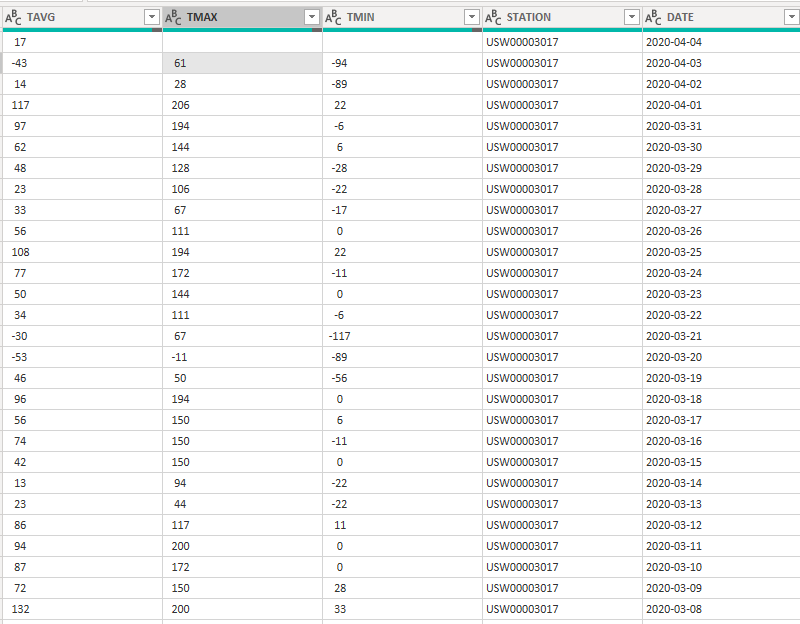
Hi Tony,First off, thank you for your help on this one. What you provided works really well to pull back data. However, I ran into an issue when I looked at the data to verify it. The temperature min and max (TMIN & TMAX) seem to be random and not accurate. (See screenshot).
This is the Denver international airport weather station. I believe I was wearing shorts on 4/3/2020, I highly doubt the minimum temperature was -94. 🙂
Do you have any ideas why this data may be pulling back incorrectly?
For my data in the past, I have been manually pulling in data from this station: GHCND:USW00003017
——————————
Josiah
——————————
——————————————- -
It was hard to find, but in the README file that accompanies the dataset states that those TMAX and TMIN values represent temperatures in centigrade, along with the tenth portion of the number. In other words, a TMAX value of 111 is actually 11.1 degrees centigrade. A TMIN value of 100 is actually 10.0 degrees centigrade, and so on.
Crosswalking the values in this dataset with a sample report from the same weather station, I was able to correctly convert the temperatures to their Fahrenheit equivalents. Here’s an update to the M query that’ll convert both min and max temperatures to Fahrenheit, and also convert the precipitation from millimeters to inches:
let
    responseType = "csv", // "json" or "csv"
    station = "USC00186915", // station ID
    currentDate = Date.From(DateTime.LocalNow()), // your local time according to your computer's clock
    numYears = 31, // the number of years to return data for
    previousDate = Date.AddYears(currentDate, -numYears), // start date of the date range
    startDate = Date.ToText(previousDate, "yyyy-MM-dd"), // text formatted version of the start date
    endDate = Date.ToText(currentDate, "yyyy-MM-dd"), // text formatted version of the end date
    tempConversion = (n as number) => (n * 9/5) + 32, // convert celcius to fahrenheit
    inchConversion = (n as number) => n / 25.4, // convert millimeters to inches
    request =
        Web.Contents(
            "https://www.ncei.noaa.gov",
            [
                RelativePath = "/access/services/data/v1",
                Query = [
                    dataset = "daily-summaries",
                    // dataTypes = "DP01,DP05,DP10,DSND,DSNW,DT00,DT32,DX32,DX70,DX90,SNOW,PRCP",
                    stations = station,
                    startDate = startDate,
                    endDate = endDate,
                    // includeAttributes = "true",
                    format = responseType
                ]
            ]
        ),
    responseTable = if responseType <> "json" then
            let
                response = Csv.Document(request),
                PromotedHeaders =  Table.PromoteHeaders(response)
            in
                PromotedHeaders
        else
            let
                response = Json.Document(request),
                ConvertedToTable = Table.FromList(response, Splitter.SplitByNothing(), null, null, ExtraValues.Error),
                ExpandedColumn = Table.ExpandRecordColumn(ConvertedToTable, "Column1", {"FMTM", "WSF2", "FMTM_ATTRIBUTES", "WSF5_ATTRIBUTES", "STATION", "WSF5", "PRCP_ATTRIBUTES", "PRCP", "WDF2_ATTRIBUTES", "AWND_ATTRIBUTES", "DATE", "WDF2", "WDF5_ATTRIBUTES", "AWND", "WDF5", "TMAX", "TMAX_ATTRIBUTES", "TMIN", "WSF2_ATTRIBUTES", "TMIN_ATTRIBUTES", "WT01_ATTRIBUTES", "WT13_ATTRIBUTES", "WT01", "WT13", "WT04_ATTRIBUTES", "WT04", "WT06", "WT18_ATTRIBUTES", "WT06_ATTRIBUTES", "WT02_ATTRIBUTES", "WT15", "WT16", "WT18", "WT16_ATTRIBUTES", "WT22_ATTRIBUTES", "WT22", "WT02", "WT15_ATTRIBUTES", "WT08_ATTRIBUTES", "WT08", "WT19", "WT19_ATTRIBUTES", "WT21", "WT21_ATTRIBUTES", "WT03", "WT03_ATTRIBUTES", "WT05", "WT05_ATTRIBUTES", "WT10_ATTRIBUTES", "WT10", "WT11", "WT11_ATTRIBUTES", "WT14_ATTRIBUTES", "WT14", "WT09", "WT09_ATTRIBUTES", "PGTM_ATTRIBUTES", "PGTM", "TAVG_ATTRIBUTES", "TAVG", "SNWD", "SNWD_ATTRIBUTES", "WT07", "WT07_ATTRIBUTES", "WV03", "WV03_ATTRIBUTES", "DP01_ATTRIBUTES", "DP10", "DP10_ATTRIBUTES", "DP01"}, {"FMTM", "WSF2", "FMTM_ATTRIBUTES", "WSF5_ATTRIBUTES", "STATION", "WSF5", "PRCP_ATTRIBUTES", "PRCP", "WDF2_ATTRIBUTES", "AWND_ATTRIBUTES", "DATE", "WDF2", "WDF5_ATTRIBUTES", "AWND", "WDF5", "TMAX", "TMAX_ATTRIBUTES", "TMIN", "WSF2_ATTRIBUTES", "TMIN_ATTRIBUTES", "WT01_ATTRIBUTES", "WT13_ATTRIBUTES", "WT01", "WT13", "WT04_ATTRIBUTES", "WT04", "WT06", "WT18_ATTRIBUTES", "WT06_ATTRIBUTES", "WT02_ATTRIBUTES", "WT15", "WT16", "WT18", "WT16_ATTRIBUTES", "WT22_ATTRIBUTES", "WT22", "WT02", "WT15_ATTRIBUTES", "WT08_ATTRIBUTES", "WT08", "WT19", "WT19_ATTRIBUTES", "WT21", "WT21_ATTRIBUTES", "WT03", "WT03_ATTRIBUTES", "WT05", "WT05_ATTRIBUTES", "WT10_ATTRIBUTES", "WT10", "WT11", "WT11_ATTRIBUTES", "WT14_ATTRIBUTES", "WT14", "WT09", "WT09_ATTRIBUTES", "PGTM_ATTRIBUTES", "PGTM", "TAVG_ATTRIBUTES", "TAVG", "SNWD", "SNWD_ATTRIBUTES", "WT07", "WT07_ATTRIBUTES", "WV03", "WV03_ATTRIBUTES", "DP01_ATTRIBUTES", "DP10", "DP10_ATTRIBUTES", "DP01"})
            in
                ExpandedColumn,
    SelectedColumns = Table.SelectColumns(responseTable,{"STATION", "DATE", "SNOW", "SNWD", "PRCP", "TMAX", "TMIN"}),
    DefinedDataTypes = Table.TransformColumnTypes(SelectedColumns,{{"STATION", type text}, {"DATE", type date}, {"TMAX", Int64.Type}, {"TMIN", Int64.Type}, {"SNOW", Int64.Type}, {"SNWD", Int64.Type}, {"PRCP", Int64.Type}}),
    ConvertedColumn = Table.TransformColumns(DefinedDataTypes, {{"PRCP", each inchConversion(_/10), type number}, {"TMAX", each tempConversion(_/10), type number},{"TMIN", each tempConversion(_/10), type number}})
in
    ConvertedColumn?
——————————
Tony McGovern
co-Founder & Data Scientist
Emdata Inc.
——————————
——————————————- -
Josiah Bussing
MemberApril 8, 2020 at 7:14 PM
Hi Tony,Thanks again for responding. I dug around for about an hour yesterday and couldn’t find an explanation so I am grateful you were able to.
That worked perfectly! Thank you so much!
It solved our needs!
——————————
Josiah
——————————
——————————————- -
Jonathon Lipke
MemberJune 25, 2020 at 12:10 PM
Hi guys,I was fascinated by this thread and wanted to try it out! I live in the Northern VA/Washington D.C. area. I noticed that some stations provide better data than others. By any chance do you guys know why this is or how to choose the best station?
I am using this website to research different station ID’s: https://www.ncdc.noaa.gov/cdo-web/results
I’m looking at the coverage and date range. It appears that the stations that are close to where I live (Alexandria) has less accurate data, but if I select a station in the mountains the data is better.
Thanks,
Jon
——————————
Jonathon Lipke
Finance Manager
Alexandria VA
703-675-3323
——————————
——————————————- -
Lutz Bendlin
MemberJune 26, 2020 at 9:22 AM
Simply a function of how dedicated the individual station keeper is, which sensors they use and how well they maintain them. The stations in the mountains use to be better because that data is actually vital.——————————
Lutz
——————————
——————————————- -
John Thomas
MemberJune 26, 2020 at 2:34 PM
Tony – great response. There is an parameter you could have used to get Standard output rather than metric. Just add, “units=standard” to the request step.:Converting Units – units
The units parameter converts the output data for datasets and datatypes that support conversion to either “metric” or “standard” units.
But, having said that, I like the conversion technique you used so I learned something from it!
I can’t seem to figure out what SNWD column is. Anyone know?
——————————
John Thomas
Huntersville NC
——————————
——————————————-
DSC Communities replied 6 years, 1 month ago 1 Member · 0 Replies -
-
0 Replies
Sorry, there were no replies found.
The discussion ‘NOAA Weather Data for a single station’ is closed to new replies.
