

DYN365 Sales Hub solution can’t be imported because of missing dependency (MicrosoftPartnerPipeline (8.3.0.4))

  • DYN365 Sales Hub solution can’t be imported because of missing dependency (MicrosoftPartnerPipeline (8.3.0.4))
    Posted by DSC Communities on February 1, 2021 at 9:49 am
    • Milka Bijelik

      Member

      February 1, 2021 at 9:49 AM

      I am trying to deploy- import my Dynamics sales customizations on the QA environment and I’m facing with error:
      There are missing dependencies. Install the following solutions before installing this one: “MicrosoftPartnerPipeline (8.3.0.4)”.

      My changes include only existing tables ( Opportunity, Account, Quotes, etc), and there I’m adding new columns, business rules, I’m editing main forms, processes.

      I compared my Dev and my QA environment, on QA I don’t have this solution Dynamics 365 Portals – Partner Pipeline and I can realize that this is the problem. I don’t know where I can check if I use this solution (dependency) in my customizations at all?

      My second question is the following: Is there a way to exclude this dependency from my solution?

      BR,Ā 
      Milka

      ——————————
      Milka Bijelik
      Developer
      ——————————

    • Donal McCarthy

      Member

      February 2, 2021 at 2:47 AM

      You may have inadvertently added the components that interact with this solution.
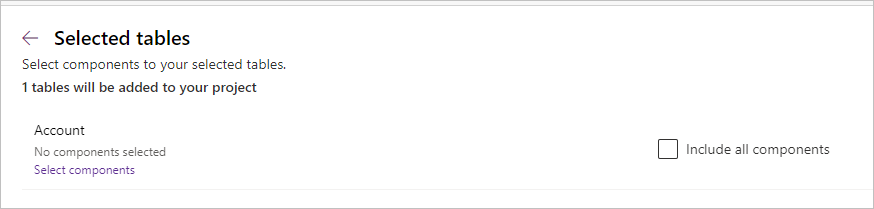
      That could have happened if you added one of the entities with the ‘Include all components’ option selected (99% of the time you should not do this).
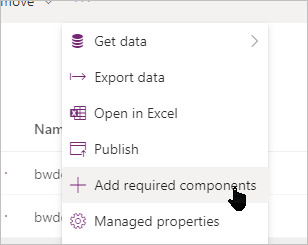
      Or you could have selected the ‘add required components’ option – which adds even more unnecessary stuff as it can add a bunch of tables you are not using in your solution.
      When building solutions like this, you should only add the components you need.


      So what are your options?
      If you are not using the Dynamics 365 Portals – Partner Pipeline solution, you could try removing that from your Dev environment – this will remove the dependencies from your solution.
      Alternatively, if the above sounds true, you could rebuild your solution and only add in the components you have customized or added.

      ——————————
      Donal McCarthy
      Digital Marketing Administrator
      BrightWork
      Galway
      ——————————
      ——————————————-

    DSC Communities replied 5 years, 2 months ago 1 Member · 0 Replies
  • 0 Replies

Sorry, there were no replies found.

The discussion ‘DYN365 Sales Hub solution can’t be imported because of missing dependency (MicrosoftPartnerPipeline (8.3.0.4))’ is closed to new replies.

Start of Discussion
0 of 0 replies June 2018
Now

Welcome to our new site!

Here you will find a wealth of information created for peopleĀ  that are on a mission to redefine business models with cloud techinologies, AI, automation, low code / no code applications, data, security & more to compete in the Acceleration Economy!
