


Power Platform
Public Group
Active a day ago
Power Platform
Organizer:
- JOSE Organized by
-
-

Collection missing a column
-
Collection missing a column
Posted by Unknown Member on August 7, 2020 at 7:10 pm-
I am having a problem with a collection that has been working fine for some months. Yesterday I needed to make a very simple change to the code that runs on startup. That code is unrelated to the new issue and fixed a completely different issue. However because I made a change and published it, I got a new version of Power Automate. Previously the Power Apps release version was 3.20053.24. On republish the release version moved to 3.20071.24. Was this version release a mistake? I can find no mention of it online. Now even if I revert to the previous version and my app says its back to 3.20053.24 (before I made yesterdays change) the new problem still persists. (Using a server in Central Canada.)
The problem is: On my browse screen when a record is selected, I reset a number of collections. The one I am concerned with is done as follows:
ClearCollect(colLevel, Filter(‘[dbo].[RAFormLevel]’, RAFormId = Value(FormIDValue.Text)));
This is fetching data from a table called RAFormLevel that is in Azure sql. This is a very small table with only 4 columns and less than 500 records altogether. I do limit the records returned by a foreighn key that is in one of these fields. I expect to get 5 records back.
I then navigate to the next screen. That is an edit screen. On clicking the save button I delete any records from the table that do not appear in the collection and add any new records that are in the table. I use the record ID that is came from the table and should be in the collection. If i look at what is in the collection when I arrive on the edit screen I see the 5 records I want – I see all 4 fields. Three of the fields show the data as it is in the sql table but the fourth column (which is a bigint and is the recordID) shows blank or has a value for the first record and nothing for the rest. See screenshot.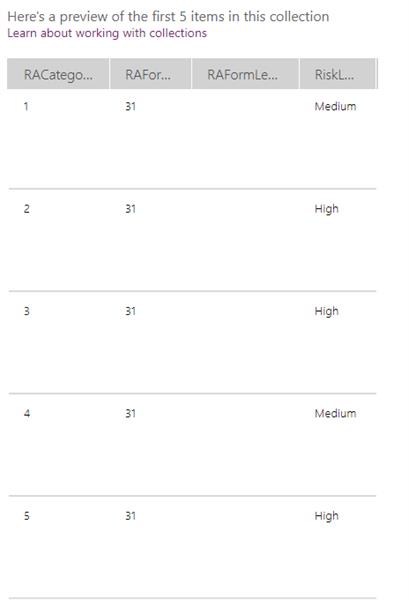
Three of the four columns are bigint so the data type is not the issue. The missing values are the primary key for the table. This is a problem because I say that any records in the table and not in the collection (By matching record IDs) should be deleted from the table. But because the records in the collection have record IDs which are blank I remove these records from sql table and I loose the data.
So bottom line – the collection is not being set up properly in the first place. I have tried putting a refresh before the clearcollect (Refresh(‘[dbo].[RAFormLevel]’); ).
Googling the problem I found a suggestion to add a condition for the column so I tried:
ClearCollect(colLevel, Filter(‘[dbo].[RAFormLevel]’, RAFormId = Value(FormIDValue.Text), RAFormLevelId > 0));I found another suggestion to call out the columns using ShowColumns which results in a final expression :
Refresh(‘[dbo].[RAFormLevel]’);
ClearCollect(colLevel,
ShowColumns(Filter(‘[dbo].[RAFormLevel]’, RAFormId = Value(FormIDValue.Text), RAFormLevelId > 0), “RAFormLevelId”, “RAFormId”, “RACategoryId”, “RiskLevel”)
);I have tried all possible combinations of these suggestion and have had no luck. To make matters worse, every now and again that column is not empty – the records come through as expected or the first one is correct and the other 4 are blank.
I tried creating a brand new app just to create and display the collection, using these same commands and the same connection – it works as expected.
Recreating the main app from scratch is not really an option – it would take far too long. It was months of work in the first place.
Any advice would be greatly appreciated.
——————————
Michelle Dyason
Canada
—————————— -

Mark Pearson
MemberAugust 10, 2020 at 2:29 AM
When working with SQL (which is rare for me), I found many strange things, paticulary with Galleries. That said I found UI need toi remove the connected table and reinsert it fixed a few of the issues——————————
Mark Pearson
National Operations Manager
61409321547
——————————
——————————————- -
Hi Mark
Thanks for coming back to me. I actually tried that a few hours ago and it does seem to have been the isuue. But in the meantime I coded around the problem. But essentially I think you are correct. What really has me puzzled though, is that I made the same minor change in both dev and production systems. That change was unrelated to any sql connection and in both systems the same table connection went wonky (out of a possible 30 or so connections). Different Power App environments and different sql servers. Very weird.
I dismantled so much of this app and changed collection names and so on – I am now trying to get it all back together again.
Thank You
——————————
Michelle Dyason
Canada
——————————
——————————————- -
Warren Belz
MemberAugust 10, 2020 at 4:27 AM
Hi Michele,
Your code is pretty simple and as you have said should return the required records. As the command works on a new app, there is nothing to debug there.
Have you tried disconnecting the data source and re-connecting it. Also you might try exporting and re-importing as another user as this re-creates the connection.——————————
Warren Belz
Queensland Australia
——————————
——————————————- -
Hi Warren.
That is essentially what I did. Eventually I deleted all sql connections and put them back then exported from dev to prod and dropped and replaced them all there too.
It seems to be OK now.
Thanks for looking
——————————
Michelle Dyason
Canada
——————————
——————————————-
Unknown Member replied 5 years, 8 months ago 1 Member · 0 Replies -
-
0 Replies
Sorry, there were no replies found.
The discussion ‘Collection missing a column’ is closed to new replies.
