


Power Platform
Public Group
Active 22 hours ago
Power Platform
Organizer:
- JOSE Organized by
-
-

Can’t determine relationship between two or more fields
-
Can’t determine relationship between two or more fields
Posted by DSC Communities on August 25, 2022 at 12:11 am-

Windy Tech
MemberAugust 25, 2022 at 12:11 AM
Hi there,
I got a data model which looks as follows: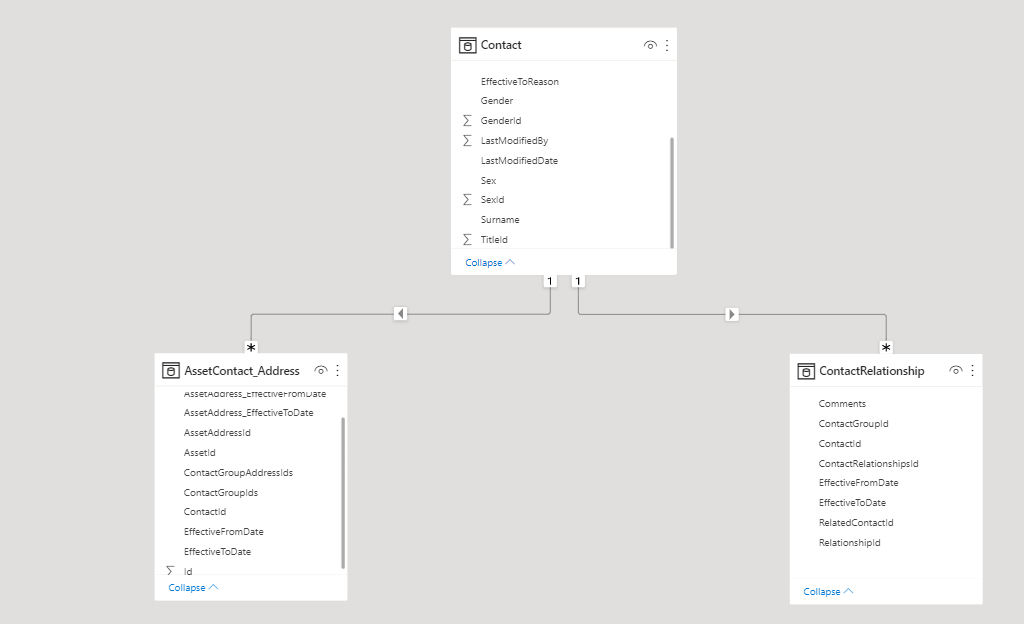
I am trying to show columns from different tables in a table visual. Table visual works fine when I use columns from contact and AssetContact_Address tables. However, it throw an error ‘cant determine the relationship between two or more fields’ when I tried to put a column (any column) from the ContactRelationship table. I checked and there is no missing value in any table. I also changed the cross filter option from Single to both but did not work. Any help would be really appreciated.Sample here.
——————————
Windy Tech
Analyst
—————————— -
Rd 3nidad
MemberAugust 25, 2022 at 4:16 AM
Hi,I think the problem is Power BI cannot determined or establish connection between the other 2 tables although both are connected to table “Contract”. Try to create an aggregate formula in any of the other 2 tables e.g. count (contractRelationship[ContactId]), then include it to your table.
Thanks.
RD——————————
Ardie Trinidad
Senior Finance Analyst
——————————
——————————————- -
RD is correct. The relationships are both one to many. The table visual can’t deal with that. Change it to a matrix and it will stop throwing errors. Any displayed data will need to use either an aggregate or measure that that returns a single value.
——————————
Rick Gosden
Systems Analyst
[
——————————
——————————————- -
Kaz Shakir
MemberAugust 27, 2022 at 6:39 PM
,
I think it would be easier to understand the issue if you take a look at a smaller portion of the data. For example, let’s take a look at ContactId = 1620 from the Contact table. That item has 2 rows associated with it in the AssetContact_Address table, and it has 4 rows? associated with it in the ContactRelationship table (see image below).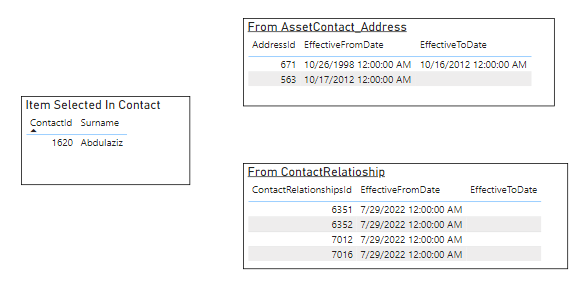
If I ask Power BI, what information is in the AssetContact_Address table for my contact, then Power BI can answer that question with this sort of table, where it shows me the two rows from AssetContact_Address table and just duplicates the information from the Contact table for each of those rows. That’s logical, and easy to understand: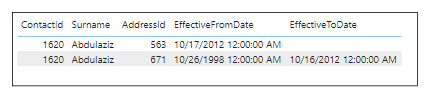 And the same would be true if I ask Power BI, what information is in the ContactRelationship table for my contact, I would get this, which is also logical: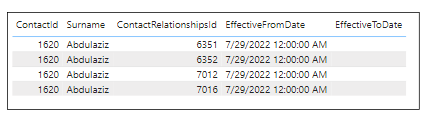
Now, if I ask Power BI, what information is in both the AssetContact_Address table and the ContactRelationship table, for my contact, and show it to me in just one table, then it’s pretty confusing. Power BI is wondering how can I show the information from both of those tables on the same rows? Is the user looking for something like this: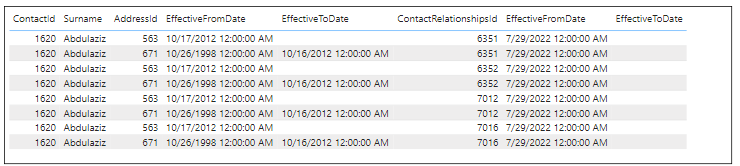
That would give you all of the data you want, but it’s pretty confusing. Instead of the two rows from AssetContact_Address or the four rows from ContactRelationship, now you have 8 rows – basically it multiplied the rows together. For this small example, that’s not a big deal, but you can see that for the larger data, that would get to be a lot of unnecessary duplication, and produce a table that’s very hard to figure out. By the way, if you are wondering what I did to create that table, I changed the relationships in the data model, so that it looks like this instead: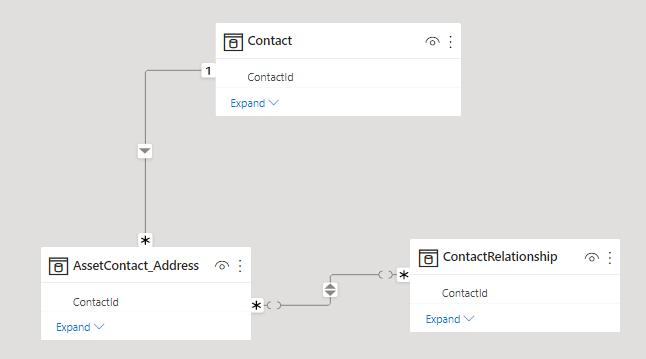
Let me be clear, I only did that for the exercise. This type of model is a really bad idea, and will be hard to manage going forward.What you need to ask yourself is what exactly are you trying to communicate with your table visual in Power BI? And take an example, like that one contact that I picked, and decide what information would you want to display for that one contact, and how do you want it to look? If you can lay out that kind of an example, I think it will make it easier to figure out how to achieve that result.
I hope that helps.
Kaz.
——————————
Kaz Shakir
Sr. Program Manager, Asset Planning
TN
——————————
——————————————- -
Windy Tech
MemberAugust 28, 2022 at 9:56 PM
Thanks a lot. Much appreciated for your detailed reply Kaz Shakir?——————————
Windy Tech
Analyst
——————————
——————————————-
DSC Communities replied 3 years, 8 months ago 1 Member · 0 Replies -
-
0 Replies
Sorry, there were no replies found.
The discussion ‘Can’t determine relationship between two or more fields’ is closed to new replies.
