


Dynamics GP
Public Group
Active 3 days ago
Dynamics GP
Organizer:
- JOSE Organized by
-
-

GP2016 – SOP Blank Invoice Template – Logo
-
GP2016 – SOP Blank Invoice Template – Logo
Posted by DSC Communities on April 27, 2017 at 2:07 pm-

Jennifer Peterson
MemberApril 27, 2017 at 2:07 PM
I have revised the SOP Blank Invoice Template to be (mostly) what I want. I am having an issue with adding the logo. I have tried adding the logo to the actual Word template, but it won’t show. I have also tried adding it under Reports – Template Configuration Manager under Images, but them the invoice text doesn’t print AND the logo isn’t on there.We are running 2016R2. Does anyone have any ideas?
Much appreciated!
——————————
Jennifer Peterson
Muscatine Power & Water
Muscatine IA
—————————— -
Silver Subie
MemberApril 27, 2017 at 2:51 PM
You might need to do step 5. Please read the whole post as well.How to resize logo in Microsoft Dynamics GP Word Templates
The Dynamics GP Blogster remove preview 
How to resize logo in Microsoft Dynamics GP Word Templates Getting used to the new Word Templates functionality can be a bit challenging at times. One of those challenges came in the form or a simple question: “How to resize the logo on the template?”. One thing to keep in mind is that most objects on a Microsoft Dynamics GP Word Template document live inside… View this on The Dynamics GP Blogster > ——————————————-
-
Jennifer Peterson
MemberApril 28, 2017 at 11:13 AM
Thanks! I got it!——————————
Jennifer Peterson
Muscatine Power & Water
Muscatine IA
——————————
——————————————- -
Diane Hays, CPA, MBA
MemberApril 28, 2017 at 8:40 AM
Jennifer,
I removed the “Logo” field from the header on the Word template and copied and pasted my jpeg file right on the header and then it showed up.
Thanks,
Diane M. Hays
Business Systems Analyst/Developer
715-552-4454 X1136 (Work) | http://www.mydynamicfitness.com | 715-559-1292 (Cell)



——Original Message——
I have revised the SOP Blank Invoice Template to be (mostly) what I want. I am having an issue with adding the logo. I have tried adding the logo to the actual Word template, but it won’t show. I have also tried adding it under Reports – Template Configuration Manager under Images, but them the invoice text doesn’t print AND the logo isn’t on there.
We are running 2016R2. Does anyone have any ideas?
Much appreciated!
——————————
Jennifer Peterson
Muscatine Power & Water
Muscatine IA
—————————— -
Just be aware that setting the logo directly in the template means that it will no longer be dynamics depending on the GP company you are logged into.
David
——————————
David Musgrave MVP, GPUG All-StarManaging Director
Winthrop Development ConsultantsPerth, Western Australia
http://www.winthropdc.com
——————————
——————————————- -
Gina Hoener
MemberJune 8, 2017 at 5:53 PM
What does one do if they accidentally delete the ‘company logo’ field? How do you get it back? Please don’t say to start over since I just spent hours modifying the PO!——————————
Gina Hoener
Summit Group Software——————————
——————————————- -
Rob Wagner
MemberOctober 31, 2017 at 9:14 AM
The company logo is controlled by special content control. In the case where you deleted, simply copy it from any of the default report templates back into the one from which it had been deleted.When the template processing takes place, a content control with this title and tag will be replaced by the logo for your current GP company.
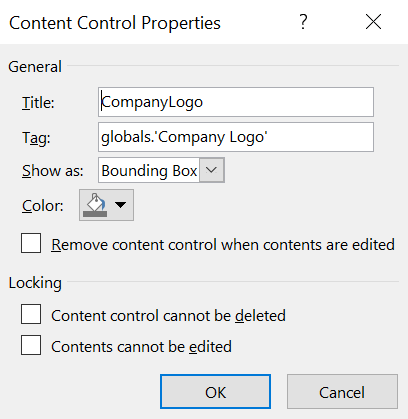
Let me know if you have any questions on word template processing. I’d be happy to help anyone get these up and running.Thanks,
——————————
Rob Wagner
Implementation Specialists (IS)
Hawley MN
——————————
——————————————- -
Emmaline Hawn
MemberOctober 28, 2017 at 10:43 AM
Hi,
I am Emmaline. I guess I’d like to bounce some ideas around and get guidance from experts here. Looking forward to it!Thanks.
——————————
Emmaline Hawn
Innovative Tech Ltd.
——————————
——————————————-
DSC Communities replied 9 years, 1 month ago 1 Member · 0 Replies -
-
0 Replies
Sorry, there were no replies found.
The discussion ‘GP2016 – SOP Blank Invoice Template – Logo’ is closed to new replies.
