


Dynamics GP
Public Group
Active 2 days ago
Dynamics GP
Organizer:
- JOSE Organized by
-
-

Fixed Assets – Disposal and Account for Trade-In
-
Fixed Assets – Disposal and Account for Trade-In
Posted by Tammy Harper on January 14, 2020 at 9:24 am-
I need to dispose of an asset that was fully depreciated and was traded in on a new vehicle. Any idea how to account for this?
Then the amount of the new vehicle needs to show as $6,000.00 more than the final invoice amount. The amount I will be pulling over from the clearing account to set up the new asset is not the amount I need to use. How can I add that trade-in amount back in?
Thanks.
——————————
Tammy Harper
Charlotte County Airport
PUNTA GORDA FL
—————————— -
Hi
In Financial>Transactions>Fixed Assets>Retire, simply retire the asset that was traded in and use the “Non Cash” Proceeds to record the trade-in Value you received. This will NOT add cost to the new Asset, though and will record as a Proceed during the retirement process.?
The retirement will use these accounts (depending on other settings)
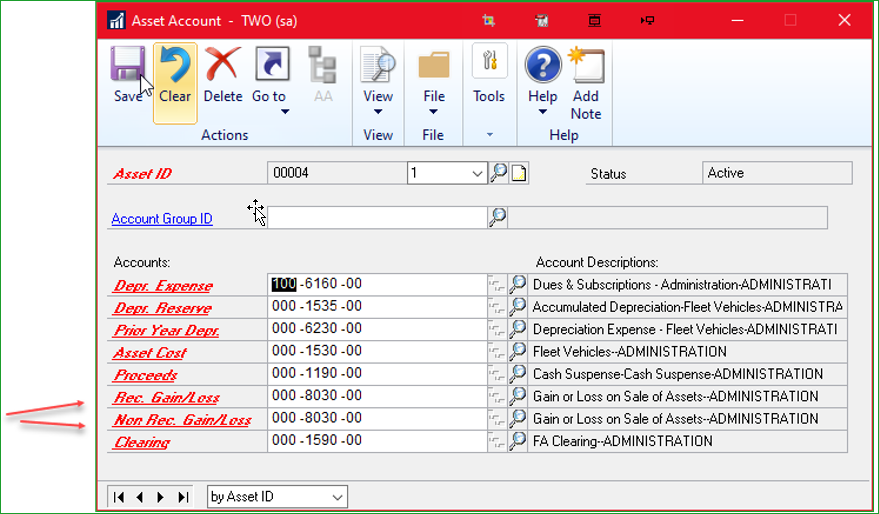
You can then add the new asset as usual but open up the blue arrow next to “Acquisition Cost” and make a note of the additional 6k Like This: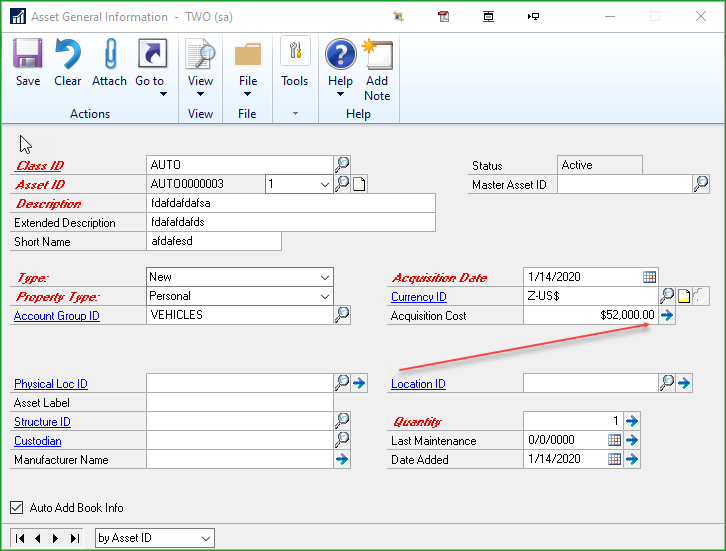
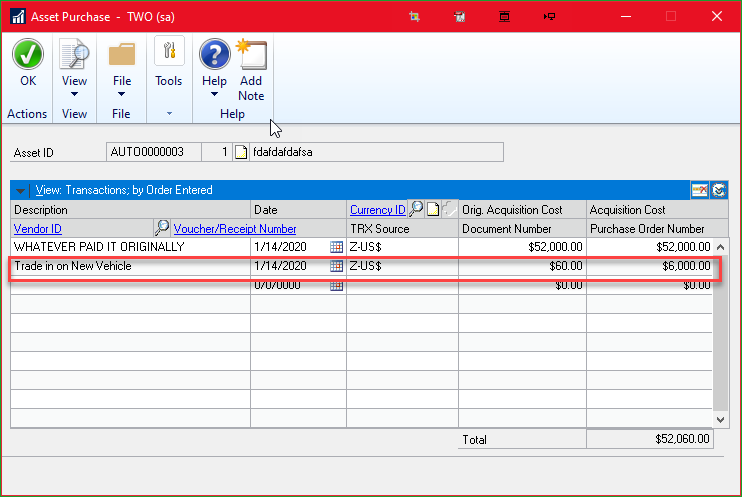
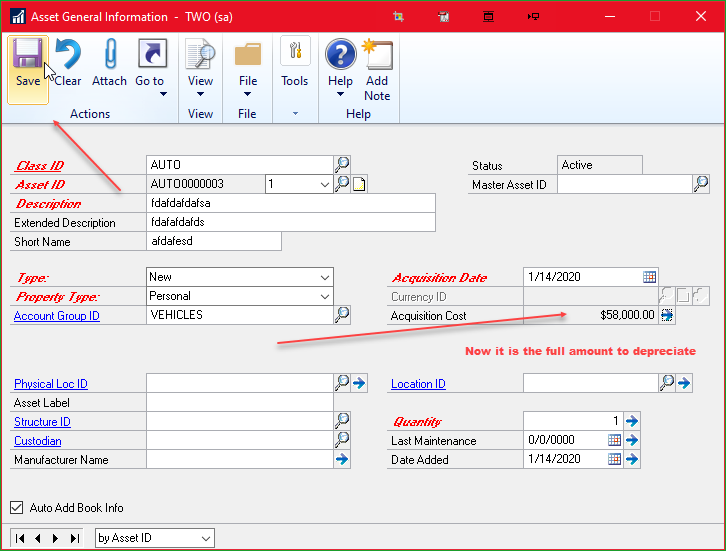
In the Book Setup it is now right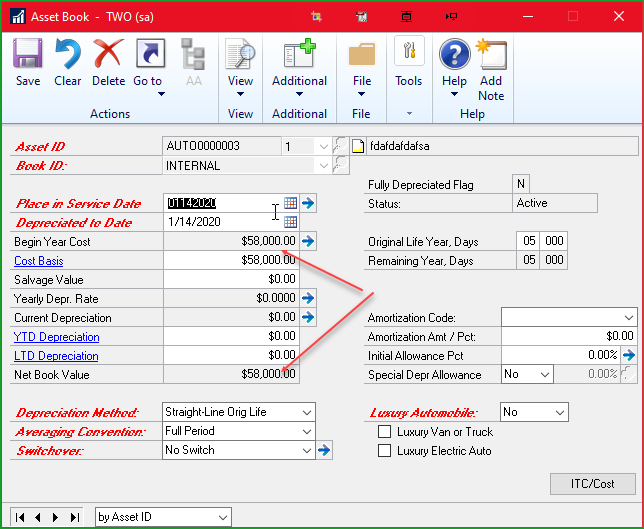
Now simply reclass the gain/loss to the Asset Cost Account used by the New Asset and you have a good audit trail code of what happened.
——————————

——————————
——————————————- -
Thank you!
Tammy Harper | Fixed Assets/Accounting Coordinator

Punta Gorda Airport (PGD)
28000 A-1 Airport Road
Punta Gorda, FL 33982
Office: 941.639.1101 ext:
Email: tharper@flypgd.comNOTICE: This communication may contain confidential and privileged information that is for the sole use of the intended recipient. Any viewing, copying or distribution of, or reliance on this message by unintended recipients is strictly prohibited. If you have received this message in error, please notify me immediately by phone, fax or e-mail.
——Original Message——
Hi
In Financial>Transactions>Fixed Assets>Retire, simply retire the asset that was traded in and use the “Non Cash” Proceeds to record the trade-in Value you received. This will NOT add cost to the new Asset, though and will record as a Proceed during the retirement process.?
The retirement will use these accounts (depending on other settings)
You can then add the new asset as usual but open up the blue arrow next to “Acquisition Cost” and make a note of the additional 6k Like This:
In the Book Setup it is now rightNow simply reclass the gain/loss to the Asset Cost Account used by the New Asset and you have a good audit trail code of what happened.
——————————
—————————— -
Thank you so much for the help with this. I have retired the vehicle which was used for the trade-in and I have the new vehicle set up with the trade-in value. My problem now is my accumulated depreciation is overstated by the amount of the vehicle that was retired. Do you have any idea how to fix this? The depreciation amount is fine, it is just accumulated depreciation that is off.
Thank you.
Tammy Harper | Fixed Assets/Accounting Coordinator

Punta Gorda Airport (PGD)
28000 A-1 Airport Road
Punta Gorda, FL 33982
Office: 941.639.1101 ext:
Email: tharper@flypgd.comNOTICE: This communication may contain confidential and privileged information that is for the sole use of the intended recipient. Any viewing, copying or distribution of, or reliance on this message by unintended recipients is strictly prohibited. If you have received this message in error, please notify me immediately by phone, fax or e-mail.
——Original Message——
Hi
In Financial>Transactions>Fixed Assets>Retire, simply retire the asset that was traded in and use the “Non Cash” Proceeds to record the trade-in Value you received. This will NOT add cost to the new Asset, though and will record as a Proceed during the retirement process.?
The retirement will use these accounts (depending on other settings)
You can then add the new asset as usual but open up the blue arrow next to “Acquisition Cost” and make a note of the additional 6k Like This:
In the Book Setup it is now rightNow simply reclass the gain/loss to the Asset Cost Account used by the New Asset and you have a good audit trail code of what happened.
——————————
—————————— -
Unsure why that would happen unless you had an unusual Averaging Convention on that asset. Its particularly odd that depreciation is fine but Accum is not. Can you provide any more details on it or have you popped open the account to see how it got hit?
Could it be the new asset causing it?
——————————
——————————
——————————————-
Tammy Harper replied 6 years, 8 months ago 1 Member · 0 Replies -
-
0 Replies

Sorry, there were no replies found.
The discussion ‘Fixed Assets – Disposal and Account for Trade-In’ is closed to new replies.
