


Dynamics F/SCM
Public Group
Active a week ago
Dynamics F/SCM
Organizer:
- JOSE Organized by
-
-

Which license for which user
-
Which license for which user
Posted by DSC Communities on September 6, 2022 at 3:30 am-

Alexandra Cadet
MemberSeptember 6, 2022 at 3:30 AM
Hello,We’re trying to grant the right license to each user and it seems incredibly complicated.
What I’m after is:
-for each user, which license to grant (activity, team, base license, attached license)
-in a format I can easily use (not a PDF, but a txt or csv file)Neither “finance and operation user count report” nor “license count estimator” fit this requirement (I have to scroll through each role per user in one, and if it includes operation, then look in the other one – and this is all manual as I don’t get them in a useful format).
Do you know of a solution?
Else, how do you manage that?Thanks for your help, dear D365FO community!
——————————
Alexandra Cadet
Camfil
—————————— -
Alexandra,
I have an entire series of blog posts on D365FO licensing and show how you can get to this data manually as well as an automated solution that I am the lead developer on that will do all of the license processing for you, feel free to take a look and reach out with any questions you might have: https://alexdmeyer.com/2021/01/25/current-state-of-d365fo-user-licensing/
——————————
Alex Meyer
Director of Microsoft Software Development
Fastpath
Des Moines, IA
——————————
——————————————- -
Alexandra Cadet
MemberSeptember 14, 2022 at 3:21 AM
Many thanks Alex!Your blog post is very clear – but I’m still after a way to extract base / attached / team / activity per user in CSV or Text format. I didn’t find how to. Did I miss that part or is it missing in the solution.
Are you refering to an ISV solution providing an automated solution, or…?
——————————
Alexandra Cadet
Camfil
——————————
——————————————- -
Alexandra,
The only way natively to get a report like this is to go through a process like you laid out in your initial question, use a combination of both the User License Count and User License Estimator reports and keep a count of which licenses each user should be assigned. This is obviously a very manual process and leaves out the detail information about why a particular user requires that license.
If you want a solution to help with that here are examples of the reports available in the Fastpath solution that I created. The first report is an overview report to show the licenses types and SKUs required for a user:
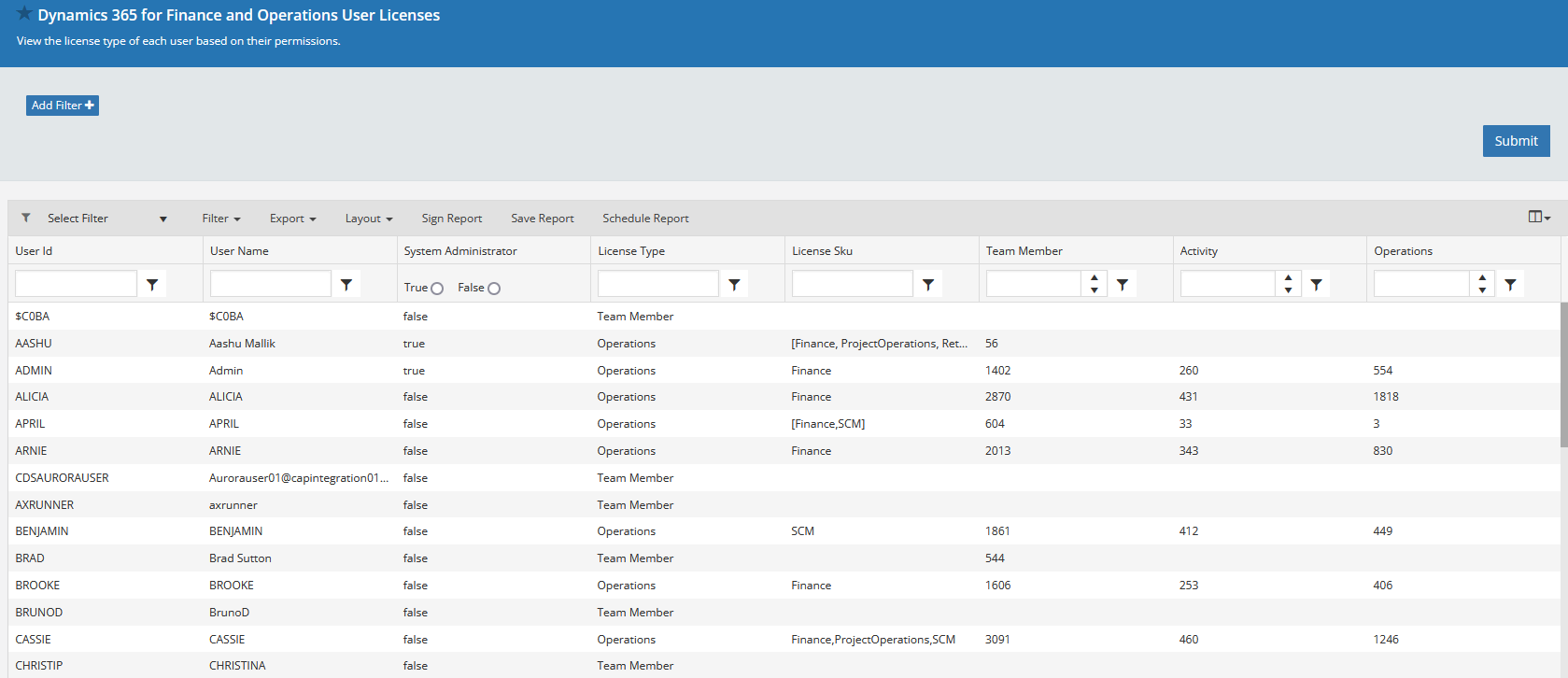
And the second is a detailed report that shows why these users are requiring that license (which access assigned to the user is requiring that license):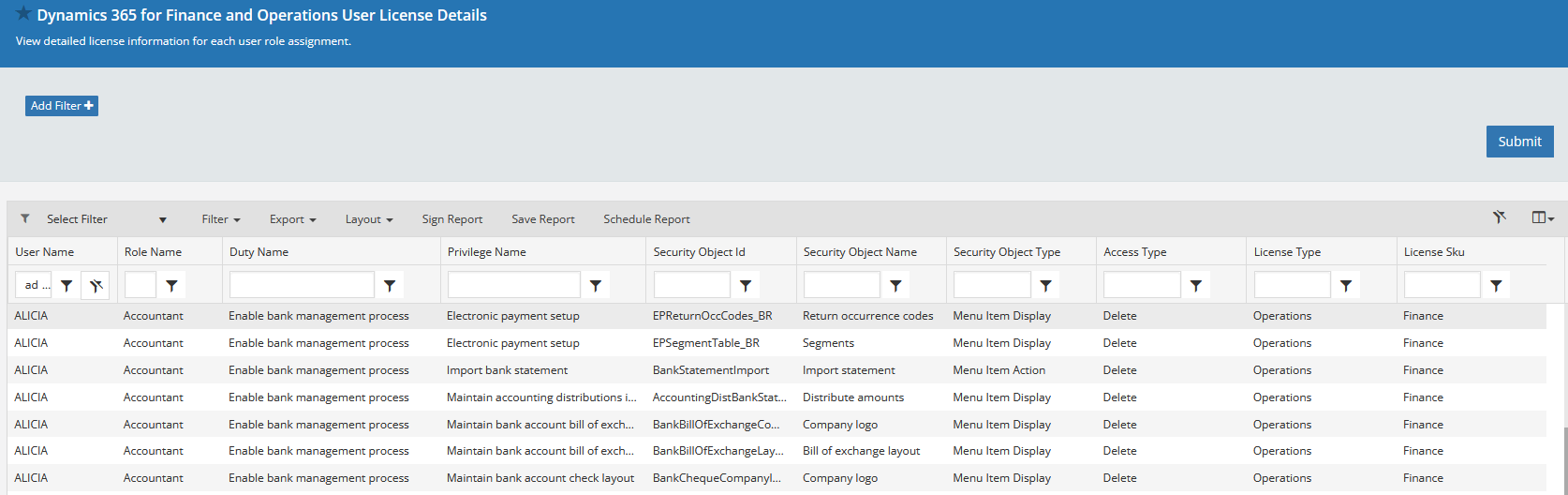
And these reports can be exported to Excel, PDF, and CSV formats. Feel free to reach out with any questions about these.——————————
Alex Meyer
Director of Microsoft Software Development
Fastpath
Des Moines, IA
——————————
——————————————- -
Alexandra Cadet
MemberSeptember 14, 2022 at 7:52 AM
Many thanks, that’s a spot on answer. Although I’m quite disapointed that there is no out of the box solution, I’m grateful for the info.I might come back to you and Fastpath indeed.
——————————
Alexandra Cadet
Camfil
——————————
——————————————-
DSC Communities replied 3 years, 9 months ago 1 Member · 0 Replies -
-
0 Replies
Sorry, there were no replies found.
The discussion ‘Which license for which user’ is closed to new replies.
