


Dynamics F/SCM
Public Group
Active 3 days ago
Dynamics F/SCM
Organizer:
- JOSE Organized by
-
-

Security around data management workspace
-
Security around data management workspace
Posted by DSC Communities on December 3, 2019 at 6:17 pm-

Calvin Eddings
MemberDecember 3, 2019 at 6:17 PM
Hello
I have couple questions regarding security, data management workspace and data entities.
My organization has gone live on F&O recently and I have helped manage security access and problem solve in that area. There has been need for data uploads using the data management workspace. There are three roles that I am aware of for giving access to the data management workspace (short of just granting ‘system administrator’).Data management administrator – has 5 duties
Data management migration user – has 40+ duties
Data management operation user – has 2 duties1) I was wondering if anyone has advice on appropriate use of these out of box roles?
2) Data upload discussions seem to center around data entities – like there is a specific data entity involved with a specific data upload. How do these out of box roles interact with data entities? Do these different roles grant you access to some or all data entities? Should we look to configure custom roles for data upload if a user only needs a single data upload?
Thanks!
Calvin#Security
#DataManagement
#FinanceandOperations???
——————————
Calvin Eddings
The Church of Jesus Christ of Latter-Day Saints
Salt Lake City UT
—————————— -
Beth Zapadka
MemberDecember 3, 2019 at 7:08 PM
Hi Calvin,
I can’t answer the first question as we don’t use those.We grant access to users requiring journal upload via data management by first creating an Import Project (create one by uploading a sample file of the type they will be uploading). Then we assign that specific import project to an existent role via the Data Management tile named “Set up roles for data projects”.
Eg. We granted Import Project “AP Journal Import” to existent custom role “GLE AP Clerk”. (All our roles are custom – we copied the out-of-the box ones and amended them to fit our needs.)
Hope that helps.
——————————
Beth Zapadka
ERP Functional Expert
Glentel Inc.
——————————
——————————————- -
Calvin,
The roles you mention give you different access to the Data Management workspace but not to the individual data entities themselves, access to import/export data in this area is controlled by security to specific data entities (for example, to import/export Vendors you would use the VendorsV2 data entity).
Here are some additional docs to help:
Securing the Open in Microsoft Office Button in D365FO – will help determine which data entity is used on a particular page
——————————
Alex Meyer
Director of Dynamics AX/365 for Finance & Operations Development
Fastpath
Des Moines, IA
——————————
——————————————- -
Hi Calvin,
If you want to grant access to the data management workspace to normal users to import or export some entities, the best you can do is assigning the Data Management Operations User. Then you can also apply data project security like described in my blog: https://dynamicspedia.com/2019/10/what-are-the-options-for-securing-data-projects/
The data management operations administrator is also allowed to make changes in setup and security whereas the “user” role only can create and run data projects.
The migration user has also access to a lot of data entities to be able to import master, reference data and opening balances.Out of the box entities are usually in separate privileges and duties compared to access to the forms. The standard roles also have the entities assigned. If you create custom roles, you might forget the entity related duties/privileges.
——————————
kind regards,André Arnaud de Calavon
Solution Architect, Microsoft MVP – Microsoft Dynamics Business Solutions
——————————
——————————————- -
Calvin Eddings
MemberDecember 6, 2019 at 1:24 PM
Thank you for your detail response Andre, as well as Alex and Beth. All responses appear to be very on point and helpful. I feel much better informed and ready with some details and tools to tackle an approach with out IT group, which I plan to do next week.——————————
Calvin Eddings
The Church of Jesus Christ of Latter-Day Saints
Salt Lake City UT
——————————
——————————————- -
Calvin Eddings
MemberDecember 17, 2019 at 4:18 PM
I wanted to add a follow up post – I was able to implement and test. For my situation, one of the key learning resources was this link provided by Alex:One detail eluded me at first – since I had not worked with security below the privilege level before – to add the data entity to a new privilege, create/open the privilege, then click on ‘entity’ and then click add reference, just like you would when adding duty to role, privilege to duty. And of course you have to identify the proper data entity names before you can add them to a privilege.
I was not successful with Beth’s advice on using the tile in the Data management workspace called “Set up roles for data projects”. However, I can see how it is supposed to work – I think I was missing a step. It looks quite useful, and probably faster than creating custom roles. I couldn’t find a step by step on that however and couldn’t make it work.
——————————
Calvin Eddings
The Church of Jesus Christ of Latter-Day Saints
Salt Lake City UT
——————————
——————————————- -
Kerstin Newman
MemberDecember 18, 2019 at 7:48 AM
Hi Calvin,I actually tested this too because we have a use case for it. I found that I had to be IN the specific project I was trying to assign a user/role to, and then go to Applicable roles at the top of the screen. It defaults the project name there and you can select if you want to give permissions for that project to a role or to a specific user only.
Our use case: Our inventory accountant has inventory adjustment journals to post on a semi-regular basis, and instead of me (sys admin) uploading them through the DMF, I gave her role the “View data import export tasks” privilege and added her specific user to the upload project we’ve been using. She now has access to ONLY that data import project and sees nothing else in the data management workspace.
——————————
Kerstin Newman
Business Analyst
StarTech.com
London ON
——————————
——————————————- -
Aybike Turk
MemberOctober 29, 2020 at 2:53 PM
Hi Kerstin,I followed your suggestion, but that didn’t allow the user to add a new file with the updated data to the project. How can I make it so that she can upload her updated file and import that specific entity -but no other entity?
——————————
Aybike Turk
National Vision, Inc
Duluth GA
——————————
——————————————- -
Kirk Anger
MemberNovember 3, 2020 at 1:14 PM
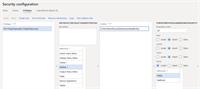
Hi Aybike,I’m a colleague of Kerstin’s and have worked on this a bit myself as well. You likely have to grant access to the specific data entity (or entities) involved in the data project as well. Even though the user may have access to the modules in the user interface that interact with these data entities, they don’t always have direct DMF access to them.
We’ve found several cases where we had to grant access in security to the data entity to enable the user to add files and import.
e.g.
——————————
Kirk Anger
StarTech.com
London ON
——————————
——————————————-
DSC Communities replied 6 years, 5 months ago 1 Member · 0 Replies -
-
0 Replies
Sorry, there were no replies found.
The discussion ‘Security around data management workspace’ is closed to new replies.
