


Dynamics F/SCM
Public Group
Active 5 days ago
Dynamics F/SCM
Organizer:
- JOSE Organized by
-
-

PO will not go into ‘Invoiced’ status
-
PO will not go into ‘Invoiced’ status
Posted by DSC Communities on February 13, 2017 at 11:14 am-

Archive User
MemberFebruary 13, 2017 at 11:14 AM
I have several instances where a PO is fully received and matched to invoices, yet the PO status remains ‘Open.’ There are no pending invoices and everything appears to have been posted. Any ideas what might cause this?
Thanks much!——————————
Marcia Michalik
Winnebago Industries
Eden Prairie MN
—————————— -
Frank Hüther
MemberFebruary 15, 2017 at 4:30 AM
There is a fix (KB3004866 The original purchase order (PO) status was not changed to “Invoiced” after deleting a pending invoice) that tries to solve an issue regarding the status not set correctly, when there are pending invoices, but the whole quantity is already invoiced. Unfortunately the fix only allows the status to be set, when the invoiced quantity matches the ordered quantity. So if you have over or under delivery in your purchase order, that check will fail, even if all lines are fully invoiced and there is no delivery remainder.
Thus if you have that fix installed, and you are dealing with over or under delivery, maybe that could be the reason for your issue.
A solution would be either to remove the fix or change the PurchLineType setPurchStatus method in line 13 fromif (_requestedStatus == PurchStatus::Invoiced && _purchLine.invoicedInTotal() == _purchLine.PurchQty)
toif (_requestedStatus == PurchStatus::Invoiced && _purchLine.RemainPurchPhysical == 0 && _purchLine.RemainPurchFinancial == 0)——————————
Frank Hüther
SYCOR GROUP
Goettingen
——————————
——————————————- -
Courtney Lazzari
MemberFebruary 14, 2017 at 8:29 AM
Did you check the delivery remainder?. You mentioned that it appears to be fully received, but an open status is indicative that there is an open quantity to receive (delivery remainder) on at least one of the lines.——————————
Courtney Blumling
Global Finance and Project Manager
TMS International, LLC
Glassport PA
——————————
——————————————- -
Archive User
MemberFebruary 14, 2017 at 10:02 AM
All of the lines show as being fully received and fully invoiced. There are no open/remaining receipts or uninvoiced quantities.——————————
Marcia Michalik
Winnebago Industries
Eden Prairie MN
——————————
——————————————- -
Archive User
MemberFebruary 14, 2017 at 10:18 AM
Couple quick ‘n’ easy things to try might be a consistency check and/or adding a new line and subsequently deleting it. That should trigger the status check again.——————————
Jessie Swartz
Wipfli
——————————
——————————————- -
Archive User
MemberFebruary 14, 2017 at 10:20 AM
Ah, wait. When I re-read your post you weren’t asking how to fix it but rather WHY it happens. That’s a much tougher question. I’ve had similar situations in PO’s, SO’s, etc. and any Microsoft cases I’ve opened haven’t revealed a smoking gun. Sorry I can’t explain this one.——————————
Jessie Swartz
Wipfli
——————————
——————————————- -
Grace Gillenwater
MemberFebruary 14, 2017 at 10:29 AM
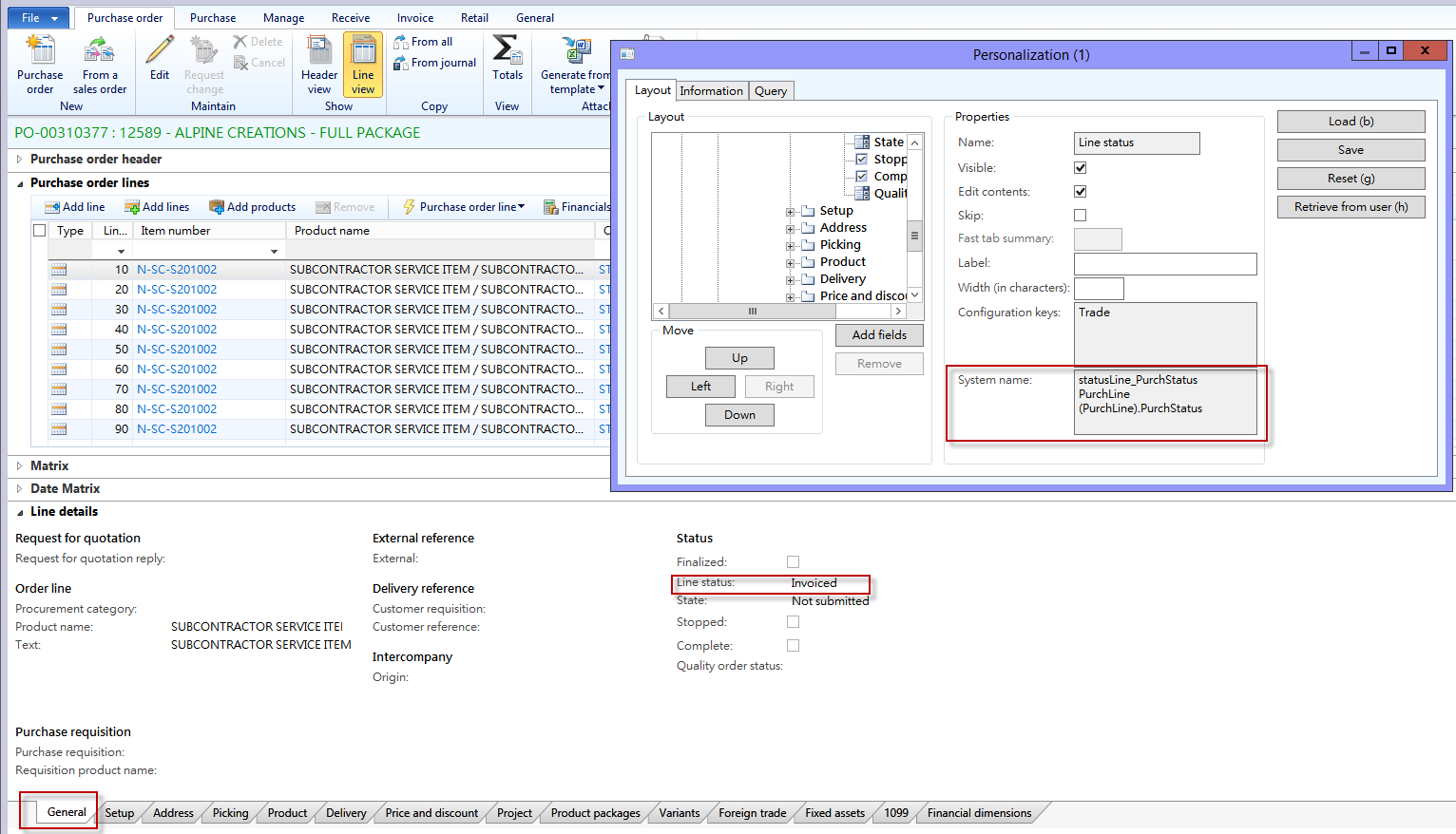 Hi Marcia. I have this same problem with my PO’s. My IT Dept. has written a script to change the status from Open Order (or Received) to Invoiced. What needs to happen is the Line Status (under the Line Details – General Tab) needs to reflect INVOICED. If the status is anything other than INVOICED, the script will have to be run.
Here is what my IT guys said to do: The SQL Statement needs to update the PurchStatus to a 3 (which equals invoiced). This script has to be run on the PurchLine (which is under the General Tab of the Line Details); and must be run on the PurchTable at the Header level. Both statuses need to be changed to a 3.
Hope this helps!——————————
Grace Gillenwater
Accounting Clerk
Landau Uniforms
Olive Branch MS
——————————
——————————————- -
Grace Gillenwater
MemberFebruary 14, 2017 at 12:39 PM
Marcia,
We have not been able to determine why this is happening. I remember our VAR opened a ticket with Microsoft about this issue, but I never heard back as to the “why.” Only how to correct the issue.
I know several of the PO’s this was happening on came from our conversion from AX4.0 to AX2012. However, I am now seeing this issue on current PO’s. It is really weird; and I don’t like unexplained happenings!
——————————
Grace Gillenwater
Accounting Clerk
Landau Uniforms
Olive Branch MS
——————————
——————————————- -
Jennifer Wilkins
MemberFebruary 15, 2017 at 9:12 AM
You also state its fully received, but are the receipts posted? This could be another area to check.——————————
Jennifer Wilkins
Aftermarket Operations Supervisor
Nidec Motor Corporation
St Louis MO
——————————
——————————————-
DSC Communities replied 9 years, 4 months ago 1 Member · 0 Replies -
-
0 Replies
Sorry, there were no replies found.
The discussion ‘PO will not go into ‘Invoiced’ status’ is closed to new replies.
