


Dynamics F/SCM
Public Group
Active 3 days ago
Dynamics F/SCM
Organizer:
- JOSE Organized by
-
-

Negative inventory unable to fix, need to update the item model group
-
Negative inventory unable to fix, need to update the item model group
Posted by Unknown Member on July 7, 2020 at 8:03 am-
Hi,
I have been trying to fix the negative inventory on an item as I need to change the item model group and I get an error message.Error:
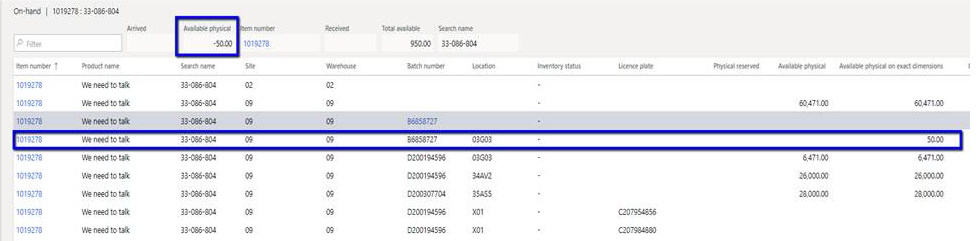
The current combination of inventory dimension group CNTRACTSTK for item 1029278 effects a negative physical on-hand quantity of -50.00 for the dimensions Site=09, Warehouse=09, inventory status=.,Batch number = B6858727. Select a different configuration, or change the on hand quantity.I have tried to do an inventory adjustment but without any success, when I try to remove it, there system says there no inventory.is there a way to reset it? make it 0?
——————————
Pascale Bouchard
DATA Communications Management Corp
Brampton ON
—————————— -

Genie Engels
MemberJuly 8, 2020 at 9:13 AM
Good Day PascaleCould you share the set up of your storage dimension group please and the item model group? Thank you!
——————————
Genie Engels
ERP Manager
AXUG All Star
Rubicon Oilfield Intl.
Houston
——————————
——————————————- -
Hi Genie,
below is the setting for the storage dimension group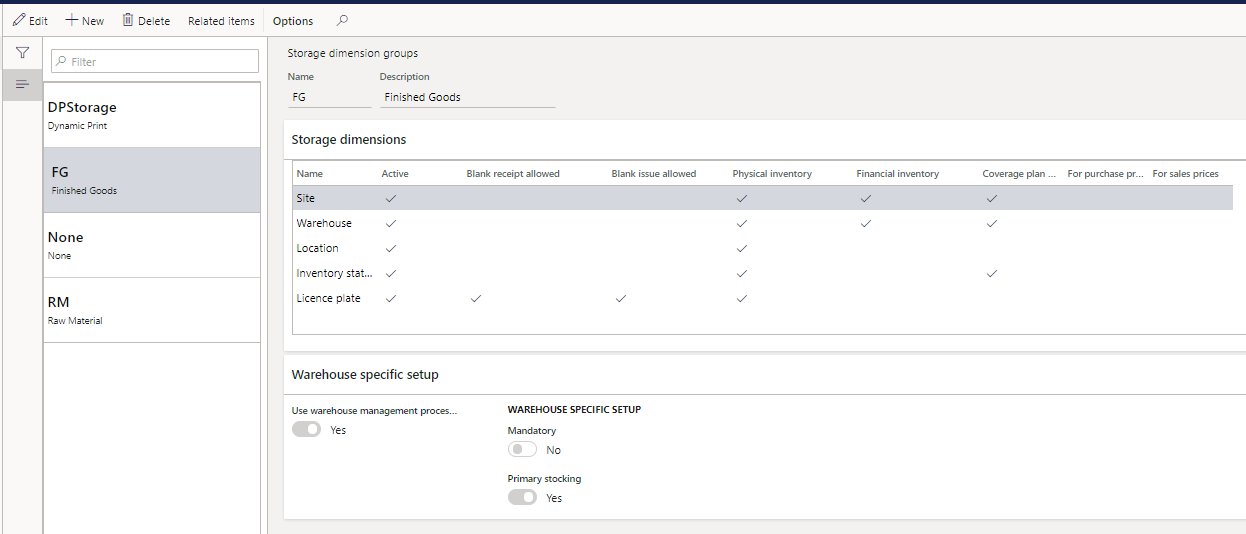
The current item model group is stocked.
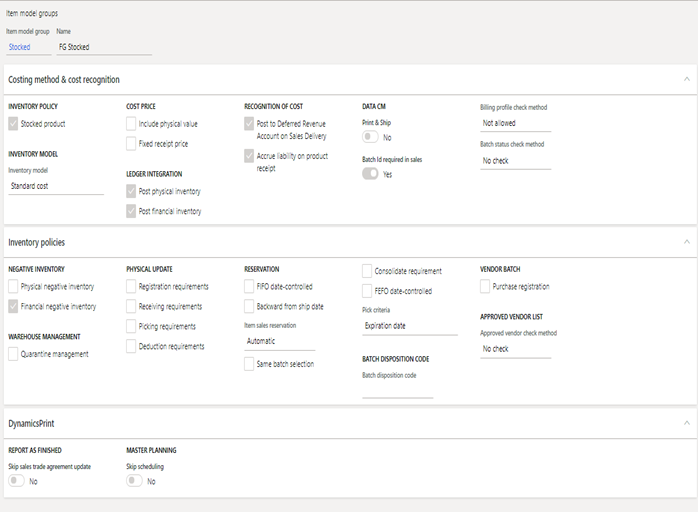
I am trying to change the item model group to CNTRACTSTK, A contract stock item is basically the same as a stocked item the only difference is that the system does not create a new Trade agreement when the production is complete.
in the DynamicsPrint tab the flag is set to “yes” to Skip sales trade agreement update.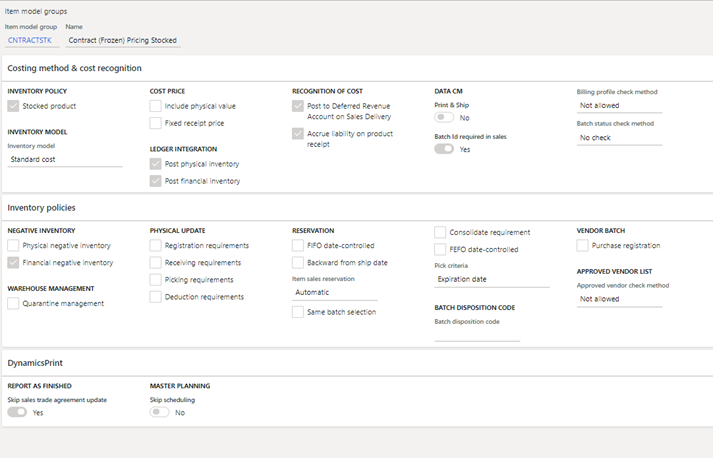
Please help!
Thank you!——————————
Pascale Bouchard
DATA Communications Management Corp
Brampton ON
——————————
——————————————- -
What are the values in all of the inventory dimensions on your adjustment journal?
——————————
Kevin McLean
Strategic Solutions NW
Beaverton OR
——————————
——————————————- -
Hi Kevin,
I am afraid I am lost from here…my knowledge on inventory transaction and how to read it is limited.
I am only trying to change the item model group the item and get an error message. (I have 8 items to update and they all give me the same error)
I looked at the transaction and see this inventory movement, it looks backwards to me. but it is closed now.


When trying to remove the 50 I get the error below, the warehouse has confirmed that we do not have inventory for batch B6858727 in this location

——————————
Pascale Bouchard
DATA Communications Management Corp
Brampton ON
——————————
——————————————- -
Between old eyes and a fuzzy monitor, I cannot read any of the screen captures you’ve posted. You said you have an adjustment transaction that is bringing the inventory back to zero. If you open the adjustment journal in Inventory Management, and navigate to the lines, you should be able to see the transaction you are trying to post. There will be a “Dimensions display” button at the top of the form. Click that, and you will see a list of all the inventory dimensions. Make sure they are all selected, and click OK. You will then see all those dimensions displayed on the grid. Write down what all the values are.
——————————
Kevin McLean
Strategic Solutions NW
Beaverton OR
——————————
——————————————- -
Coincidentally I experienced the same error message just yesterday.
It means you have somewhere a negative quantity for this item, hence you cannot make it into an item that does not allow negative quantity.
Look at On-Hand quantity, as told above, turn on all dimensions so you can see the full resolution and understand what dimension combination that has negative quantity.
——————————
Zvika Rimalt
Functional Consultant
Vancouver BC
——————————
——————————————- -
Genie Engels
MemberJuly 9, 2020 at 8:59 AM
Agreed. If you notice the initial move of inventory was from P01 to the 03g0s location yet there is no evidence of materials existing in that pick location prior. Your 1000 is in location a “Blank” location.Turn on all of your dimensions as there is something missing in your view.
——————————
Genie Engels
ERP Manager
AXUG All Star
Rubicon Oilfield Intl.
Houston
——————————
——————————————- -
Thank you all for your help!
I think I found the problem….
I looked at the transactions and found work on an old sales order where somehow we picked from a blank location?
this SO is long gone and have been invoiced. (from December.)
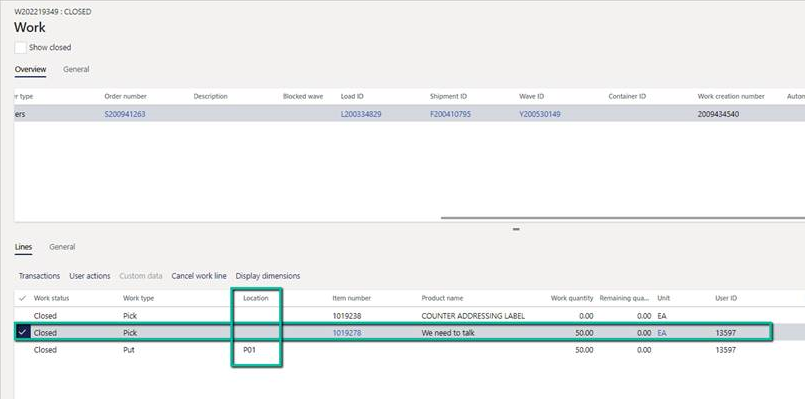
this would explain the -50 in the blank location
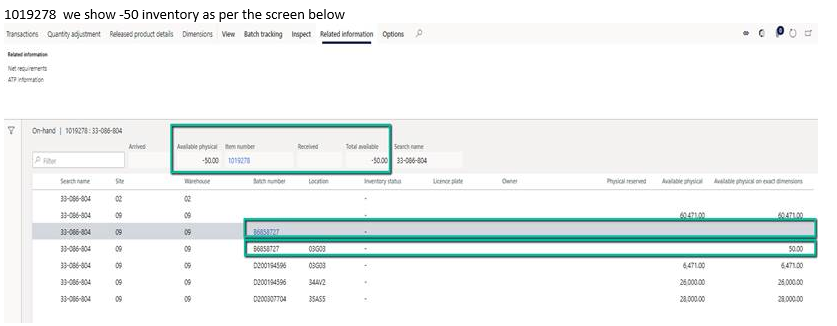
is there a way to fix this ?——————————
Pascale Bouchard
DATA Communications Management Corp
Brampton ON
——————————
——————————————- -
What is the status of the work?
——————————
Kevin McLean
Strategic Solutions NW
Beaverton OR
——————————
——————————————- -
The status of the work is closed.
——————————
Pascale Bouchard
DATA Communications Management Corp
Brampton ON
——————————
——————————————- -
So the work was completed, but the inventory transaction was not updated. Is the pick location on the work blank? There should be 4 inventory transactions associated with that piece of work:
- Issue from the pick location
- Receipt to the user location
- Issue from the user location
- Receipt to the put location
All 4 transactions will have the work ID as the document reference. What is the issue status and receipt status of those 4 transactions?
I’m not sure how you were able to complete the work with a blank location. The system should have stopped that. The system may not be able to update the inventory transaction because the location is blank. There is a consistency check for warehouse transactions. Running it in “Fix error” mode may fix the problem, especially if there is a pick location on the work that was not updated to the inventory transaction. I’ve fixed this type of problem in AX 2012 by using SQL to change the InventDimId and StatusIssue on the transaction, and then running the consistency check to synchronize the on-hand quantities with the inventory transactions. That approach is not readily available in D365, so you’ll have to understand all the data related to that work in order to determine how to fix it. The questions I’ve written above are the first steps to doing that.
——————————
Kevin McLean
Strategic Solutions NW
Beaverton OR
——————————
——————————————- -
Richard Wu
MemberJuly 10, 2020 at 6:09 AM
Just throwing this out there; not on D365 so I’m not sure if the option is there and as long as the actual transaction doesn’t matter, would doing a “counting” instead of inventory adjustment work so you set all the counts in all locations to zero?——————————
Richard Wu
Bicon, LLC
Boston MA
——————————
——————————————- -
thank you all for trying to help.Something definitely went wrong with these sales orders.
I see 3 Work ID for the same line item. 1 canceled and 2 closed.I tried counting option is it does not work either. They system is showing me 50 available but when doing the adjustment (inventory or counting) the system says it is not there also when trying to remove the -50 from the blank location it is asking me for a location.
I will end over this issue out to our IT team, I was hoping it was a quick fix.
have a great weekend everyone!
take care.——————————
Pascale Bouchard
DATA Communications Management Corp
Brampton ON
——————————
——————————————-
Unknown Member replied 5 years, 10 months ago 1 Member · 0 Replies -
-
0 Replies
Sorry, there were no replies found.
The discussion ‘Negative inventory unable to fix, need to update the item model group’ is closed to new replies.
