LCS Implementation Project Analysis Step “Download Templates” is out-of-date?

  • LCS Implementation Project Analysis Step “Download Templates” is out-of-date?
    Posted by DSC Communities on January 8, 2021 at 9:21 am
    • Daniel Zook

      Member

      January 8, 2021 at 9:21 AM

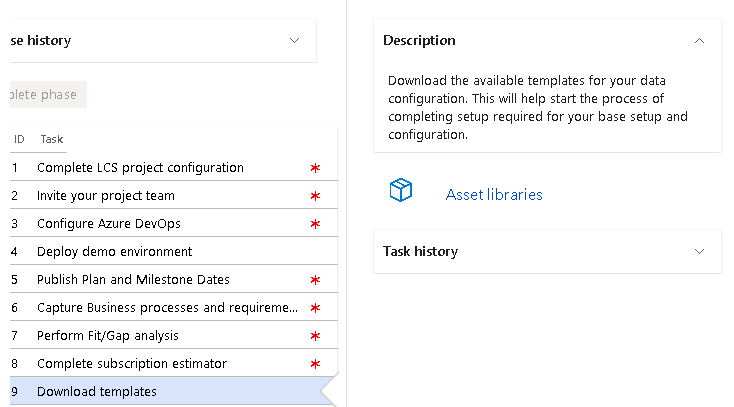
      I’m working through the Implementation Project for D365 in LCS.Ā  In the Analysis phase, there is a step titled “Download templates.”


      The link to “Asset libraries” goes to the asset library of the project, which is empty.Ā  I checked the shared assets library in LCS, but didn’t find any checklists there either.
      I tried contacting “Microsoft Support” (actually Tek Experts, *not* Microsoft), but the only useful thing they could tell me was that I could ignore the step.Ā  They also said that if it doesn’t automatically create a checklist when all the prior steps are completed, then I should contact them again.
      Does anyone have any experience with this “Download templates” step in LCS?Ā  Is it supposed to work, or did Microsoft withdraw the templates and forget to remove this step?

      ——————————
      Daniel Zook
      Director of IT
      Lehman’s
      Dalton OH
      ——————————

    • Charlie West

      Member

      January 11, 2021 at 10:30 AM

      Hi Daniel –

      These templates are related to data migration. Each time there is a major platform update, MSFT releases a new set of demo data and data migration templates. You can navigate HERE and use the latest “demo data” package, it will prepare a .zip file for you with empty data migration templates.

      ——————————
      Charlie West
      Campus Management Corp.
      Boca Raton FL
      ——————————
      ——————————————-

    • Lizzeth Arredondo

      Member

      January 11, 2021 at 12:12 PM

      Hello Daniel,

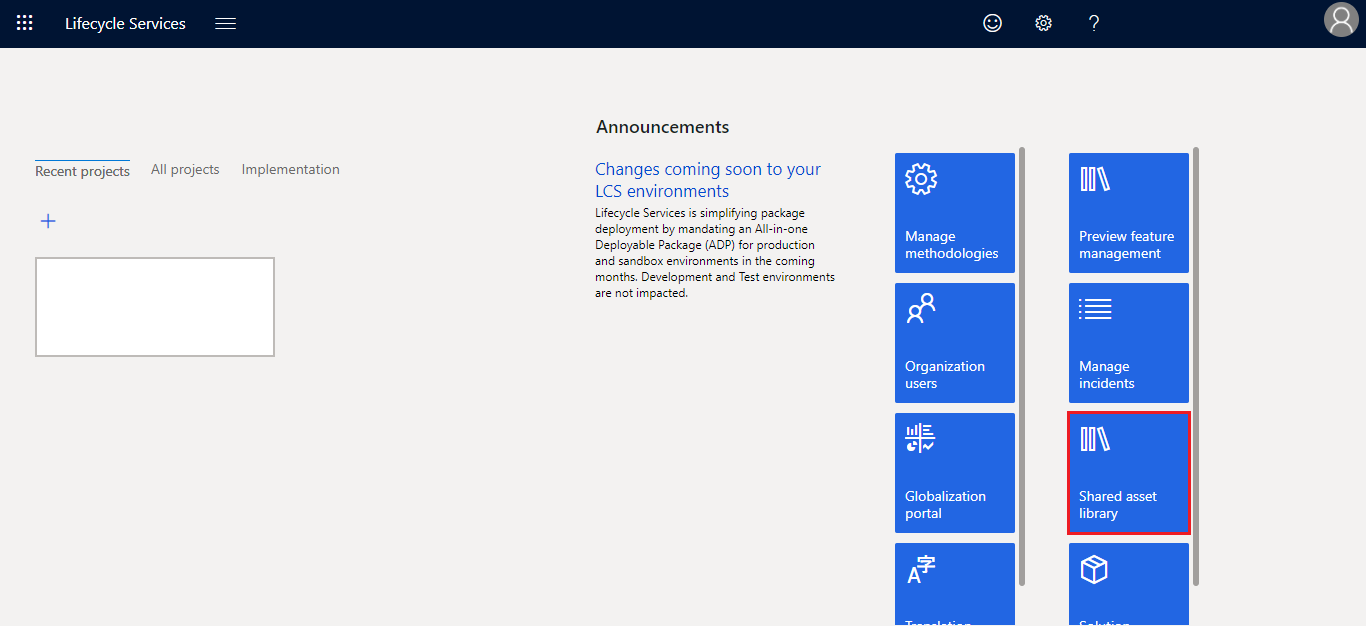
      On the LCS home page, there is an icon called Shared asset library.


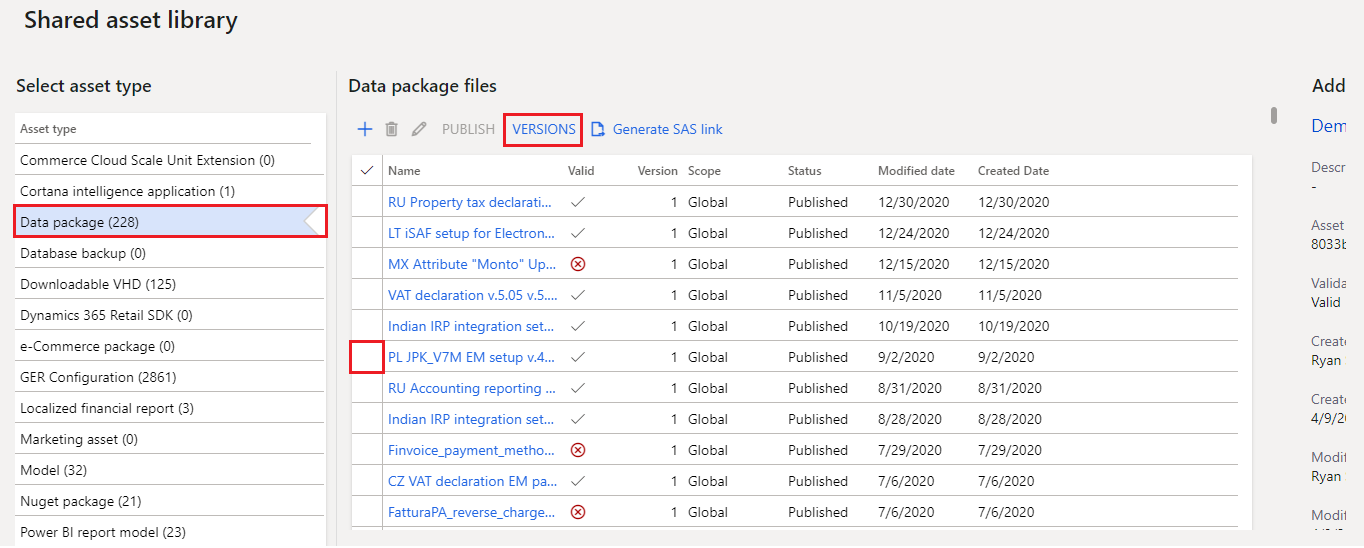
      There you will find all the default templates for D365: Data packages and Power BI reports, are the most common. You might not have to use them all, though. There are useful, for example, if you want to work with a Contoso existent database. You can download the template to install it in your environment.Ā 

      You only have to select the demo data (e.g. Demo data 10.0.9 Financials…) and then select the Versions bottton > Download version:

      Once you have downloaded the data, you can go to the Asset Library of the project and import it. You can also generate your own database files by using the Data Management workspace if you have some information in an envirenment that you want to use for testing.Ā 

      However, this is not a mandatory step and you can ignore it if you want a blank environment.

      Hope this be useful.

      Best regards,

      ——————————
      Lizzeth Arredondo
      GCG – GONZALEZ, CORTINA, GLENDER Y CIA., S.A. DE C.V.
      Col. Polanco Chapultepec
      ——————————
      ——————————————-

    • Daniel Zook

      Member

      January 11, 2021 at 12:46 PM

      Thank you both for clarifying!

      ——————————
      Daniel Zook
      Director of IT
      Lehman’s
      Dalton OH
      ——————————
      ——————————————-

    DSC Communities replied 5 years, 3 months ago 1 Member · 0 Replies
  • 0 Replies

Sorry, there were no replies found.

The discussion ‘LCS Implementation Project Analysis Step “Download Templates” is out-of-date?’ is closed to new replies.

Start of Discussion
0 of 0 replies June 2018
Now

Welcome to our new site!

Here you will find a wealth of information created for peopleĀ  that are on a mission to redefine business models with cloud techinologies, AI, automation, low code / no code applications, data, security & more to compete in the Acceleration Economy!