


Dynamics F/SCM
Public Group
Active 2 days ago
Dynamics F/SCM
Organizer:
- JOSE Organized by
-
-

D365: How to use the “Customer attachments” data entity to import File type attachments
-
D365: How to use the “Customer attachments” data entity to import File type attachments
Posted by DSC Communities on January 11, 2021 at 11:52 am-

Daniel Zook
MemberJanuary 11, 2021 at 11:52 AM
Attachments in D365 can be various types. One type is called “Note”. A Note type attachment is plain text. For example, it looks like this…
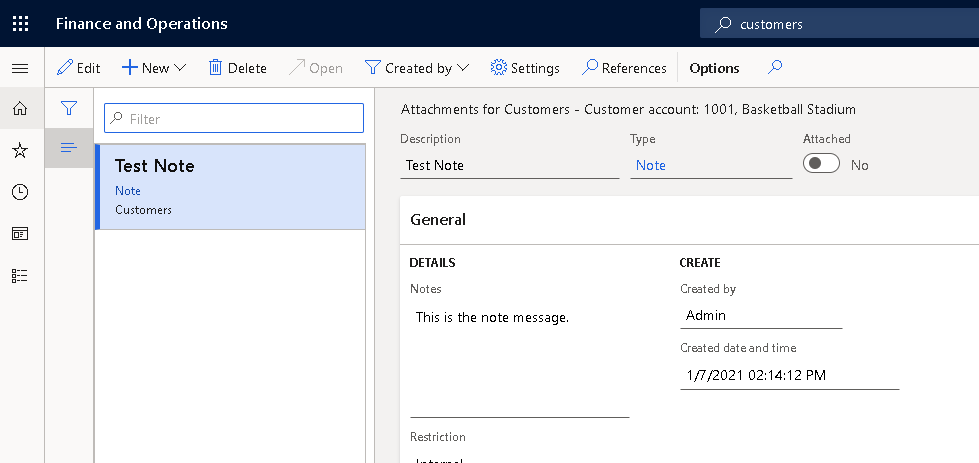
As you can see, the type is “Note”, and under General/Details/Notes, there is the plain text note that is just the text “This is the note message.”
Another type of attachment in D365 is called “File”. A File type attachment is just like an attachment in an email message. It could be a DOCX document file, an XLSX spreadsheet, a PDF document, or any other file type at all. In my case, I’m testing the file attachment import using a DOCX file, but the type of file is irrelevant for this process.
For example, here is a File type attachment in D365.
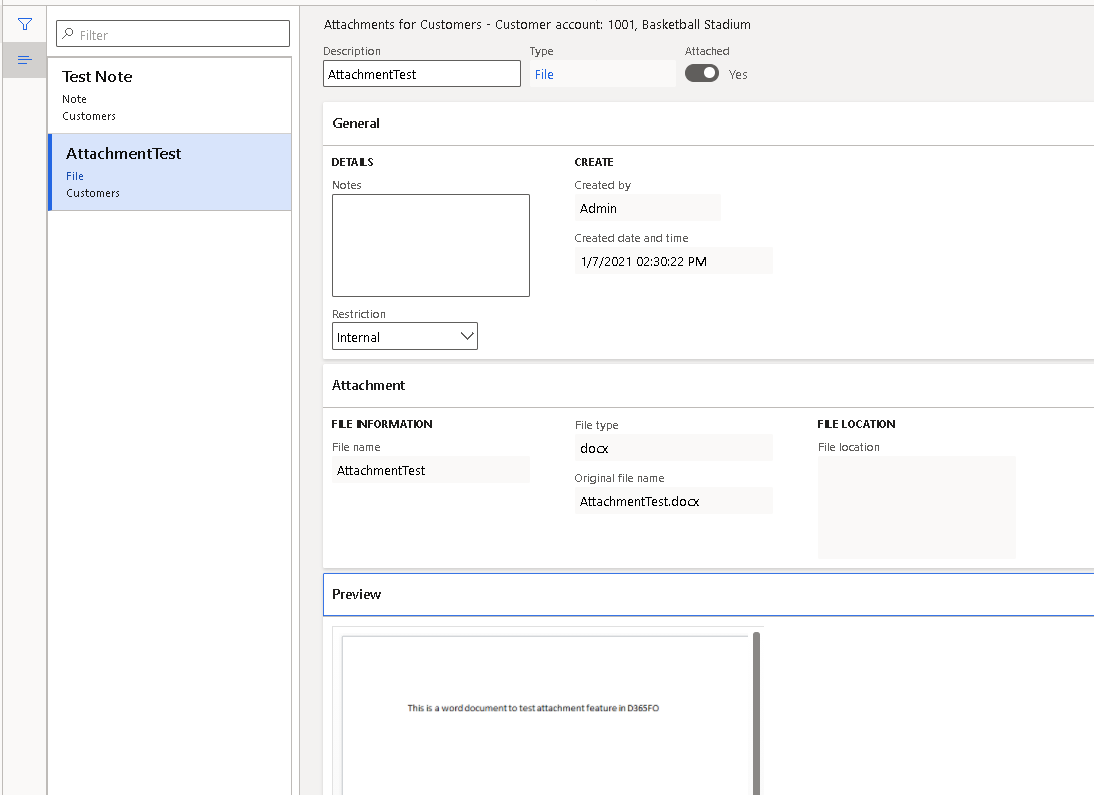
You can see in the screen capture that the type of attachment in this case is “File”, and in the Attachment fast tab it shows the file information. The file can be previewed in the “Preview” fast tab.
This is what I expect the end result to look like when I import a D365 “customer attachment” record of type “File.” The challenge I’m facing is how to include the file itself in the import process. Every time I try to import a D365 attachment of type “File”, I get these errors:
Results. ‘FileContents’ is required when attaching a file
Results. validateWrite failed on data source ‘DocuRefEntity (DocuRefEntity)’
It seems like it should be possible to import the FileContents, but there is no documentation on this that I can find, and so I don’t know how to populate that field.
Here is an example of the record I’m trying to import. (The FileContents is empty because there is no documentation on how to populate that field.)

Has anyone else used the “Customer attachments” (or similar) data entity to import File type attachments to D365? If so, how did you get it to work?
Thanks in advance for any and all advice about this.——————————
Daniel Zook
Director of IT
Lehman’s
Dalton OH
—————————— -
Daniel Zook
MemberJanuary 14, 2021 at 11:07 AM
Update: I opened a case with Microsoft’s LCS support (really “Tek Experts”), and so far they haven’t been able to tell me how to make it work. Here are the steps they suggested:Create a data export job
Add export entity: customer attachment
- destination format file: excel
- Importable fields only
- Enable Staging
Enable “data package”
Run export job (click “Export Now”)
Click “Download package” in export results page button bar at the top
Extract the package
Add a folder named Resources
Add the file(s) to the Resources folder that you want to import as file type attachments
Edit the Excel file.
Delete the existing entries, leaving the header row
Generate GUID using website: https://www.uuidgenerator.net/guidand put it to DocumentID column, with curly braces
Save the changes to the XLSX file
Compress all 3 files and the folder to a zip file
Their instructions stopped their, so I made some assumptions and tried these steps to import it…
Create an Import job.
Add file
- Entity name: Customer attachments
- Source data format: package
- Upload and add
Click Import now
Unfortunately, those steps don’t work for me.
Once it is finally working I will update this post.
——————————
Daniel Zook
Director of IT
Lehman’s
Dalton OH
——————————
——————————————- -
Juan Sebastian Grijalba
MemberJanuary 14, 2021 at 4:15 PM
Hello,Not that this will help but is the customer attachment an OOB data entity? I was under the impression that there was no solution to bulk upload attachments in F&O. Also could not see it my environment
I did an a similar upload of employee images and the steps are very close to what you did, although in my case the Resources folder had sub folder.See the blog of the steps
https://empowerdynamics365axusers.com/2020/05/21/mass-upload-employee-pictures-to-d365-finance-and-supply-chain-also-d365-hr/regards,
——————————
Juan Sebastian Grijalba
Berkowitz Pollack Brant
Miami
——————————
——————————————- -
Daniel Zook
MemberJanuary 14, 2021 at 4:24 PM
Thanks Juan. It is an OOB entity. I think we are on 10.0.15.Can you explain what you mean about “the Resources folder had sub folder”?
——————————
Daniel Zook
Director of IT
Lehman’s
Dalton OH
——————————
——————————————- -
Juan Sebastian Grijalba
MemberJanuary 14, 2021 at 4:35 PM
How weird, I am on 10.0.16 and don’t see that entity. When you download the zip package, inside the Resources folder is there another folder?——————————
Juan Sebastian Grijalba
Berkowitz Pollack Brant
Miami
——————————
——————————————- -
Daniel Zook
MemberJanuary 14, 2021 at 4:39 PM
That’s what puzzled me… there is no Resources folder in the zip file that I downloaded. Maybe I’m doing something wrong?Our demo environment is off-line for the day, so I’ll double-check the version tomorrow or Monday.
——————————
Daniel Zook
Director of IT
Lehman’s
Dalton OH
——————————
——————————————- -
Juan Sebastian Grijalba
MemberJanuary 14, 2021 at 4:58 PM
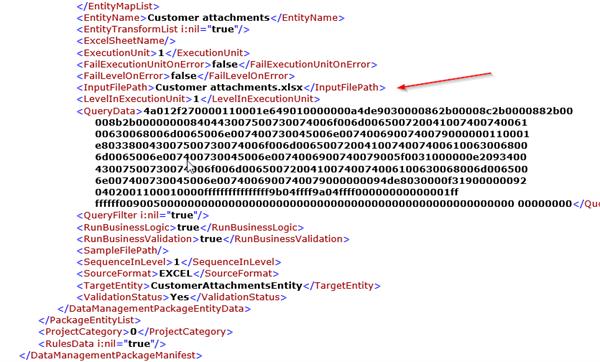
Ahh, I was able to find the entity, had to refresh the list of entities. Who knows when this entity came out. You are right about it not exporting a resources folder. It is probably a bug. You can probably add the resources folder, and then add a second sub folder and call it Customer attachments. make sure your excel file is called Customer attachments.xlsx. It could also be case sensitiveI saw the xml file and figured it will point to this
——————————
Juan Sebastian Grijalba
Berkowitz Pollack Brant
Miami
——————————
——————————————- -
Daniel Zook
MemberJanuary 15, 2021 at 9:18 AM
How does this look?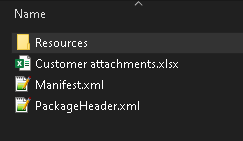

——————————
Daniel Zook
Director of IT
Lehman’s
Dalton OH
——————————
——————————————- -
Juan Sebastian Grijalba
MemberJanuary 15, 2021 at 9:29 AM
It looks good, although I tried many times last night with different formats and couldn’t get it to work. got this error all the time. I think there is a bug here from MS. I like the entity this has been a GAP for a while now. The ability to bulk upload documents for clients is good for data migrations. Let me know if you get it to work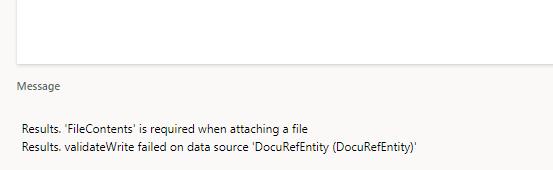 thanks
——————————
Juan Sebastian Grijalba
Berkowitz Pollack Brant
Miami
——————————
——————————————- -
Daniel Zook
MemberJanuary 15, 2021 at 9:46 AM
Thanks again Juan. So far it is still not working for me. I have a case open on LCS and ask them to elevate it to a Microsoft tech so the bug can be fixed.——————————
Daniel Zook
Director of IT
Lehman’s
Dalton OH
——————————
——————————————- -
Daniel Zook
MemberJanuary 15, 2021 at 2:18 PM
Here is the reply I received from LCS support:“I will raise this up with senior engineers and will give you feedback.”
djz
——————————
Daniel Zook
Director of IT
Lehman’s
Dalton OH
——————————
——————————————- -
Daniel Zook
MemberJanuary 18, 2021 at 1:28 PM
Got this from LCS support:
———–Thank you for your feedbacks and patience.
After further review on my end, feedback is that this is a known issue that is affecting, importing attachments via CustomerAttachmentsEntity.
Here is the link for the information provided above https://fix.lcs.dynamics.com/Issue/Details?bugId=533465&dbType=3&qc=5438566630de29d6e8e118235204020ec14708a305859d1ba2a15665c9c1b2d3 and investigations are currently on-going to address this issue. You can use the ‘notify me’ option to receive notifications on its progress.
Furthermore, while there is no tentative date on the fix yet, I would appreciate it if you could allow us some more time for the necessary actions to be taken for a possible resolution or workaround.
I understand this is not the ideal scenario for this, however, this concern is greatly noted by Microsoft going forward.
Please let me know if there are further concerns or clarification to proceed further on the case.
———–So at this point I’m waiting till this is fixed before we go live with D365. In the meantime, I’ve got lots of other things to do to prepare for the migration.
——————————
Daniel Zook
Director of IT
Lehman’s
Dalton OH
——————————
——————————————- -
Juan Sebastian Grijalba
MemberJanuary 18, 2021 at 1:39 PM
thanks for following up on this, I see the ticket in LCS. I am sure another factor that will affect this functionality will be whether you are storing the documents on Azure blog storage or SharePoint. My gut tells me that the import will only work for the standard OOB D365 blog storage.
regards,
——————————
Juan Sebastian Grijalba
Berkowitz Pollack Brant
Miami
——————————
——————————————- -
Daniel Zook
MemberJanuary 27, 2021 at 8:20 AM
Latest reply from Microsoft/Tek Experts:—————-
My name is Babajide and I am Iretijesu’s Technical Lead. I am reaching out to you today, so I could thank you for all your patience and collaboration on this support request.
Over this period, we had to go through different technical authorities for further assistance and additional review, so we could make sure you received the most accurate response from our side. Kindly accept my sincere apologies for the inconvenience caused and the time you had to spend, as at this point, I can only count on your understanding that if there was any other possible workaround we would have done it right away but an investigation is currently on-going to address the stated bug.
As confirmed, Iretijesu will proceed to temporarily archive this support request as there is no tentative date on the fix yet.
Please do not hesitate to reach out to me directly in case you have any other question or concern, I will always be available in your service alongside my team.
Thank you, and keep staying safe.
Regards,
Babajide Oke
Technical Lead
Dynamics 365 for Finance and Operations | Tech
v-baoke@microsoftsupport.com——————————
Daniel Zook
Director of IT
Lehman’s
Dalton OH
——————————
——————————————- -
Daniele Barbini
MemberMarch 8, 2021 at 9:40 AM
Hi,
Sorry but it seems that the mentioned data entity doesn’t exist in the AOT.
There is not a standard data entity to import customer attachments.Is it right?
Thanks
Daniele——————————
Daniele Barbini
Wuerth Phoenix
——————————
——————————————- -
Daniel Zook
MemberMarch 11, 2021 at 4:47 PM
FYI: I’m in D365 F&O, version:2020 release wave 2Installed product version : 10.0.15 (10.0.644.10015)
Installed platform version : Update39 (7.0.5816.35651)It looks like this in the list of target entities:

——————————
Daniel Zook
Director of IT
Lehman’s
Dalton OH
——————————
——————————————- -
Daniele Barbini
MemberMarch 12, 2021 at 3:17 AM
Thanks Daniel,
I’ve found it in the list.Bye
Daniele——————————
Daniele Barbini
Wuerth Phoenix
——————————
——————————————-
DSC Communities replied 5 years, 5 months ago 1 Member · 0 Replies -
-
0 Replies
Sorry, there were no replies found.
The discussion ‘D365: How to use the “Customer attachments” data entity to import File type attachments’ is closed to new replies.
