


Dynamics F/SCM
Public Group
Active an hour ago
Dynamics F/SCM
Organizer:
- JOSE Organized by
-
-

Customer Payment Terms COD with Cash Payment selected
-
Customer Payment Terms COD with Cash Payment selected
Posted by DSC Communities on May 8, 2020 at 6:05 pm-

Anilda Pena
MemberMay 8, 2020 at 6:05 PM
Hello,Can anyone share how D365 manages “COD” payment terms with Cash payment selected and the g/l account is specified.
Normally, our customer invoice posts an accounts receivable GL account which is cleared at a later date. In the case of COD/Cash payments we do not want a posting made to AR since the customer is payment COD.
In AX 2012, this setup would post to the cash account and would not post to AR however, I am not finding the same behavior in D365. I have followed Microsoft documents but to no avail.I wonder if I am missing a setting.
Would appreciate guidance if anyone has experience with COD/Cash settings.
Thank you——————————
Anilda Pena
Sr. IT Business Analyst
Omniparts Automotive
Franklin TN
—————————— -
Shilpi Thakur
MemberMay 9, 2020 at 3:10 AM
In D365 for Terms of Payment = Cash. Check that you are giving the proper ledger account for cash sales entries.

This terms of payment =Cash should either be attached to a customer or be used when you are creating the sales order or free text invoice when the customer has different terms of payment.Hope this helps.
——————————
Shilpi Thakur
Freelance AX/D365 Microsoft Consultant
Dynact Consulting Ltd
——————————
——————————————- -
Anilda Pena
MemberMay 11, 2020 at 10:21 AM
Shilpi –
I originally set my terms of payment with a cash account and I expected it would DR the cash account as it did in AX however it was not the case. Payment method was cash and I did not setup the Posting-Account type as bank. I left it blank. This was my expectation.——————————
Anilda Pena
Sr. IT Business Analyst
Omniparts Automotive
Franklin TN
——————————
——————————————- -
Phil Dawson
MemberMay 10, 2020 at 5:40 PM
Hi Anilda,Even with the COD setting the transaction will still be posted to the customer. However what it will also do is immediately post the “payment” transaction. So the impact to the customer ledger is $0.
I always suggest for the ledger account to be a “staging” account. What happens is that the invoice amount is posted to this account, This account would then be used by the users that post banking transactions later.
Example
Invoice Posted with COD
DR Customer $1,000
CR Revenue $1,000DR Ledger Account Set on COD Payment Term $1,000
CR Customer $1,000So the customer is $0 balance but there is a $1,000 balance against the ledger account nominated in the COD payment term.
Then when the payment is processed later, the users would use that ledger account as the offset to the payment.
DR Bank $1,000
CR Ledger Account Set on COD Payment Term $1,000Hope that helps.
Regards
Phil——————————
Phil Dawson
Sunpork Fresh Foods Pty Ltd
——————————
——————————————- -
Anilda Pena
MemberMay 11, 2020 at 10:11 AM
Phil –
I appreciate your feedback.
Would we use the Bridging posting setting and enter the “staging account” in the bridging account field?——————————
Anilda Pena
Sr. IT Business Analyst
Omniparts Automotive
Franklin TN
——————————
——————————————- -
Anilda Pena
MemberMay 11, 2020 at 10:25 AM
Phil – never mind my question as it relates to setting up payment method and not payment terms.——————————
Anilda Pena
Sr. IT Business Analyst
Omniparts Automotive
Franklin TN
——————————
——————————————- -
Anilda Pena
MemberMay 11, 2020 at 12:59 PM
Phil,I do not see where this posting is happening.
DR Ledger Account Set on COD Payment Term $1,000
CR Customer $1,000I see where the customer account is being credited for the amount, but I do not see the DR to the ledger account I set on COD payment terms which is our cash account.
I appreciate if you can share your thoughts what I am doing incorrectly.
Thank you,
——————————
Anilda Pena
Sr. IT Business Analyst
Omniparts Automotive
Franklin TN
——————————
——————————————- -
Phil Dawson
MemberMay 11, 2020 at 5:22 PM
Hi Anilda,Sorry, I probably wasn’t clear.
That transaction would be a separate transaction to post the payment. It is not pat of the invoice posting.
Where I have used this in the past the users responsible for posting the bank receipts would create and post these banking journals for COD type transactions.
Regards
Phil——————————
Phil Dawson
Sunpork Fresh Foods Pty Ltd
——————————
——————————————- -
Shilpi Thakur
MemberMay 10, 2020 at 10:50 PM
Phil is right as the structure in D365 does not change.If you want to make the automated business process more efficient [depending if this meets your customer’s business requirements], you can also look at using the Method of Payment = Cash.
What this does is it automatically posts and settles the payment journal once the sales invoice is generated in D365, to the assigned bank as per the method of payment = Cash setup.
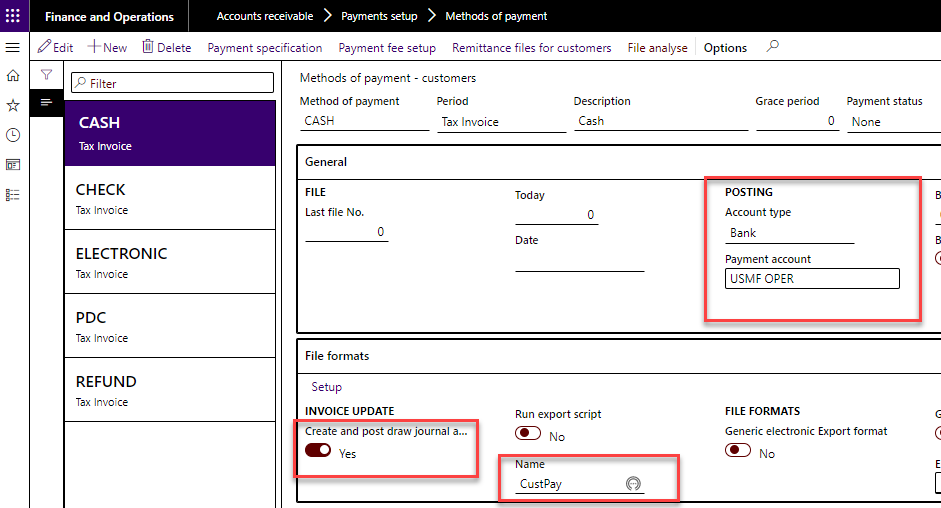
Go to the ‘General’ tab.Account type – Select “Bank”.
Payment account – Select the bank account to deposit the money into.
Bank transaction type – Select the bank transaction type which is of name deposit to identify the deposit.
Go to ‘File formats’ tab.
Create and post draw journal automatically when posting invoices [Mark the Automatic posting] – Set to Yes.
Name – Select a customer payment journal.
The use of such a method of payment ignores the due date calculated through the terms of payment and posts the payment journal immediately after posting the invoice.
For cash payment processing, a Free text invoice or a sales invoice may be used.
Sales order invoice posting

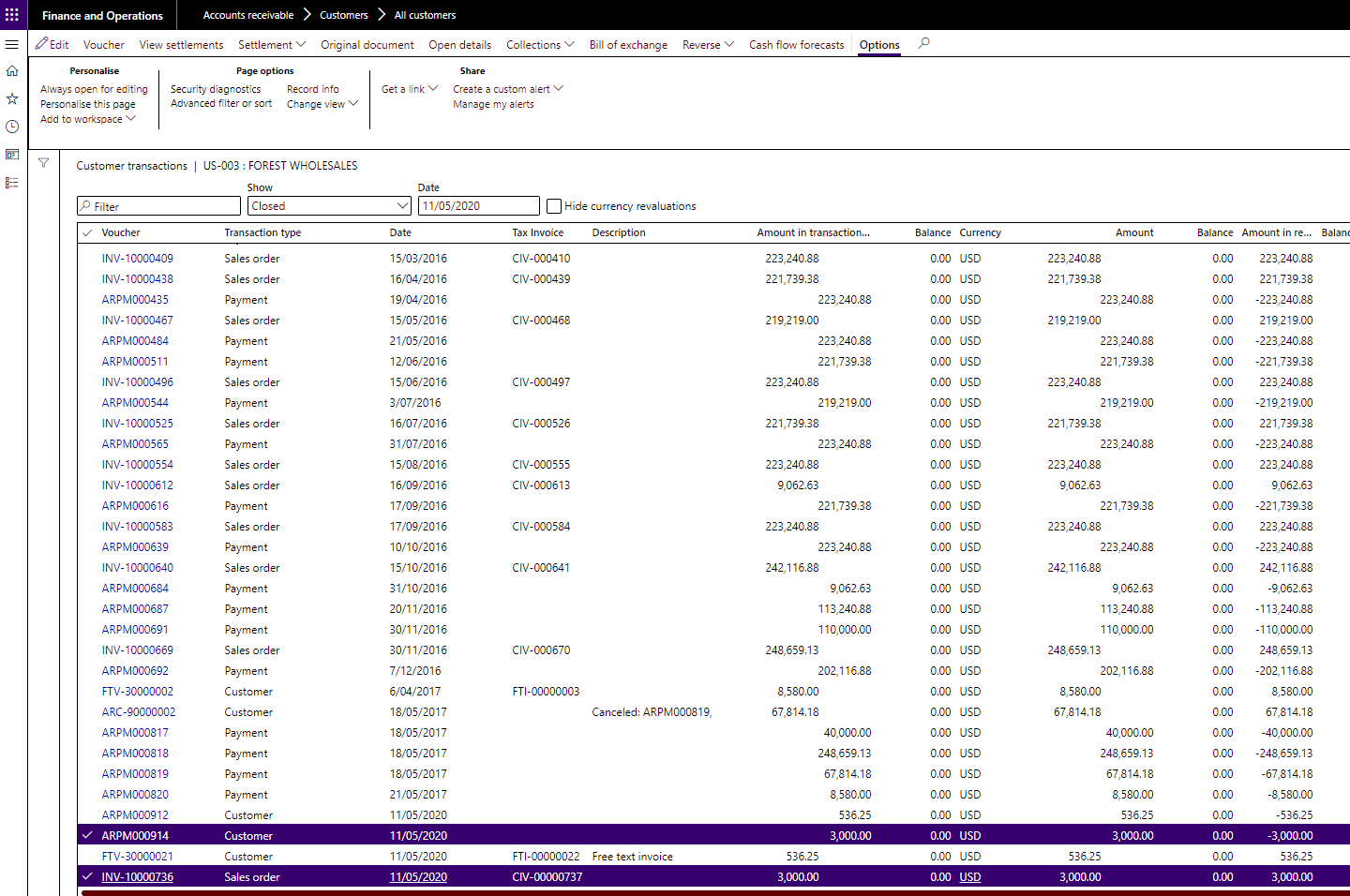
In parallel, a customer payment journal is posted for the customer.Check the customer transactions: The highlighted transaction below shows invoice and the payment voucher posted for this transaction and settled.
——————————
Shilpi Thakur
Freelance AX/D365 Microsoft Consultant
Dynact Consulting Ltd
——————————
——————————————- -
Anilda Pena
MemberMay 11, 2020 at 10:13 AM
Shilpi,Thank you for your feedback.
I would either use payment method “Cash” with the setting you suggested or Payment terms “COD” setting the cash account? Not both in one transaction, correct? Just want to make sure my understanding is correct.
——————————
Anilda Pena
Sr. IT Business Analyst
Omniparts Automotive
Franklin TN
——————————
——————————————- -
Shilpi Thakur
MemberMay 12, 2020 at 5:12 PM
You just add the Method of Payment = Cash in your sales transaction.The use of this method of payment ignores the due date calculated through the terms of payment and posts the payment journal immediately after posting the invoice.
——————————
Shilpi Thakur
Freelance AX/D365 Microsoft Consultant
Dynact Consulting Ltd
——————————
——————————————- -
Nanditha Kini Mukerjee
MemberMay 20, 2020 at 11:08 AM
Hi Anilda,To understand your scenario better. You’re using the COD payment term with cash as your payment method and a cash account with cash payment identified in your terms of payment form?
Then what the system will do, is post a normal sales transaction with the relevant vouchers when you post a sales order/ free text invoice and immediately post the payment (Receipt) transaction so that the impact on your A/R is effectively 0.
Best Regards,
Nanditha——————————
Nanditha Kini Mukerjee
Senior Manager- Presales
Synoptek
——————————
——————————————-
DSC Communities replied 5 years, 12 months ago 1 Member · 0 Replies -
-
0 Replies
Sorry, there were no replies found.
The discussion ‘Customer Payment Terms COD with Cash Payment selected’ is closed to new replies.
