


Dynamics F/SCM
Public Group
Active 4 days ago
Dynamics F/SCM
Organizer:
- JOSE Organized by
-
-

Coverting AX Queries to SQL Queries
-
Coverting AX Queries to SQL Queries
Posted by DSC Communities on December 4, 2019 at 8:12 am-

Allen Broady
MemberDecember 4, 2019 at 8:12 AM
Good Morning,I have an ongoing project to take one of our reports within AX 2012 and develop and automated job. This involves mostly querying the inventory tables to gather the data together the complication I am having is how to effectively do so. My current query does not generate any records for me now which I believe I am linking the dimension views incorrectly but I have no ideas how these tables should be linked.
Attached is the report and the table information along with my query that I have been working on.
 Select Top 100 S.ACC, S.[Item Number], S.[Name], S.Physical_Date, S.Remark, S.Quantity, S.[Physical Unit Price], S.Total, S.Dept, S.Line, S.Proj From (
Select Top 100   Ito.[ItemId] AS 'Item Number',
  Ijt1.[JournalNameID] AS 'Name',
  FORMAT(Its.[DatePhysical], 'MM-dd-yyyy') AS 'Physical_Date',
         Ijts1.[AW_ResolveMemo] As 'Remark',
         Its.[QTY] As 'Quantity',
         Its.[COSTAMOUNTPHYSICAL] As 'Physical Unit Price',
  Its.[COSTAMOUNTPHYSICAL] * Its.[QTY] As 'Total',
         isnull(d_1.DISPLAYVALUE,'') as ACC,
         isnull(d_2.DISPLAYVALUE,'') as DEPT,
         isnull(d_3.DISPLAYVALUE,'') as LINE,
         isnull(d_4.DISPLAYVALUE,'') as RINGI,
         isnull(d_5.DISPLAYVALUE,'') as PROJ
FROM MicrosoftDynamicsAX.dbo.INVENTTRANS Its
inner join MicrosoftDynamicsAX.dbo. InventTable It
on Its.RECID = It.RECID
inner join MicrosoftDynamicsAX.dbo. InventTransOrigin Ito
on Its.RECID = Ito.RECID
inner join MicrosoftDynamicsAX.dbo. InventDim Id
on Its.RECID = Id.INVENTDIMID
inner join MicrosoftDynamicsAX.dbo. InventJournalTrans Iss
on Iss.DEFAULTDIMENSION = Iss.INVENTDIMID
left join MicrosoftDynamicsAX.dbo.DIMENSIONATTRIBUTELEVELVALUEALLVIEW d_1
on Its.INVENTTRANSORIGIN = d_1.VALUECOMBINATIONRECID
and d_1.VALUEORDINAL = 1
left join MicrosoftDynamicsAX.dbo.DIMENSIONATTRIBUTELEVELVALUEALLVIEW d_2
on Its.INVENTTRANSORIGIN = d_2.VALUECOMBINATIONRECID
and d_2.VALUEORDINAL = 2
left join MicrosoftDynamicsAX.dbo.DIMENSIONATTRIBUTELEVELVALUEALLVIEW d_3
on Its.INVENTTRANSORIGIN = d_3.VALUECOMBINATIONRECID
and d_3.VALUEORDINAL = 3
left join MicrosoftDynamicsAX.dbo.DIMENSIONATTRIBUTELEVELVALUEALLVIEW d_4
on Its.INVENTTRANSORIGIN = d_4.VALUECOMBINATIONRECID
and d_4.VALUEORDINAL = 4
left join MicrosoftDynamicsAX.dbo.DIMENSIONATTRIBUTELEVELVALUEALLVIEW d_5
on Its.INVENTTRANSORIGIN = d_5.VALUECOMBINATIONRECID
and d_5.VALUEORDINAL = 5
left join MicrosoftDynamicsAX.dbo.InventJournalTable Ijt1
on Ijt1.LEDGERDIMENSION = d_1.VALUECOMBINATIONRECID
and d_1.VALUEORDINAL = 1
left join MicrosoftDynamicsAX.dbo.InventJournalTable Ijt2
on Ijt2.LEDGERDIMENSION = d_2.VALUECOMBINATIONRECID
and d_2.VALUEORDINAL = 2
left join MicrosoftDynamicsAX.dbo.InventJournalTable Ijt3
on Ijt3.LEDGERDIMENSION = d_3.VALUECOMBINATIONRECID
and d_3.VALUEORDINAL = 3
left join MicrosoftDynamicsAX.dbo.InventJournalTable Ijt4
on Ijt4.LEDGERDIMENSION = d_4.VALUECOMBINATIONRECID
and d_4.VALUEORDINAL = 4
left join MicrosoftDynamicsAX.dbo.InventJournalTable Ijt5
on Ijt5.LEDGERDIMENSION = d_5.VALUECOMBINATIONRECID
and d_5.VALUEORDINAL = 5
left join MicrosoftDynamicsAX.dbo. InventJournalTrans Ijts1
on Ijts1.LEDGERDIMENSION = d_1.VALUECOMBINATIONRECID
and d_1.VALUEORDINAL = 1
left join MicrosoftDynamicsAX.dbo. InventJournalTrans Ijts2
on Ijts2.LEDGERDIMENSION = d_2.VALUECOMBINATIONRECID
and d_2.VALUEORDINAL = 2
left join MicrosoftDynamicsAX.dbo. InventJournalTrans Ijts3
on Ijts3.LEDGERDIMENSION = d_3.VALUECOMBINATIONRECID
and d_3.VALUEORDINAL = 3
left join MicrosoftDynamicsAX.dbo. InventJournalTrans Ijts4
on Ijts4.LEDGERDIMENSION = d_4.VALUECOMBINATIONRECID
and d_4.VALUEORDINAL = 4
left join MicrosoftDynamicsAX.dbo. InventJournalTrans Ijts5
on Ijts5.LEDGERDIMENSION = d_5.VALUECOMBINATIONRECID
and d_5.VALUEORDINAL = 5
where isnull(d_1.DISPLAYVALUE,'') LIKE '631%') S
Where Format(CONVERT(date, S.Physical_Date), 'MMMM, yyyy') = 'August, 2019'
group by S.ACC, S.[Item Number], S.[Name], S.Physical_Date, S.Remark, S.Quantity, S.[Physical Unit Price], S.Total, S.Dept, S.Line, S.Proj?
——————————
Allen Broady
AWNC
—————————— -
Colby Gallagher
MemberDecember 4, 2019 at 8:44 AM
A couple things:- You can see how AX tables are related to each other in the AOT. Find the table(s) and expand the relations node, then you can see how they are related. Here’s how InventTrans is related to InventTransOrigin for example.
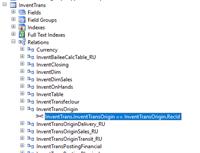
- A simple job will display an AOT query’s SQL in an info-log if you already have a working AOT query. You can also look at the AOT query to see the relations node in case you are using custom relations.
static void ColbyTestAOTQuery(Args _args){Query query;query=new query(queryStr(EnterYourAOTQueryNameHere));info(query.toString());}3. The table joins I see in your query that are incorrect are below. You’ll want to review the columns in the views and determine how you want to join to those.
InventTrans to InventTransOrigin on InventTrans.InventTransOrigin = InventTransOrigin.RecID
InventTrans to InventTable on ItemID
InventTrans to InventDim on InventDimId
InventJournalTrans joins to InventTransOrigin on InventTransOrigin, you look to have InventJournalTrans joining to itself.
——————————
Colby Gallagher
Manufacturing Systems Consultant
Agility Business Solutions
Brecksville OH
——————————
——————————————- - You can see how AX tables are related to each other in the AOT. Find the table(s) and expand the relations node, then you can see how they are related. Here’s how InventTrans is related to InventTransOrigin for example.
-
Mark Prouty
MemberDecember 4, 2019 at 3:52 PM
I?sn’t the join to InventDim on InventDimId? Since this is an inner join with no values, the result set would be empty.
Also do not use reserved words (like Id) as an alias for a table or field.——————————
Mark Prouty
Programmer / Analyst
ANGI Energy Systems
Janesville WI
——————————
——————————————- -
If you create a View for the Query in the AOT, it will also create the View in SQL. You can then look at the View in SQL instead of the AOT, and it will give you a TSQL version.
——————————
Dan Cantley
Systems Analyst
Bedrock Manufacturing Co, LLC
Detroit MI
——————————
——————————————- -
George Zhao
MemberDecember 6, 2019 at 1:44 AM
You need double check your joins. For example InventTrans and InventTable are joined by ItemId; InventTrans and InventDim are joined by InventDimId. RecId does not work in those two instances. There could be more that I couldn’t spot out in first glance.——————————
George Zhao
PAR Technology
New Hartford NY
——————————
——————————————- -
Allen Broady
MemberJanuary 8, 2020 at 2:21 PM
Good Afternoon,I modified the query based on the suggestions but I am still having some complications.
Select S.ACC, S.[Item Number], S.[Name], S.Physical_Date, S.Remark, S.Quantity, S.[Physical Unit Price], S.Total, S.Dept, S.Line, S.Proj From (
Select Ito.[ItemId] AS ‘Item Number’,
Ijt.[JournalNameID] AS ‘Name’,
FORMAT(Its.[DatePhysical], ‘MM-dd-yyyy’) AS ‘Physical_Date’,
Ijt.[Description] As ‘Remark’,
Its.[QTY] As ‘Quantity’,
Its.[COSTAMOUNTPHYSICAL] As ‘Physical Unit Price’,
Its.[COSTAMOUNTPHYSICAL] * Its.[QTY] As ‘Total’,
isnull(d_1.DISPLAYVALUE,”) as ACC,
isnull(d_2.DISPLAYVALUE,”) as DEPT,
isnull(d_3.DISPLAYVALUE,”) as LINE,
isnull(d_4.DISPLAYVALUE,”) as RINGI,
isnull(d_5.DISPLAYVALUE,”) as PROJ
FROM MicrosoftDynamicsAX.dbo.INVENTTRANS Its
inner join MicrosoftDynamicsAX.dbo.InventTable It
on Its.ItemID = It.ItemID
inner join MicrosoftDynamicsAX.dbo.InventTransOrigin Ito
on Its.ItemID = Ito.ItemID
inner join MicrosoftDynamicsAX.dbo. InventDim Im
on Its.INVENTDIMID = Im.INVENTDIMID
inner join MicrosoftDynamicsAX.dbo.InventJournalTable Ijt
on Its.RecID = Ijt.RecID
left join MicrosoftDynamicsAX.dbo.DIMENSIONATTRIBUTELEVELVALUEALLVIEW d_1
on Its.RECID = d_1.VALUECOMBINATIONRECID
and d_1.VALUEORDINAL = 1
left join MicrosoftDynamicsAX.dbo.DIMENSIONATTRIBUTELEVELVALUEALLVIEW d_2
on Its.RECID = d_2.VALUECOMBINATIONRECID
and d_2.VALUEORDINAL = 2
left join MicrosoftDynamicsAX.dbo.DIMENSIONATTRIBUTELEVELVALUEALLVIEW d_3
on Its.RECID = d_3.VALUECOMBINATIONRECID
and d_3.VALUEORDINAL = 3
left join MicrosoftDynamicsAX.dbo.DIMENSIONATTRIBUTELEVELVALUEALLVIEW d_4
on Its.RECID = d_4.VALUECOMBINATIONRECID
and d_4.VALUEORDINAL = 4
left join MicrosoftDynamicsAX.dbo.DIMENSIONATTRIBUTELEVELVALUEALLVIEW d_5
on Its.RECID = d_5.VALUECOMBINATIONRECID
and d_5.VALUEORDINAL = 5
where Its.[DatePhysical] >= ‘2019-08-01’) S
group by S.ACC, S.[Item Number], S.[Name], S.Physical_Date, S.Remark, S.Quantity, S.[Physical Unit Price], S.Total, S.Dept, S.Line, S.Proj——————————
Allen Broady
AWNC
Durham
——————————
——————————————- -
Allen Broady
MemberJanuary 9, 2020 at 8:33 AM
Update***
I was able to fix my query but now but I few of my fields did now come in the Deparment Code, Line Code, Project Code, Ringi Code.Select Top 10000 S.ACC, S.[Description 1], S.[Financial Date], S.[Item Number], S.[Name], S.Physical_Date, S.Remark, S.[Vendor Account], S.[Vendor Catalog Number], S.Receipt, S.Issue, S.Quantity, S.[Physical Unit Price], S.[Physical Cost], S.[Financial Cost], S.Reason, S.Dept, S.Line, S.Proj, S.Ringi From (
Select Ito.[ItemId] AS ‘Item Number’,
Ijt.[JournalNameID] AS ‘Name’,
FORMAT(Its.[DatePhysical], ‘MM-dd-yyyy’) AS ‘Physical_Date’,
Ijt.[Description] As ‘Remark’,
It.PrimaryVendorID As ‘Vendor Account’,
It.[AW_SPECIFICATION] AS ‘Vendor Catalog Number’,
Im.[INVENTLOCATIONID] As ‘Warehouse’,
Its.[QTY] As ‘Quantity’,
Its.[COSTAMOUNTPHYSICAL] As ‘Physical Unit Price’,
It.[AW_Desc1] As ‘Description 1’,
It.[AW_Desc1] As ‘Description 2’,
Its.[COSTAMOUNTPOSTED] As ‘Financial Cost’,
Its.[DATEFINANCIAL] As ‘Financial Date’,
It.[AWFIXEDORDERQTYADC] AS ‘FOQ’,
Its.[StatusIssue] As ‘Issue’,
Its.[STATUSRECEIPT] AS ‘Receipt’,
Ijs.[AWNCINVREASONHTH] AS ‘Reason’,
Its.[COSTAMOUNTPHYSICAL] * Its.[QTY] As ‘Physical Cost’,
isnull(d_1.DISPLAYVALUE,”) as ACC,
isnull(d_2.DISPLAYVALUE,”) as DEPT,
isnull(d_3.DISPLAYVALUE,”) as LINE,
isnull(d_4.DISPLAYVALUE,”) as RINGI,
isnull(d_5.DISPLAYVALUE,”) as PROJ
FROM MicrosoftDynamicsAX.dbo.INVENTTRANS Its
inner join MicrosoftDynamicsAX.dbo.InventTable It
on Its.ItemID = It.ItemID
inner join MicrosoftDynamicsAX.dbo.InventTransOrigin Ito
on Its.InventTransOrigin = Ito.RecId
inner join MicrosoftDynamicsAX.dbo. InventDim Im
on Its.INVENTDIMID = Im.INVENTDIMID
inner join MicrosoftDynamicsAX.dbo.InventJournalTrans Ijs
on It.ItemId = Ijs.ItemId
inner join MicrosoftDynamicsAX.dbo.InventJournalTable Ijt
on Ijs.JournalId = Ijt.JournalId
left join MicrosoftDynamicsAX.dbo.DIMENSIONATTRIBUTELEVELVALUEALLVIEW d_1
on Ijs.LedgerDimension = d_1.VALUECOMBINATIONRECID
and d_1.VALUEORDINAL = 1
left join MicrosoftDynamicsAX.dbo.DIMENSIONATTRIBUTELEVELVALUEALLVIEW d_2
on Ijt.LedgerDimension = d_2.VALUECOMBINATIONRECID
and d_2.VALUEORDINAL = 2
left join MicrosoftDynamicsAX.dbo.DIMENSIONATTRIBUTELEVELVALUEALLVIEW d_3
on Ijt.LedgerDimension = d_3.VALUECOMBINATIONRECID
and d_3.VALUEORDINAL = 3
left join MicrosoftDynamicsAX.dbo.DIMENSIONATTRIBUTELEVELVALUEALLVIEW d_4
on Ijt.LedgerDimension = d_4.VALUECOMBINATIONRECID
and d_4.VALUEORDINAL = 4
left join MicrosoftDynamicsAX.dbo.DIMENSIONATTRIBUTELEVELVALUEALLVIEW d_5
on Ijt.LedgerDimension = d_5.VALUECOMBINATIONRECID
and d_5.VALUEORDINAL = 5
where Its.[DatePhysical] >= ‘2019-08-01’ and d_1.DISPLAYVALUE LIKE ‘631%’) S
group by S.ACC, S.[Item Number], S.[Name], S.Physical_Date, S.Remark, S.[Vendor Account], S.[Vendor Catalog Number], S.Quantity, S.[Physical Unit Price], S.[Financial Cost], S.Dept, S.Line, S.Proj, S.Ringi, S.[Description 1], S.[Financial Date], S.[Physical Cost], S.FOQ, S.Issue, S.Receipt, S.Reason——————————
Allen Broady
AWNC
Durham
——————————
——————————————- -
George Zhao
MemberJanuary 9, 2020 at 4:43 PM
Hi Allen, I have feeling that you may have some typos in your message. Did you mean “I was able to fix my query now but a few of my fields did not come in the Deparment Code, Line Code, Project Code, Ringi Code”?If that is the case, do you normally enter the financial dimensions at the item side or the offset account side? InventJournalTrans.LedgerDimension is linked to the offset account. If you used to enter FD at the item side you should try to extract them using InventJournalTrans.DefaultDimension.
——————————
George Zhao
PAR Technology
New Hartford NY
——————————
——————————————- -
Andrew Russell
MemberJanuary 10, 2020 at 4:44 AM
As a side point, you are missing partition and dataareaid in the where clause and in the table joins.If there is only one company(dataareaid) in the environment it wont affect the results, but it will affect performance – these two columns are form the start of pretty much every index in the system (you won’t see it from the AOT but look on SQL side).
——————————
Andrew Russell
direct wines
Theale
——————————
——————————————-
DSC Communities replied 6 years, 6 months ago 1 Member · 0 Replies -
-
0 Replies
Sorry, there were no replies found.
The discussion ‘Coverting AX Queries to SQL Queries’ is closed to new replies.
