


Dynamics F/SCM
Public Group
Active 2 days ago
Dynamics F/SCM
Organizer:
- JOSE Organized by
-
-

Cost Sheet Setup
-
Cost Sheet Setup
Posted by DSC Communities on May 4, 2020 at 5:05 pm-

Steve Latta
MemberMay 4, 2020 at 5:05 PM
?Hi all,I’m struggling to set up a costing sheet for process manufacturing in AX2012 R3 CU11. I can get through the direct materials and direct labor components okay, but my company is wanting to record variable overhead against various departments at a department specific rate and released product specific number of hours.
These are for things like purchasing, quality control, inventory control, etc.
I’m stumped.
I thought I might be able to set up line items on the route card for these various overhead items, just so that I could set an hours per batch. But, that method seems to require resources be set up for each and we don’t want/need these hours to count towards the total time. But, the route card seems to be the only place where a quantity of time can be set. I suppose if there was a way to plug in a unique total cost for each overhead cost per released product, that would work, but I’d really prefer to have it be hours * current active cost, so that we don’t have to manually adjust every product when we need to change an overhead rate.
I’ve read through the Microsoft whitepaper “BOM Calculations Using Costing Sheets”, as well as various online and AXUG materials, and I can’t find anything that addresses this specific requirement. Any guidance/suggestions would be appreciated.
——————————
Steve Latta
Accountant
Ortec, Inc.
Easley SC
—————————— -
Colby Gallagher
MemberMay 5, 2020 at 8:51 AM
Hi Steve,Your thinking is correct, using the route and then charges on the costing sheet is the easiest way to do this. You’ll need to create some resources, even if they are just dummy. Most of the process manufacturing clients I have worked with have a one step route that just captures the total time and one resource to get some time on the batch order. Then variable overhead like you are describing is a rate per process time on the costing sheet. You can also do this as secondary operations on the route instead of doing the rate per process time on the costing sheet, but that is messier IMHO, the shop floor doesn’t need to see those extra operations.
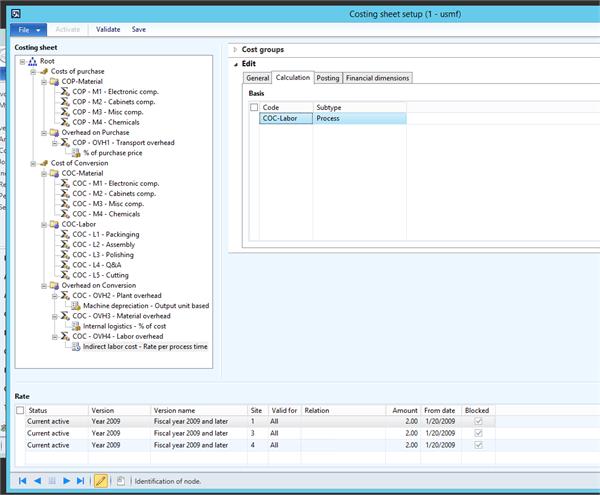
Here’s USMF / Contoso demo data showing the setup:
Cost group COC-Labor is the total labor hours for the route. It is getting multiplied by the rate shown to calculate the “Indirect Labor cost – Rate per process time” node.
Here’s the result on a calculation, there are 440 total labor hours, and they get a $2 / hr charge so $880 total overhead charge: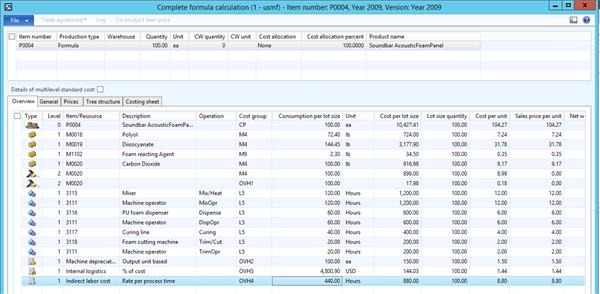
I hope that helps.
——————————
Colby Gallagher
Managed Application Services Supervisor
RSM
OH
——————————
——————————————- -
One of the things you can do to minimize the impact of adding extra lines to your route is to use a separate route group for those lines. This will allow you to keep the route lines from affecting capacity planning or lead time calculations. You can also choose to automatically generate the time card journals on the operations, so that you get your desired journal entries without anyone having to do anything.
——————————
Kevin McLean
Strategic Solutions NW, LLC
Beaverton OR
——————————
——————————————-
DSC Communities replied 6 years, 1 month ago 1 Member · 0 Replies -
-
0 Replies
Sorry, there were no replies found.
The discussion ‘Cost Sheet Setup’ is closed to new replies.
