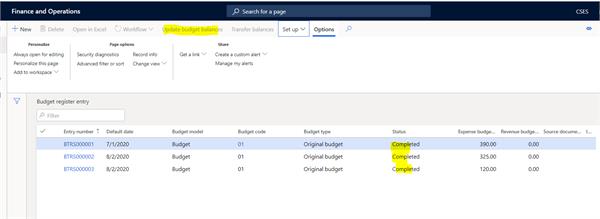
I am new to the D365 and testing a budget entry. Like to know when a budget entry is entered into the ‘Budget Register Entries’ page, status shows ‘Completed’ā¦. I thought it be a ‘Posted’ Status. Ā But when I run the ‘Actual vs Budget’ report, I don’t see the budget. Is there a process to post budget entry? How do I make sure budget which I entered is posted to the ledger.
Mohammad, you can change the reports to included unposted budget entries or you go and select updated budget balances in the budget register enter to “post” the entries.Ā If you update the budget balance entry you need to make sure all the periods you are posting to are open and that you don’t have any zero amount lines in your entries.
—————————— Jennifer Erhard Manager, Accounting/ERP Kentucky Lottery Corporation —————————— ——————————————-
Mohammad Fozail
Member
October 22, 2020 at 9:40 AM
Hi Jennifer,
Thanks for the quick reply. The ‘Update Budget Balance’ tab is greyed out. Even when I select the entry which is sitting in ‘Completed’ status, it will will not get live to post the entry. I have attached the screenshot.Ā
Please note:
This action will also remove this member from your connections and send a report to the site admin.
Please allow a few minutes for this process to complete.

Report
You have already reported this .
Welcome to our new site!
Here you will find a wealth of information created for peopleĀ that are on a mission to redefine business models with cloud techinologies, AI, automation, low code / no code applications, data, security & more to compete in the Acceleration Economy!