


Dynamics F/SCM
Public Group
Active an hour ago
Dynamics F/SCM
Organizer:
- JOSE Organized by
-
-

2012 R3 Coupon Code charges instead of discounts
-
2012 R3 Coupon Code charges instead of discounts
Posted by DSC Communities on May 10, 2019 at 9:30 am-

Adam Pascoe
MemberMay 10, 2019 at 9:30 AM
Hello fellow AX enthusiasts!I am having some issues with the retail module, specifically coupon codes, in AX2012R3 (CU9).
When applying a coupon and completing the order the coupon shows up as a “charge” instead of a “coupon”, raising the price of the order instead of discounting it. (See screen shot below)
We are using the call center functionality. Reasonably certain I have everything configured correctly.
The only other thing I’ve noticed that seems odd, when I create a new sales order the “Retail sale” checkbox isn’t checked. But it appears that the applicable MCRSalesTable records are created.
We were told that there may have been a hot-fix for this in CU8? Does anyone have any info on that? I’ve had a a hard time getting Google to cough up any information.
Thank you for your help!
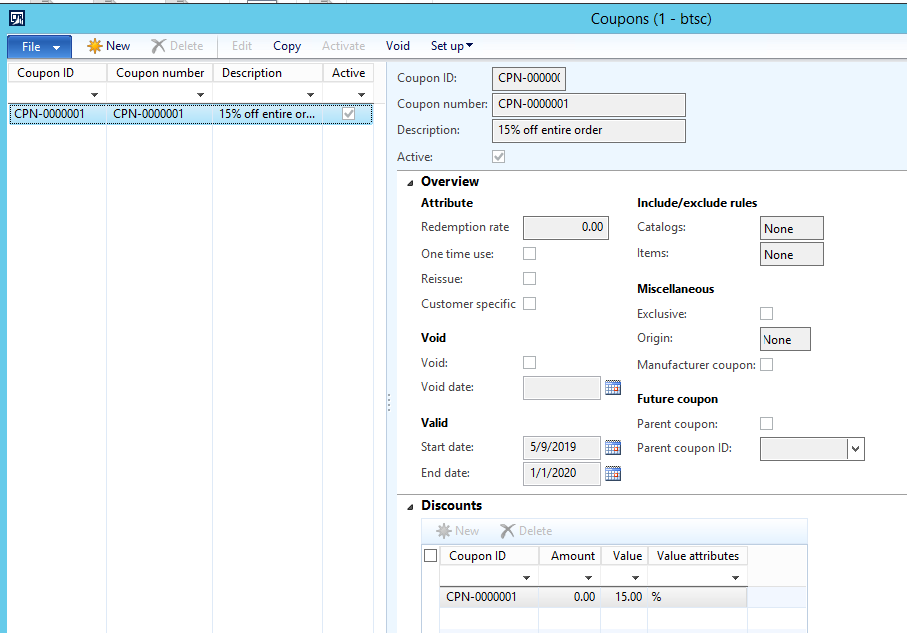
Coupon setup:
Sales order summary, note the “charge” instead of “coupon amount”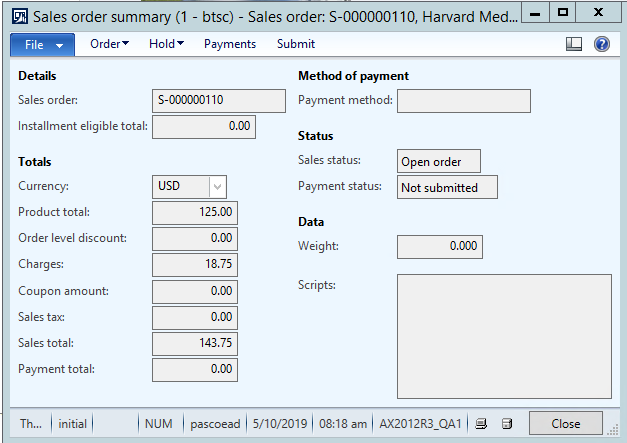
Sales Order charges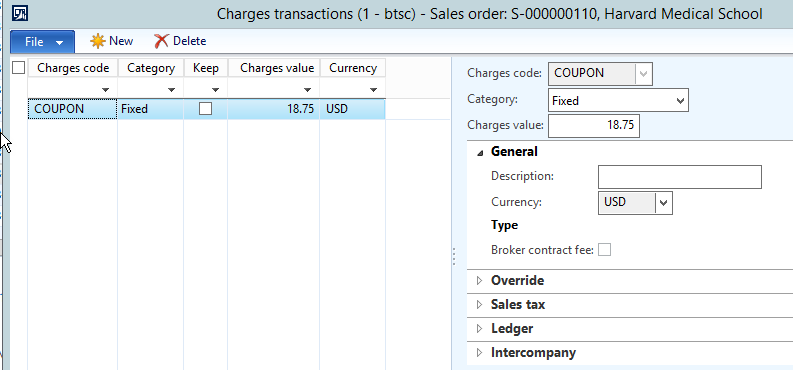
——————————
Adam Pascoe
Bio-techne
Minneapolis MN
—————————— -
Michael Gonzalez
MemberMay 10, 2019 at 10:54 AM
Can you try to set the value as negative and see what happens?——————————
Michael Gonzalez
Account Executive
Dynamics Resources
Venon Hills IL
——————————
——————————————- -
Adam Pascoe
MemberMay 10, 2019 at 11:08 AM
Michael;
It does take 15% off the order, but still shows up as a “Charge” rather than a “coupon”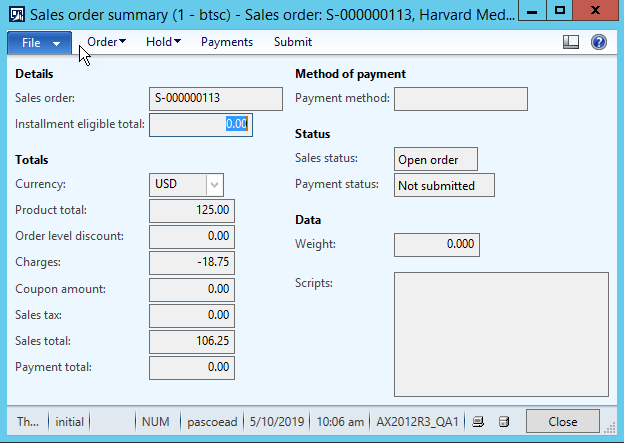
——————————
Adam Pascoe
Bio-techne
Minneapolis MN
——————————
——————————————- -
Michael Gonzalez
MemberMay 10, 2019 at 11:23 AM
Hi Adam,So here is the thing.
Your “Coupon” is only a Charge code. To set up as coupon, go to Retail > Pricing and discounts > Coupons, Set up the use parameters (Dates, bar code, etc.) and in the miscellaneous select the determined (previously configured in Retail>Pricing and Discounts>Discounts) Discount, which needs, different parameters than a charge.
I hope this helps!!
——————————
Michael Gonzalez
Account Executive
Dynamics Resources
Venon Hills IL
——————————
——————————————- -
Adam Pascoe
MemberMay 10, 2019 at 12:11 PM
I appreciate your help Michael, but I think I’m striking out. I don’t have any coupon-related setup information in the Retail module. Possibly a part of a Cumulative Update that we’re missing?In Retail>Common>Pricing and Discounts I have Discounts, Mix and match discounts, Quantity discounts, Threshold discounts, and Price adjustments.
In Retail>Setup>Pricing and Discounts I have Affiliations, Price groups, Mix and match line groups, Mix and match line group setup, Discount periods, Rounding method group, and Price point groups.
In Call center>Setup>Call center params>Coupons I have the charges coupon code set to the appropriate charge code, write accruals checked, and liability and offset accounts checked.
——————————
Adam Pascoe
Bio-techne
Minneapolis MN
——————————
——————————————- -
Michael Gonzalez
MemberMay 10, 2019 at 12:26 PM
Then the set up is okay, whomever set that up, wanted to keep it simple, otherwise they would have used the mentioned configurations. Personally, if you don’t want to set it up in the retail module. I would keep the charge code in negative so it is not restricted to dates and combinations that the proper discounted use. Remember that is a Charge code named “Coupon”, not a coupon itself.i hope this helps!!
——————————
Michael Gonzalez
Account Executive
Dynamics Resources
Venon Hills IL
——————————
——————————————- -
Darryl Howery
MemberMay 13, 2019 at 2:38 PM
?Can we get a screenshot of the postings tied to the charge code?——————————
Darryl Howery
RSM
——————————
——————————————- -
Janine Breton
MemberMay 14, 2019 at 9:35 AM
We found that when we first implemented AX12R3, the charges codes were setup incorrectly. Under AR->Setup->Charges->Charges code the coupon posting was under credit and it added to the order as you describe. We corrected to be a debit setup and now it works fine. Not sure if this is the issue for you but worth a look. Added screen shot of corrected setup for us.
Best wishes,
jmb——————————
Janine Breton
Business and Reporting Analyst
America’s Gardening Resource
Burlington VT
——————————
——————————————- -
Adam Pascoe
MemberMay 14, 2019 at 11:15 AM
? Thank you! You have no idea how long I’ve been fighting with this!Thank you as well, I imagine this is the path you were headed towards too.
Thank you as well, your efforts are appreciated.
??
——————————
Adam Pascoe
Bio-techne
Minneapolis MN
——————————
——————————————-
DSC Communities replied 7 years ago 1 Member · 0 Replies -
-
0 Replies
Sorry, there were no replies found.
The discussion ‘2012 R3 Coupon Code charges instead of discounts’ is closed to new replies.
