

Vendor’s Profit Center and Division Code on Purchase Order in the Invoicing section

  • Vendor’s Profit Center and Division Code on Purchase Order in the Invoicing section
    Posted by DSC Communities on July 5, 2019 at 7:01 am
    • Doug Mays

      Member

      July 5, 2019 at 7:01 AM

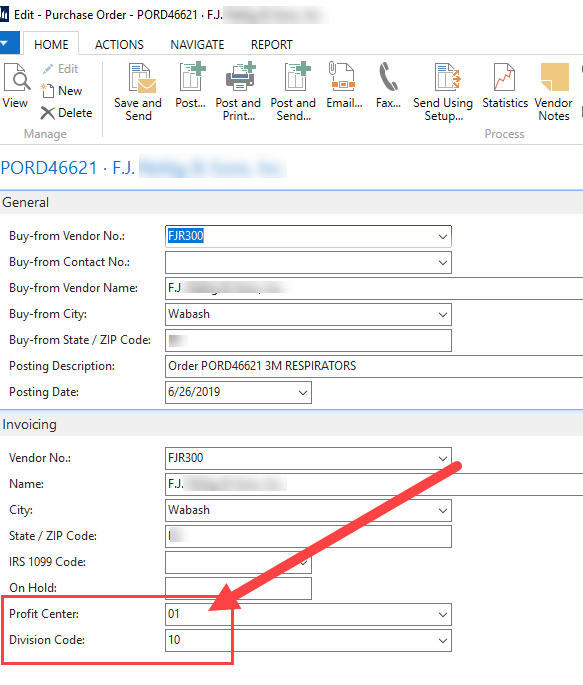
      ??When we create a PO, the Profit Center and Division Code fields auto populate with numbers in the “Invoicing” section.Ā  We don’t use the PC or DC for Balance Sheet accounts and I don’t want these to populate but I can’t find anywhere on the Vendor Card to remove the codes.Ā  How do I keep these fields from populating here?Ā  I want them blank in this section (“Invoicing”)Ā but we will use these fields in the “LInes” section and weĀ can populate those ourselves.Ā  It’s probably something obvious and I’m just not seeing it.Ā  Thank you.

      Profit Ctr & Div Code in PO

      ——————————
      Doug Mays, Controller
      Bulldog Battery Corporation
      Wabash IN
      ——————————

    • Lewis Rosenberg

      Member

      July 5, 2019 at 8:36 AM

      Profit Center and Division Code are not standard NAV fields.Ā  It looks like a customization (possibly dimension fields added to display on your Purchase Order card).

      ——————————
      Lewis Rosenberg
      IT Manager
      Mars Fishcare
      Chalfont PA
      ————————————————————————
      BCUG/NAVUG All-Star
      BCUG/NAVUG Board of Advisors, Chairperson
      BCUG/NAVUG Programming Committee

      Twitter: @RosenbergL
      LinkedIn: https://www.linkedin.com/in/rosenbergl
      ————————————————————————

      NAVUG/BCUG Summit (navugsummit.com)
      Orlando, FL – October 15-18, 2019
      ——————————
      ——————————————-

    • Alfredo Zelaya

      Member

      July 5, 2019 at 8:51 AM

      I concur with Lewis. Check your Dimensions on the Vendor Card. So………. do want these values to populate when creating the Purchase Order but not the reporting? If you are using “Account Schedules” for the Balance Sheet, modify the configuration. If you want to discard the PC/DC then remove it from the Vendor Card.

      ——————————
      Alfredo Zelaya
      Megadyne Americas LLC
      Fairfield NJ
      ——————————
      ——————————————-

    • Doug Mays

      Member

      July 5, 2019 at 10:42 AM

      Gentlemen,
      Ā  Thanks for the responses.Ā  I will have to ask our VAR.Ā  I don’t want the ?PC & DC to populate in the Invoicing section of the PO.Ā  I looked and some of the vendors have those dimension fields populated on the vendor card and some don’t so I’m not sure how those 2 fields are getting populated.Ā  I hope my VAR can help me.Ā  Thanks.

      ——————————
      Doug Mays, Controller
      Bulldog Battery Corporation
      Wabash IN
      ——————————
      ——————————————-

    • Lewis Rosenberg

      Member

      July 5, 2019 at 10:50 AM

      If we are looking at Dimensions, they are manually maintained on the vendors and based on the VALUE POSTING field (CODE MANDATORYĀ  or SAME CODE), being applied to the purchase orders.

      ——————————
      Lewis Rosenberg
      IT Manager
      Mars Fishcare
      Chalfont PA
      ————————————————————————
      BCUG/NAVUG All-Star
      BCUG/NAVUG Board of Advisors, Chairperson
      BCUG/NAVUG Programming Committee

      Twitter: @RosenbergL
      LinkedIn: https://www.linkedin.com/in/rosenbergl
      ————————————————————————

      NAVUG/BCUG Summit (navugsummit.com)
      Orlando, FL – October 15-18, 2019
      ——————————
      ——————————————-

    DSC Communities replied 6 years, 10 months ago 1 Member · 0 Replies
  • 0 Replies

Sorry, there were no replies found.

The discussion ‘Vendor’s Profit Center and Division Code on Purchase Order in the Invoicing section’ is closed to new replies.

Start of Discussion
0 of 0 replies June 2018
Now

Welcome to our new site!

Here you will find a wealth of information created for peopleĀ  that are on a mission to redefine business models with cloud techinologies, AI, automation, low code / no code applications, data, security & more to compete in the Acceleration Economy!



