


Dynamics Business Central (NAV)
Public Group
Active 6 days ago
Experts:




Un-Editable Unit Cost Field
-
Un-Editable Unit Cost Field
Posted by Unknown Member on September 19, 2019 at 12:01 pm-
?Hello!
Can someone explain why the Unit Cost field in the item card is un-editable and greyed out for some items and not others? Trying to update the Unit Cost field based on a Standard Cost Roll-Up. This particular item is a Prod. Order item and we use FIFO for our rollups. See attached picture.
Thanks in advance. 🙂
——————————
Caryn Binns
Operations Coordinator
Busch Systems International Inc
ON
—————————— -

Alfredo Zelaya
MemberSeptember 19, 2019 at 12:41 PM
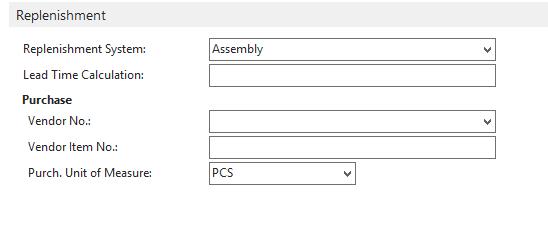
Hello!Do you have the “Replenishment” set to “Assembly”?
——————————
Alfredo Zelaya
Sr. Systems Analyst
Megadyne Americas LLC
Fairfield NJ
——————————
——————————————- -
Hi Alfredo,
No, I have it set to Prod. Order.
Thanks!
?——————————
Caryn Binns
Operations Coordinator
Busch Systems International Inc
ON
——————————
——————————————- -
Alfredo Zelaya
MemberSeptember 20, 2019 at 8:03 AM
CarynI can’t replicate that situation on my test instance. I truly hope another member has insight on this situation. The only I can see when the Unit Cost is greyed out is when the Costing Method is changed to Standard. Every other (except specific – that requires an Item Tracking set to SN) leaves the Unit Cost open for modification. ?
——————————
Alfredo Zelaya
Sr. Systems Analyst
Megadyne Americas LLC
Fairfield NJ
——————————
——————————————- -
I believe a production order item requires the item unit cost is rolled up from the BOM and it’s related costs.
——————————
Michael Carr
VP , Finance
Philadelphia Scientific LLC
Montgomeryville PA
——————————
——————————————- -
Hi Michael,
Than?k you for your response. Please see attached. When I preform a Standard Cost Roll-up the cost populates in the Standard Cost field and then I have to transfer the cost into the Unit Cost field currently. I feel like this is not the best practice, but it is what I have to do currently for the proper cost to be pulled onto quotes and sales orders. See attached snip it of another item that is an assembly and the Unit Cost field is at $0.00 and I am not able to update it.
Thanks again!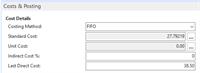
——————————
Caryn Binns
Operations Coordinator
Busch Systems International Inc
ON
——————————
——————————————- -
Caryn,
1. This setup looks odd indeed. Cost method is FIFO and yet standard cost is filled in but greyed out. Actual cost is $0 and greyed out. This would indicate a history that is muddled somehow. An assembly order with FIFO should show up with NO standard Cost.
2. Have you been running Adjust Entries – Standard Cost?
?——————————
Michael Carr
VP , Finance
Philadelphia Scientific LLC
Montgomeryville PA
——————————
——————————————- -
Navision intended the Unit Cost field to be a derived field result.
if you have a purchase order receipt
Direct Unit Cost Excluding tax less a Line Discount % calculates the Unit Cost $.
If you make the Unit Cost$ field editable, Navision will still calculate the formula above and it will post what you manually enter into the Unit Cost$ field and post to a hidden field (Our VAR sat silent to it) and will throw the difference to
an Indirect Cost Percentage .——————————
Michael Heatherly
controller
Lesman Instrument Company
BENSENVILLE IL
——————————
——————————————- -
Crystal Tollison
MemberSeptember 20, 2019 at 8:54 AM
Hi Caryn,
My experience has been that the Unit Cost field is editable until you make a posting using that Item Card. At that point, the system wants to calculate this value based on the postings to the Item Card so it is no longer editable. Best practice is to populate the Unit Cost with a value before using it. If you know the expected value of the item you can be exact however just something in the ballpark is better than zero. This field calculates the weighted average cost of on-hand inventory and will be more accurate if there is a value to start with versus a zero value.?Microsoft likes to sneak in little changes here and there so this might not hold true to your particular version of NAV but this has been the case for all versions I have worked with during the past 20+ years.
——————————
Crystal Tollison
Consultant
ArcherPoint Inc.
Lawrenceville GA
——————————
——————————————- -
Amanda Mayer
MemberSeptember 23, 2019 at 7:02 AM
,Have transactions already occurred for the items where the Unit Cost is grayed out? ?With FIFO, the unit cost is based on the receipts and or outputs that have occurred and should NOT be editable. If you want to change the value of a FIFO item, you should be using the revaluation journal.
——————————
Amanda Mayer
New View Strategies
Milwaukee WI
——————————
——————————————- -
Ted Johnston
MemberSeptember 24, 2019 at 11:15 AM
We have a similar issue but use Average Cost. NAV updates the Unit Cost field on the item card each time it recalculates Average Cost.As Average Cost is not trivial to understand, this drove sales crazy. Especially for rarely sold items. They wanted to be able to update the item when the vendor changed their pricing and have that used on the Sales Order.
I did a simple mod to the sales line table to bring the Standard Cost field off the item card into the Unit Cost field on the Sales Line.
Now I just have to periodically explain why the SO had a profit % of x but the invoice is y. When arguments break out, it is between sales and accounting. The company also has the option of calculating commission off the expected profit or the actual profit.
I do envy companies with Standard Costing……
——————————
Ted Johnston
IT Director
Streicher’s
Minneapolis MN
——————————
——————————————- -
?Hi Amanda,
Yes, I have been using the Revaluation Journal and running the Cost Adjust first as recommended. However this particular item will not populate on the Revaluation Journal and I am not understanding why. Is there a reason why some items may not populate on the Revaluation Journal, even will I filter to the specific item number I want to adjust?
Thanks!
——————————
Caryn Binns
Operations Coordinator
Busch Systems International Inc
ON
——————————
——————————————-
Unknown Member replied 6 years, 8 months ago 1 Member · 0 Replies -
-
0 Replies
Sorry, there were no replies found.
The discussion ‘Un-Editable Unit Cost Field’ is closed to new replies.
