


Dynamics Business Central (NAV)
Public Group
Active 19 hours ago
Experts:




Terminate a job in Job Queue
-
Terminate a job in Job Queue
Posted by DSC Communities on December 17, 2017 at 2:15 pm-

Barbara Pipia
MemberDecember 17, 2017 at 2:15 PM
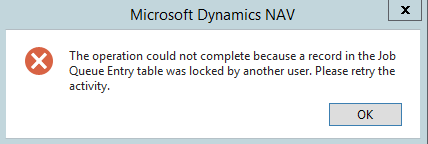
I have a job that has been running many hours. I want to stop this job, but when I try to place it on hold or mark the job as Error or Ready, I get the following message.How can I terminate this job?
——————————
Barbara Pipia
IT Manager, Infrastructure
Citizen Watch Company of America
New York NY
—————————— -
Hi Barbara,
Once a job is running, you can’t put it on HOLD and stop it. I usually restart the service to end the job from running. I understand that’s not an option all the time but that’s the only way I am able to stop a running job using job queue.I would like to know if there’s another way around it too.
Meenakshi——————————
Meenakshi Singh
Manager of Business Applications
Home Market Foods, Inc.
Norwood MA
——————————
——————————————- -
Suresh Kulla
MemberDecember 17, 2017 at 11:42 PM
Dear Barbara,As Meenakshi mentioned one way is to stop the NAV Services. If you have a separate instance for NAS then that is great because of kill that service will not kill other user sessions. It is always a good idea to set up that way.
The other way is to open the NAV Session List and if you already have a customization like mentioned in the below blog then you could kill the Background Service of the NAS which will stop the JOB queue and you need to reset the job and restart the JOB QUEUE.
https://www.olofsimren.com/kill-sessions-in-dynamics-nav/
——————————
Thanks
Suresh Kulla
NAV Technical Architect
ArcherPoint Inc.
Atlanta GA
——————————
——————————————- -
I find StopSession doesn’t always work (but certainly the first thing to try). Another unconventional way might be to go to the Dev Environment and Debug the NAS Session. It is a little challenging because you might have many sessions started from NAS. If you can succeed in finding your session and getting in to debug, simply hit the Stop button and the process will end. The advantage of this is that you do not have to restart the entire service tier.
It’s actually kind of a nice little trick when you are debugging something that you are testing. Hitting Stop will terminate the process and roll back to the previous commit so you can retest your code over and over without actually writing to the database (depending on where the commits are of course).
——————————
Jason Wilder
Senior Application Developer
Stonewall Kitchen
York ME
——————————
——————————————- -
Hi Suresh,
I do have the kill the session in NAV modification but it doesn’t work all the time. I still end up restarting the service for Job Queues and sometimes even for hung up user sessions as well.Thanks, Meenakshi
——————————
Meenakshi Singh
Manager of Business Applications
Home Market Foods, Inc.
Norwood MA
——————————
——————————————-
DSC Communities replied 8 years, 5 months ago 1 Member · 0 Replies -
-
0 Replies
Sorry, there were no replies found.
The discussion ‘Terminate a job in Job Queue’ is closed to new replies.
