


Dynamics Business Central (NAV)
Public Group
Active 6 days ago
Experts:




RE: Bank Reconciliation worksheet cannot expand Checks fast tab
-
RE: Bank Reconciliation worksheet cannot expand Checks fast tab
Posted by DSC Communities on April 8, 2017 at 4:11 pm-

John Koo
MemberApril 8, 2017 at 4:11 PM
Hello, an user cannot expand the Check fast tab in Bank Reconciliation worksheet as below. This happened after the user inserted the check mark and reconciled the open ledgers in Checks fast tab. I haven’t seen this kind of issue before… have you seen this issue before and able to advise me how to tackle this issue? Do you think it would work if I reinstall the NAV client? The user is on NAV 2009 R2.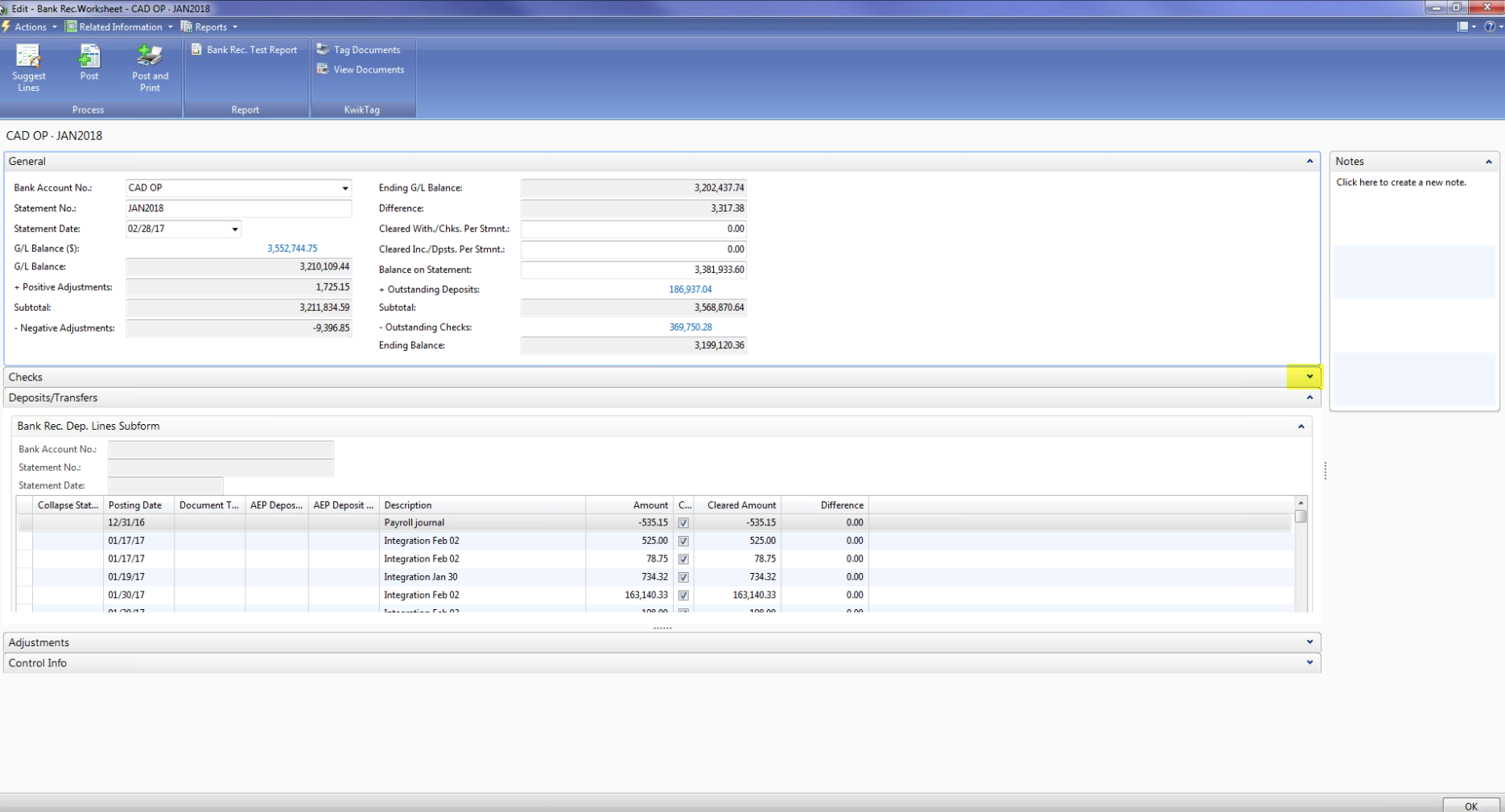
Any comments would be very appreciated. thank you.——————————
John Koo
NAV Knowledge Services & Support Analyst
Altus Dynamics——————————
-
Amanda Mayer
MemberApril 10, 2017 at 8:09 AM
John,Has the user tried to log out and back in again? Have they done the bank reconciliation previously?
——————————
Amanda Mayer
New View Strategies
Milwaukee WI
——————————
——————————————- -
John Koo
MemberApril 10, 2017 at 10:59 AM
Hi Amanda,Yes, the user logged out and in again but it didn’t work. She is a new user and did bank rec last night but didn’t post – she was able to expand the Checks Fast Tab and cleared the outstanding checks at that time. Next day, when she came back and reopened the bank reconciliation worksheet, the Checks Fast Tab didn’t expand.
Thank you,
——————————
John Koo
NAV Knowledge Services & Support Analyst
Altus Dynamics——————————
——————————————- -
John Koo
MemberApril 10, 2017 at 4:59 PM
I asked an user to login NAV through another computer and see if the Check Fast Tab expand. She was able to expand the fast tab and currently working on the bank rec through another machine. Still I am not clear what is the reason and doubt if re-installing NAV in her local computer will fix the issue?——————————
John Koo
NAV Knowledge Services & Support Analyst
Altus Dynamics——————————
——————————————- -
We had similar behavior. I deleted the Fast Tab from the users screen and then re-added it. We have not had an issue since. We are on NAV2009R2.
——————————
Kari Strandberg
Bernatello’s Pizza, Inc
Maple Lake MN
——————————
——————————————- -
John Koo
MemberApril 12, 2017 at 1:16 PM
Thanks Kari, it worked! It’s odd but I know how I should troubleshoot next time.John
——————————
John Koo
NAV Knowledge Services & Support Analyst
Altus Dynamics——————————
——————————————- -
I’ve seen this happen occasionally in the Bank Rec.
The easiest way to fix it is to delete this user’s personalizations for the bank rec pages.
Go to Delete User Personalizations > filter on the User ID > delete any bank rec pages that you see.
——————————
Kelly Smith
Business Analyst
Dynamic Manufacturing Solutions
Edmonton AB
——————————
——————————————-
DSC Communities replied 9 years, 2 months ago 1 Member · 0 Replies -
-
0 Replies
Sorry, there were no replies found.
The discussion ‘RE: Bank Reconciliation worksheet cannot expand Checks fast tab’ is closed to new replies.
