


Dynamics Business Central (NAV)
Public Group
Active a day ago
Experts:




Rapidstart Export error in NAV 2016
-
Rapidstart Export error in NAV 2016
Posted by DSC Communities on February 8, 2018 at 5:15 pm-

Vivian Mosher
MemberFebruary 8, 2018 at 5:15 PM
Hello!I am hoping someone can assist with an issue I am having in NAV 2016. I am trying to do an update to a table using Rapidstart. When I get to the step where I try to Export to Excel, I receive the following error:
A call to MicrosoftDynamics.Nav.OpenXml.Spreadsheet.WorkbookWriter.Dispose failed with this message: File contains corrupted data.
I have never come across this issue before when using Rapidstart. To resolve this issue I created a new table that is an exact duplicate of the original table. I was able to use Rapidstart with the new table with no issues. I then saved the new table as the old one. That did not fix the error.
Has anyone had this issue and fixed it? Please help!
——————————
Thank you in advance!
Vivian
—————————— -
When you say that the new table is an exact duplicate of the original table, what does that mean? Does that mean the fields and data types are the same, or did you copy every single row from old to new?
In the past when I have gotten data errors during export, it usually is the data itself. Meaning that a field contains a character that can mess up an export, such as double quote, comma, less-than (<), greater-than (>) etc.
You can turn on the debugger before the export and probably figure out which exact record in the table the export dies on.
——————————
Kyle Hardin
NAV Developer
ArcherPoint Inc.
Atlanta GA
——————————
——————————————- -
Crystal Tollison
MemberFebruary 9, 2018 at 9:31 AM
?Diddo what Kyle said. Take a small sample of only five lines of data for example. If that imports in without the error, it is most likely data related and not the import. As he points out, Excel does not like the symbols and such in it’s data.——————————
Crystal Tollison
Consultant
ArcherPoint Inc.
Lawrenceville GA
——————————
——————————————- -
Vivian Mosher
MemberFebruary 11, 2018 at 10:16 AM
I ended up deleting the original table (50001) and then creating a new table and saving it using the same ID (50001). There are only two fields, Code and Text. There is no C/AL code or no strange configurations. Just a straight forward table. Next, I entered one line of data, text only. No characters at all. I received the same error message. This table was already created before we upgraded to NAV 2016 from NAV 2009 r2. Could that have anything to do with it?——————————
Thank you!
Vivian
——————————
——————————————- -
I don’t think upgrading a table from 2009R2 to 2016 would have anything to do with this problem.
Can you post a screen snap of the configuration package?
Do you have the checkbox Exclude Config. Tables set to Yes?
——————————
Kyle Hardin
NAV Developer
ArcherPoint Inc.
Atlanta, GA
——————————
——————————————- -
Vivian Mosher
MemberFebruary 12, 2018 at 10:33 AM
Thanks for taking a look! I do have Exclude Config. Tables: checked.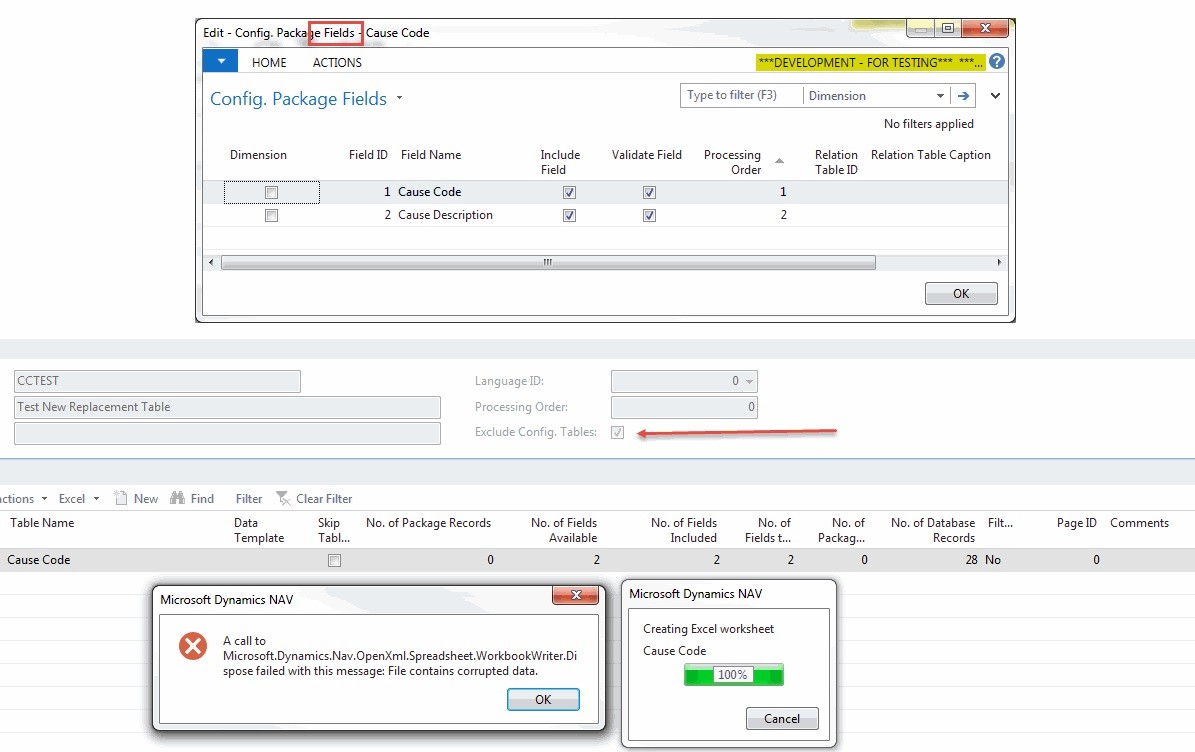
——————————
Thank you!
Vivian
——————————
——————————————- -
Jenn Claridge
MemberFebruary 13, 2018 at 8:31 AM
?Hi VivianWhen I have seen this in the past it looked like the export file was corrupted and lost some XML Mapping.
What I have done is just a clean export to excel and then copy and pasted the data from my original sheet. Just paste in the table data though, the new export will have the package information and XML it needs. After that, I would reimport and it has always worked.
——————————
Jenn Morton
Manufacturing Consultant
Sabre Limited
Cambridge Ontario Canada
——————————
——————————————- -
Vivian Mosher
MemberFebruary 15, 2018 at 10:55 AM
Thank you to everyone that replied! It turns out that this is an Upgrade issue that Microsoft is aware of and fixed in their Cumulative Update 13 for Microsoft Dynamics NAV 2016 (Build 47256) – ID 381067.Thanks to Kyle for figuring this out!!!
——————————
Thank you!
Vivian
——————————
——————————————- -
Franz Kalchmair
MemberFebruary 25, 2018 at 10:38 AM
please checkout
– https://community.dynamics.com/nav/f/34/t/148134
– https://dynamicsuser.net/nav/f/developers/92068/error-at-the-time-of-report-to-generate-in-export-to-excelfor a solution.
——————————
Franz Kalchmair
Microsoft MVP
Senior Consultant
Vienna, Austria, Europe
——————————
——————————————-
DSC Communities replied 8 years, 3 months ago 1 Member · 0 Replies -
-
0 Replies
Sorry, there were no replies found.
The discussion ‘Rapidstart Export error in NAV 2016’ is closed to new replies.
