


Dynamics Business Central (NAV)
Public Group
Active a day ago
Experts:




Planning Worksheet
-
Planning Worksheet
Posted by DSC Communities on July 5, 2017 at 10:14 am-

Tom Feldmann
MemberJuly 5, 2017 at 10:14 AM
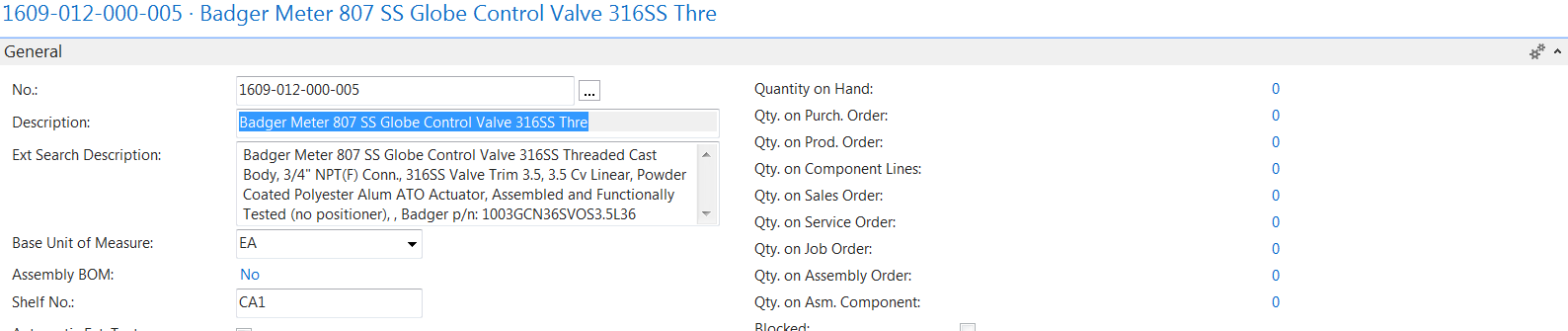
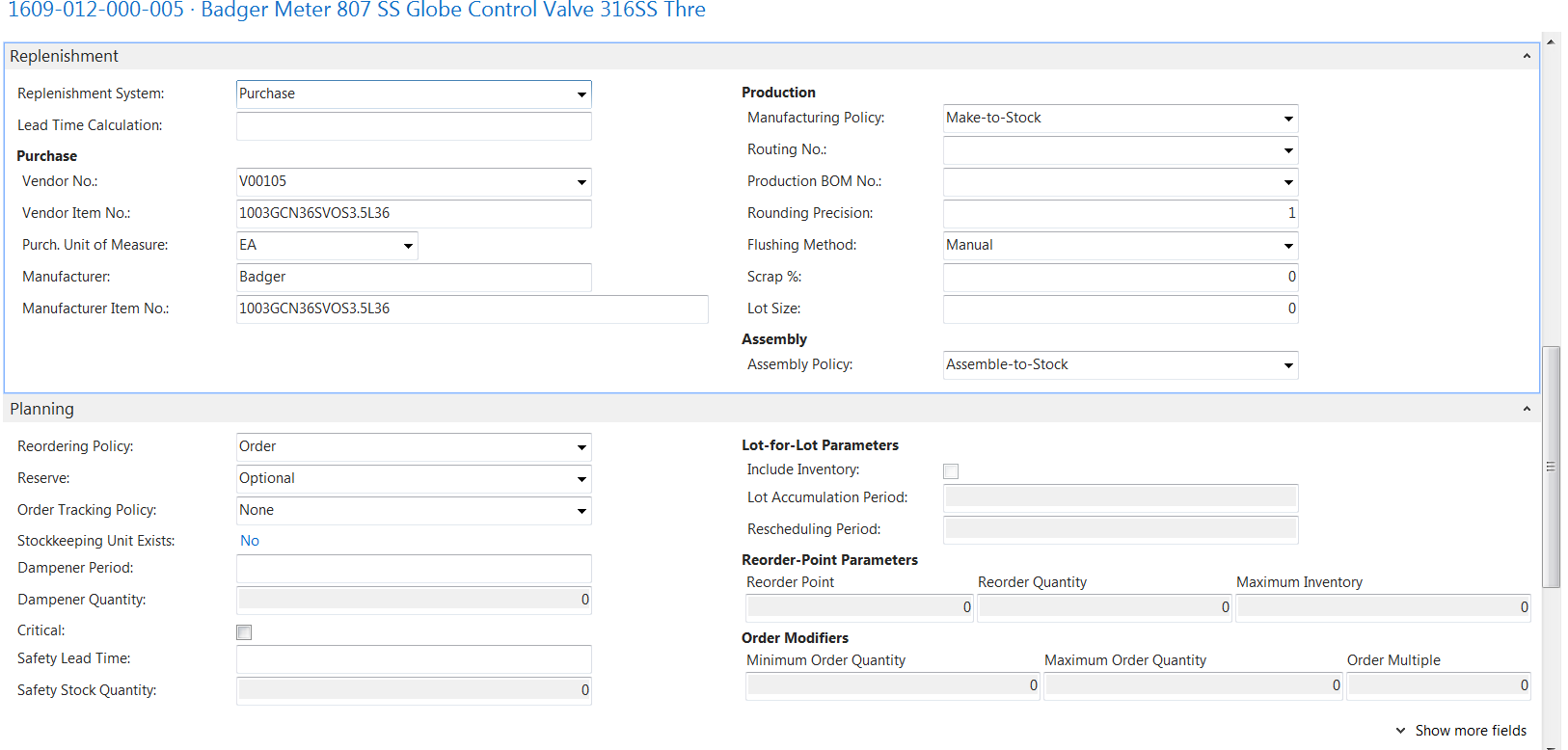
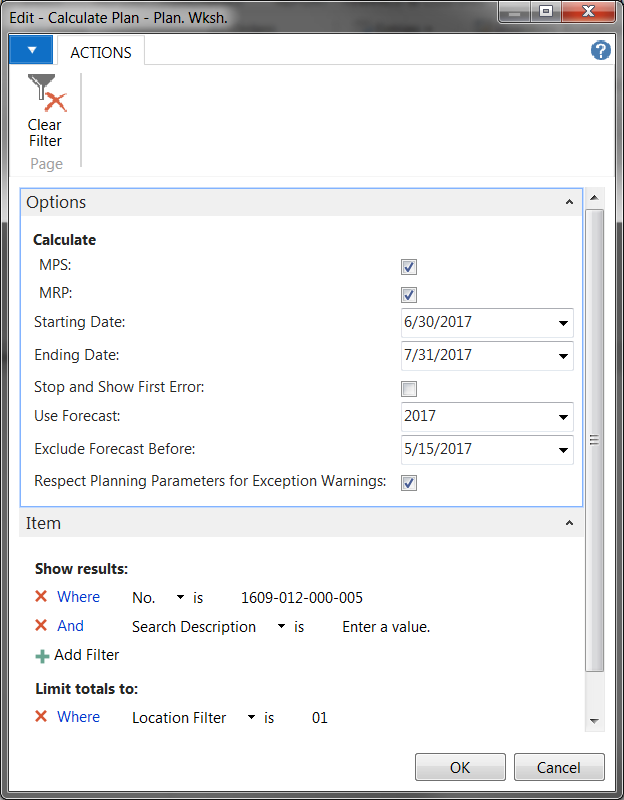
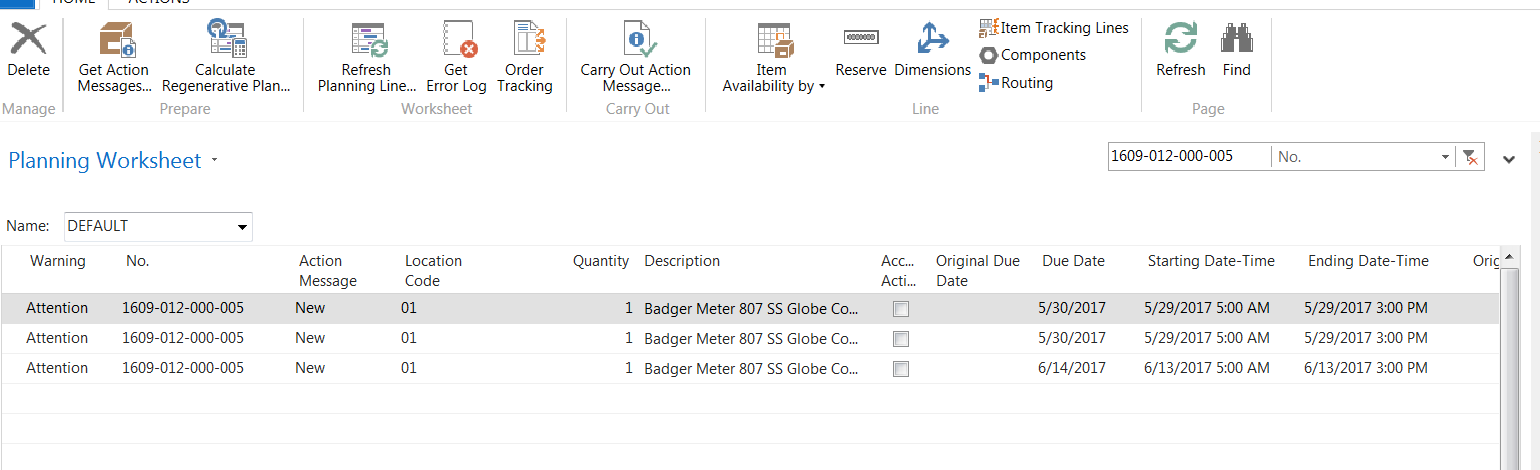
Hi All,I’m getting a weird planning worksheet issue on a part that keeps showing up on my worksheet. The item is set up as a purchased item and the Reordering Policy is set to Order. We only use one location and there is no demand for this part at all so I’m confused as to why this would show up on the planning worksheet. Below are some screen grabs of the item card, the planning worksheet parameters and the planning worksheet after it’s run. Any thoughts on what’s causing this?
To note, we are using 2016 and haven’t done any modifications.
Thanks,
——————————
Tom Feldmann
TechniBlend
New Berlin WI
—————————— -
Ian Ray
MemberJuly 5, 2017 at 11:12 AM
Does this also occur if you set exclude forecast before to today?——————————
Ian Ray
Cypress Grove
Arcata CA
——————————
——————————————- -
Tom Feldmann
MemberJuly 5, 2017 at 11:23 AM
The same thing happens if I exclude the forecast before today.——————————
Tom Feldmann
TechniBlend
New Berlin WI
——————————
——————————————- -
Do you have quantity in the production forecast for that item for that timeframe? Even though the reorder policy is set to “Order”, the system will still look to the forecast as demand and plan for it.
——————————
Dave Wiser
Controller
Beckwith & Kuffel
Seattle WA
——————————
——————————————- -
Tom Feldmann
MemberJuly 5, 2017 at 12:09 PM
I don’t have forecasting set up with any values for any parts. That doesn’t auto populate on a table somewhere does it? I just checked out the forecasting and I don’t have any values listed on any parts let alone this part in particular. Here’s how our Manufacturing Setup looks as well.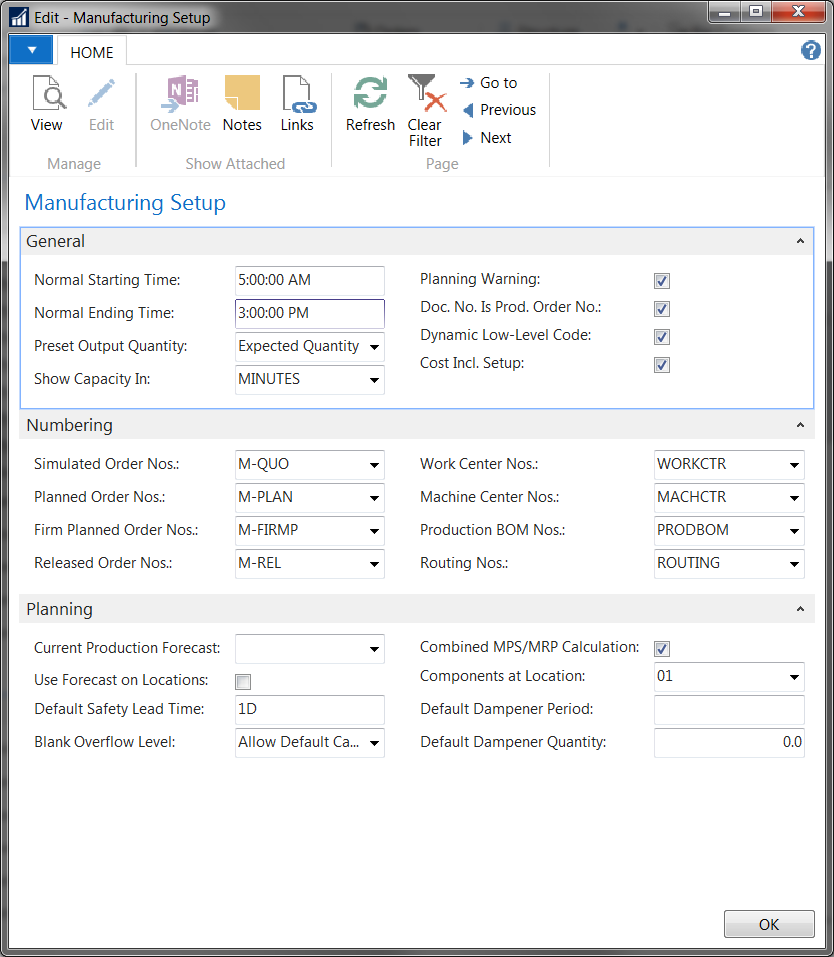
——————————
Tom Feldmann
TechniBlend
New Berlin WI
——————————
——————————————- -
Try creating a Stockkeeping Unit for the part. The planning worksheet can sometimes be weird when it comes to a Location (01) and no SKU for that location.
What results do you get when you click “Order Tracking” while you are on one of the lines in the Planning Worksheet?
What is the “Attention” message say?
——————————
Ben Baxter
Consultant
Accent Software, Inc.
Carmel IN
——————————
——————————————- -
Tom Feldmann
MemberJuly 5, 2017 at 2:35 PM
I figured it out thanks to your tip. After looking at the order tracking the system shows that it’s related to a production order that is on a sales order. There is no demand on the part though because the components aren’t listed on the released production order. The item is on the BOM but did not transfer to the active production order and it looks like the system is wondering why. I imported data from our old system into NAV and I’m not including things we did on some of our older jobs. I think once we start closing some of these older production orders that should clear that from our worksheet. This will be a bit of a pain for a little as I have other parts on my planning worksheet that are just like this but this should never happen again on any new BOM/production order we create.——————————
Tom Feldmann
TechniBlend
New Berlin WI
——————————
——————————————- -
Tom Feldmann
MemberSeptember 26, 2017 at 11:22 AM
Hi all. I’m having the same problem happen again and it’s been months and I haven’t uploaded anything new related to my original conclusion.
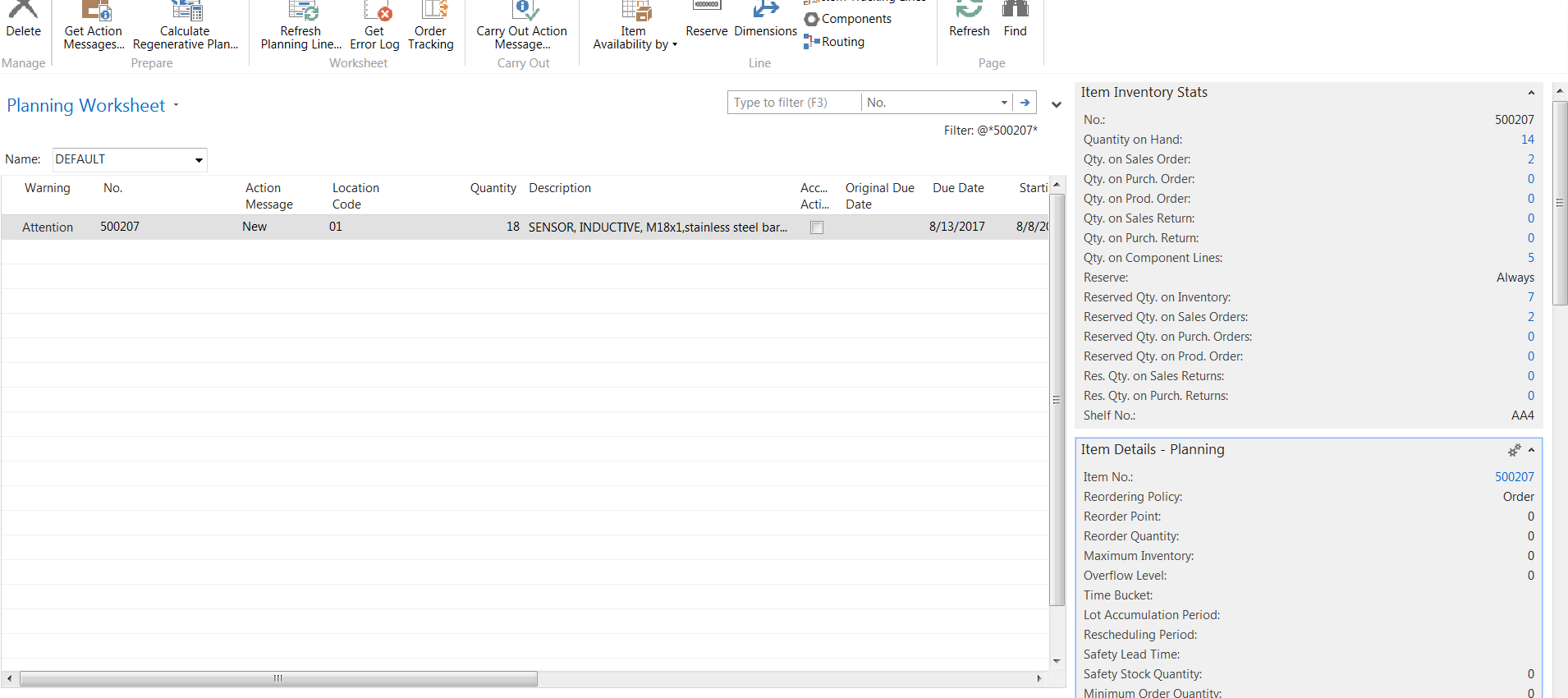
Below are a couple of pictures of my worksheet to show you what the system is doing. It is telling me to order 18 units even though I have 14 on hand. The demand on the part is 7 pieces and they are all reserved against stock. We don’t normally inventory this part but we happen to have some on hand due to some inventory adjustments done where we found some that we thought we didn’t have.
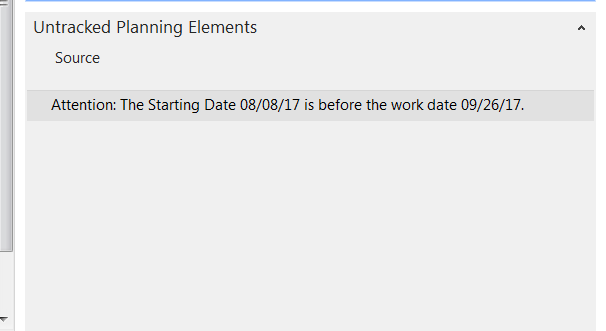
Anyway the system is trying to get me to plan for this item but there is no need. I included what the Untracked Planning Elements say and I have no idea what the starting date is referencing. I have a ton of parts that showed up on my worksheet like this yesterday and I can’t figure out why.
Any thoughts?
Thanks,
——————————
Tom Feldmann
TechniBlend
New Berlin WI
——————————
——————————————- -
Tom,
The reordering policy for the Item is “Order”. This policy will ignore your Quantity on Hand (so pretend the 14 in stock don’t exist). I also see the demand for 7 and the reservation for 7, so from what I can see a demand of 0.
The fact box does not show the Qty. on Assembly Orders, nor the Qty. on Transfer Orders. Can you please confirm neither of these demand sources are impacting your Item? Specifically for Location “01”, as that is what the supply is being created for.
Lastly, the exception message has to do with dates in the past. The Planning Worksheet has a hard time with auditing suggestions in the past. Review the potential demand sources (Components, Sales Orders, etc.) with dates in the Past to see if this Item is listed.
Hopefully you can find the source and get this corrected.
——————————
Ben Baxter
Consultant
Accent Software, Inc.
Carmel IN
——————————
——————————————- -
Tom Feldmann
MemberSeptember 29, 2017 at 10:46 AM
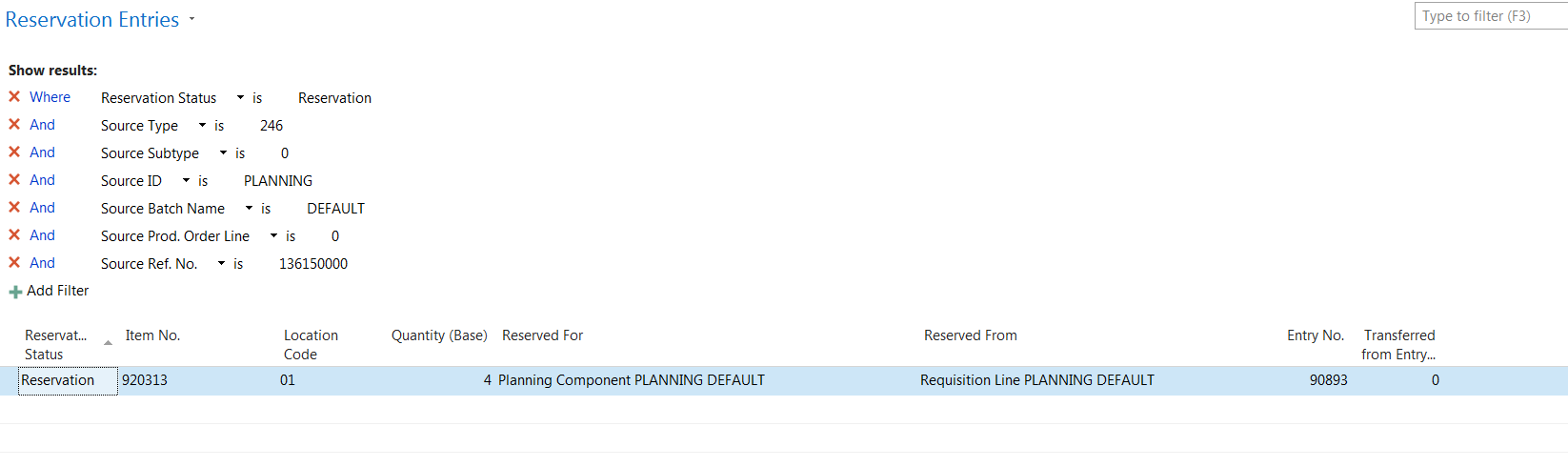
I have no demand for the part. We do not use transfer or assembly orders. ’01’ is our only location too. The weird thing about this is that part no longer is causing a problem in our system but I have other parts that are just like it still listed.Here’s another example (see below) of a part with 0 demand but the worksheet is telling me to buy it. The reservation on each of the lines are tied to the planning worksheet.
I’m at a loss for how this is the way it is. My only thought is that the person who is creating production orders was doing them manually for a while when we started using NAV a few months back instead of having the planning worksheet help. Having them created through the planning worksheet would alleviate this but that’s a different problem altogether. When he’d create production orders, he’d sometimes forget to add the location code and would manually add it to the lines and not the production header until a few weeks later while the project was being worked on. Sometimes we would get an error saying: “you cannot reserve this entry because it is not a true demand or supply” when I would try to link the reservations from the production order to the planning worksheet with purchase orders cut. I could only fix that error by deleting the production order and creating a new one, refreshing the production order wouldn’t help. I thought I caught all the production orders that were created like this but it’s possible I missed some and these production orders that were removed or pushed through are causing this issue. My only guess is that this is somehow related.
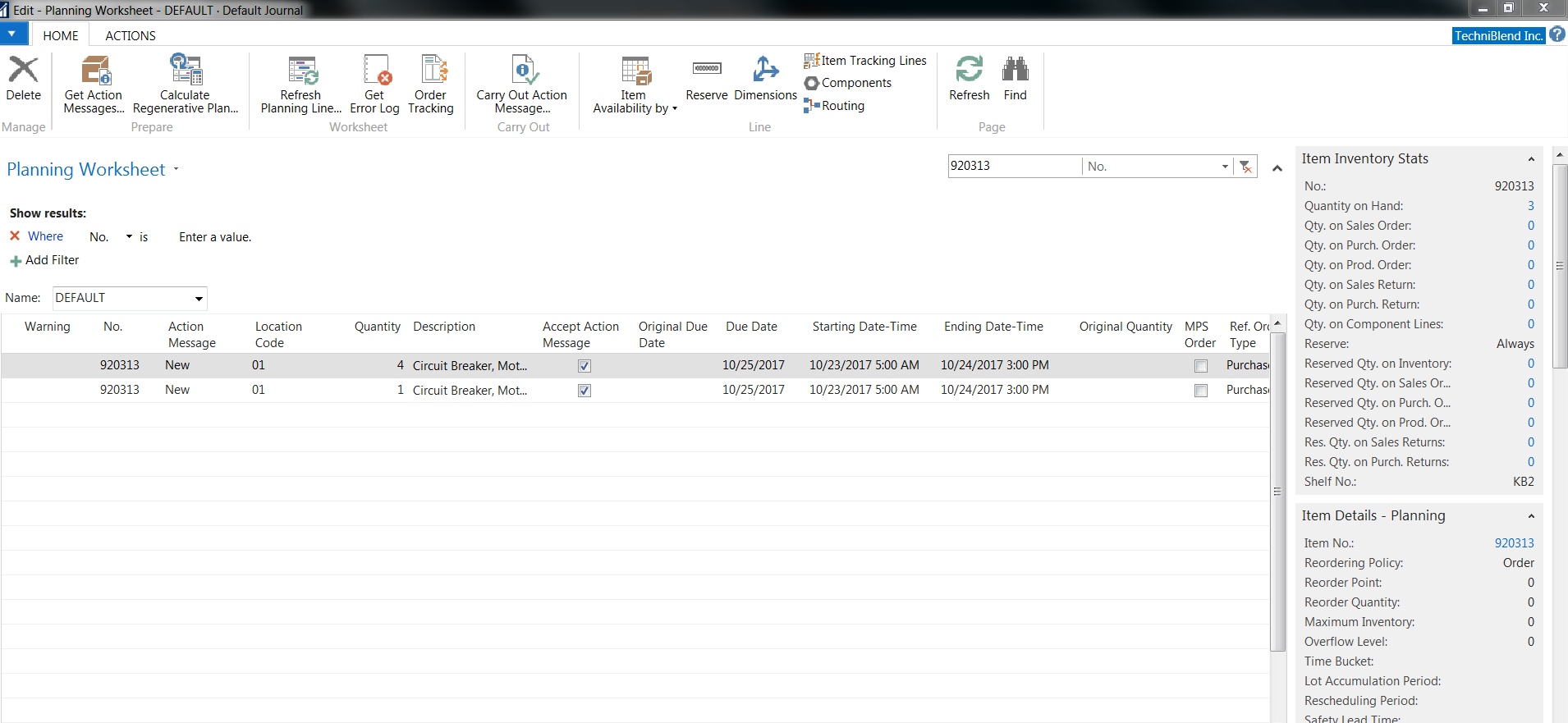
Reservations for the first line:
——————————
Tom Feldmann
TechniBlend
New Berlin WI
——————————
——————————————- -
Tom,
This is your demand source, “The reservation on each of the lines are tied to the planning worksheet.”
There is another Planning Worksheet Line (typically a new Production Order) which has this Item as a component. So while the Production Order isn’t created yet, the Planning Worksheet Line is treated as a Planned Production Order. Remove your filter and find the line referenced in the Order Tracking, then check its BOM.
The assumption is when you Carry Out the Action and create the Production Order, you will also be creating the Purchase Order for the components needed. To avoid this confusion a lot of companies will choose to run their MPS and MRP processes separately.
——————————
Ben Baxter
Consultant
Accent Software, Inc.
Carmel IN
——————————
——————————————- -
Tom Feldmann
MemberSeptember 29, 2017 at 3:10 PM
I’ll poke around with that idea, sounds like it could be beneficial for most of the items on the worksheet the more I think about it and how my team does their planning. Thanks!——————————
Tom Feldmann
TechniBlend
New Berlin WI
——————————
——————————————-
DSC Communities replied 8 years, 11 months ago 1 Member · 0 Replies -
-
0 Replies
Sorry, there were no replies found.
The discussion ‘Planning Worksheet’ is closed to new replies.
